Loading repository data…
zhaoshenzhai / repository
obsidian-mathlinks
An Obsidian.md plugin to render MathJax in your links.
#mathjax#obsidian-plugins#typescript
Live repository statistics
★ 93Stars
⑂ 5Forks
◯ 13Open issues
◉ 93Watchers
README preview
Obsidian MathLinks
An Obsidian.md plugin to render and manage MathJax in your links.
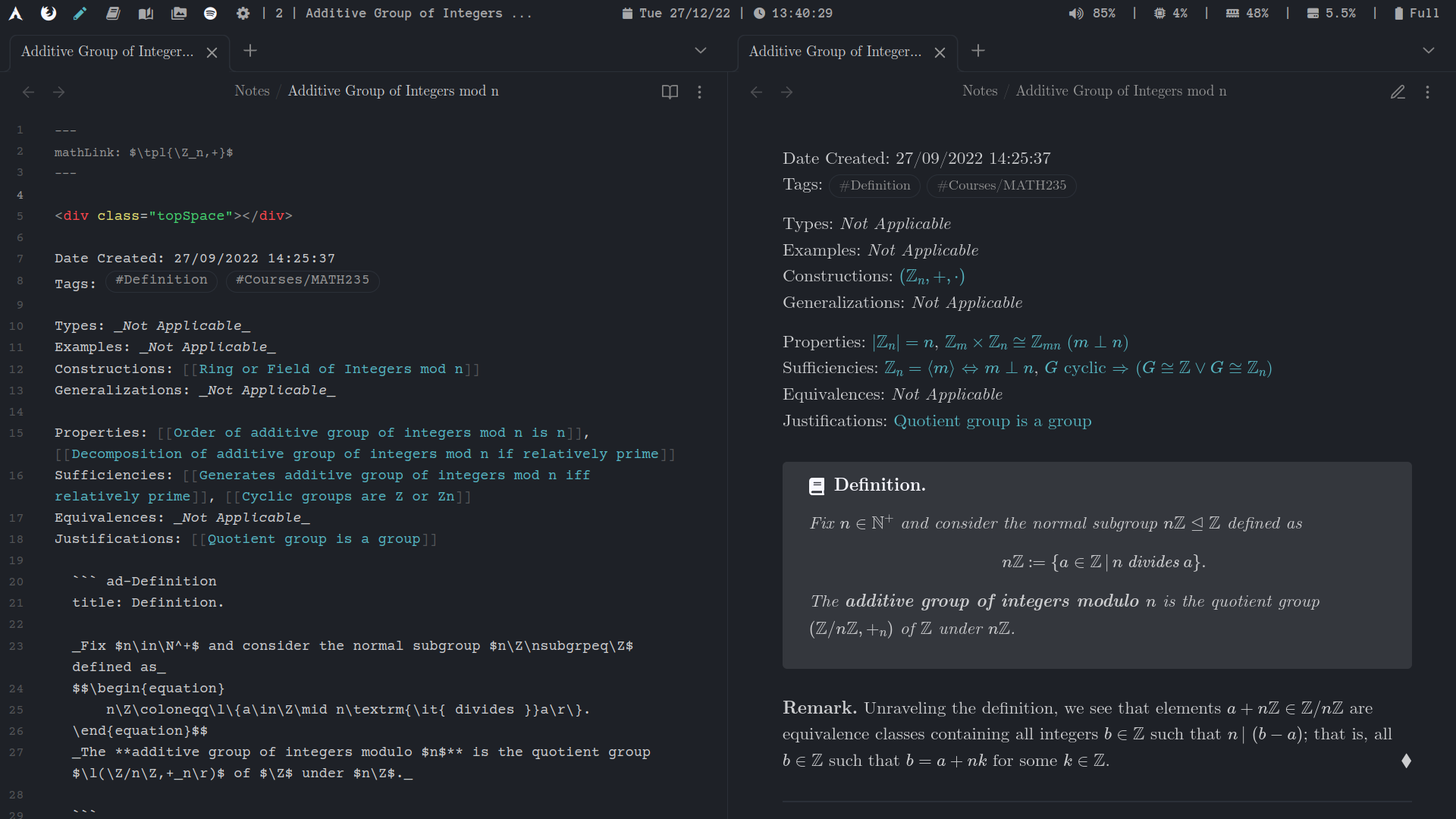
Associate a mathLink to your note, containing arbitrary MathJax, and have it displayed in all links to the note.
- Works in both reading and live-preview modes, as well as canvases.
- Add custom templates for
mathLinks. - Render MathJax in aliases for both Wikilinks and Markdown Links.
- Compatible with Extended MathJax and Dataview.
Description and Usage
Assigning a mathLink in the YAML frontmatter of note.md as shown below will make all links of the form [[note]] and [note](note.md) display as the rendered MathJax of yourMathLink. No changes are made to your notes, and updates to yourMathLink will be reflected (almost) instantaneously.
---
mathLink: yourMathLink
---

Content starts here.
This plugin also makes Wikilinks and Markdown Links compatible with MathJax, so links like [[note|yourAlias]] and [yourAlias](note.md) will be displayed as the rendered MathJax of yourAlias. A mathLink in note, if present, will be overridden by yourAlias.
Links to Blocks/Headings
Additionally, Obsidian also supports links to blocks [[note#^block-id]] and headings like [[note#section]]. Any MathJax in #section will be rendered (both in the note and in the Outline view), and you can associate a mathLink to ^block-id as well by adding a YAML frontmatter like so:
---
mathLink-blocks:
    block-id: yourMathLink
---
Templates
Oftentimes, mathLinks of notes involve replacing some text with its math counterpart. For instance, you might have many notes whose title is of the form ... iff ....
Instead of setting the mathLinks of each note manually as ... $\Leftrightarrow$ ..., simply use mathLink: auto. This will generate its mathLink via a template that replaces iff with $\Leftrightarrow$. A template consists of a string to be matched (iff), its replacement ($\Leftrightarrow$), and some options (global match, case sensitive, and match whole words). They are created and maintained in the MathLinks settings window.
Settings
Templates
Each template has the following options, which can be configured when the template is created/edited.
| Field | Description | Default |
|---|---|---|
| Match for | String to be matched and replaced. Do not include regex. | |
| Replace with | String to replace matches. Do not escape backslashes. | |
| Global match | Match all instances (instead of just the first). | true |
| Case sensitive | Matches will be case sensitive. | true |
| Match whole words | Only match whole words. | true |
Excluded Files
MathLinks will ignore those files. If a directory is selected, all files under that directory will be ignored.
Links to Blocks/Headings
MathLinks supports links to blocks and headings like [[note#^block-id]] and [[note#section]]. You can modify how they are rendered by:
- Editing the prefix for block links: By default, block links are prefixed by
^. This can be changed (or removed). - Toggling whether to render
note: If disabled, the links will be rendered as[[^block-id]]and[[section]].
Source Mode
Enable MathLinks in Source Mode (Default: false). Currently, only Wikilinks are supported.
MathLinks API
MathLinks exposes an API, allowing other community plugins to utilize its powerful "dynamic aliases" feature. You can find more information and a simple sample plugin at this repo: https://github.com/RyotaUshio/obsidian-mathlinks-api-sample-plugin.
Contributing
If you would like to point out a bug, add support, or have a feature request, don't hesitate to open an issue/pull request! Thank you to all who have contributed.
Changelog
0.5.x: Source Mode and Outline support.
- 0.5.3: Fixed a bug where Canvas failed to display MathLinks in non-embed cards (#65); fixed Live Preview failing to update decorations under certain circumstances (#65); fixed Live Preview not respecting the excluded files setting (#65).
- 0.5.2: Fixed an unhandled error that arose when Obsidian's link resolution was incomplete (#63); updated the API functions to handle situations where MathLinks is not fully loaded when called (#60).
- 0.5.1: Fixed a bug where enabling MathLinks while the cursor was over a link caused the link not to render properly until the next document change (#58); fixed an issue where the
update()API function had no effect in Editing view (#59). - 0.5.0: Render MathJax in outline (#55, #57).
0.4.x: Heading/Block Links and API Integration.
- 0.4.7: Fixed the incompatibility issue with Strange New Worlds (#51, #52); added Source mode support (#53, #54); improved the performance in Live preview (#53); introduced the new API with much more flexibility and the API sample plugin (#53).
- 0.4.6: Fixed bugs regarding heading links (#45) and block links with custom display names containing escaped square brackets (#46).
- 0.4.5: Fixed bugs regarding external links and links with extensions (#41, #42, #43, #44).
- 0.4.4: Better setting tabs: Reworked templates to allow nesting; choose excluded files from suggestion (#38).
- 0.4.3: Fix in
0.4.2no longer prevents dynamic updating (#35, #36). - 0.4.2: Fixed rendering delay when opening files.
- 0.4.1: Dynamic updating and published API as an
npmpackage (#33, ).
0.3.x: Merged with obsidian-mathjax-wikilinks.
- 0.3.5: Fixed creating new notes when anchor links are pressed (#24).
- 0.3.4: Fixed opening notes in new tab (
cmdkey and mouse); proper Dataview rendering in callouts (#17, #18, #19, #20). - 0.3.3: Open links in new tab when
ctrlis held (#16). - 0.3.2: Fixed
mathLinksin live-preview, which should now render in most markdown elements. Made theViewPluginoperate independently from each leaf, which now allows for multiple instances of the same file to be opened and rendered differently in live-preview and source (#12, #15). - 0.3.1: Render
mathLinksin Dataview inline fields (#13, #14). - 0.3.0: Merged with obsidian-mathjax-wikilinks, with credits to aaron-jack-manning. Extended its functionality to include live-preview for both Wikilinks and Markdown Links (#9).
0.2.x: No longer edit the links themselves.
- 0.2.9: Fixed hanging and 'creating new notes' on
layout-changedfor pinned notes (#10, #11). - 0.2.8: Render
mathLinksin live-preview (#7). - 0.2.7: Render
mathLinksin canvas (#6). - 0.2.6: Added Dataview support (#4, #5).
- 0.2.5: Fixed decoding
UTf-8characters infileName(#3). - 0.2.4: Fixed not respecting custom link names (#2).
- 0.2.3: Fixed only checking for files in
fileManager.getNewFileParent()(#1). - 0.2.2: Simplified
getMathLink(). - 0.2.1: Fixed duplicate title.
- 0.2.0: No longer edit the links themselves. Instead, a markdown post-processor is registered which renders individual inline MathJax equations (like
$...$) and patches them back together.
0.1.x: Initial release.
- 0.1.4: Fixed duplicate templates and excluded files/paths.
- 0.1.3: Fixed excluding files when updating backlinks.
- 0.1.2: Use
this.app.vault.configDirinstead of.obsidian. - 0.1.1: Fixed reverting back to Wikilinks when
Use [[Wikilinks]]is disabled. Instead, revert back to its Markdown Link. - 0.1.0: Initial release!