Loading repository data…
youngsoft / repository
TangramKit
TangramKit is a powerful iOS UI framework implemented by Swift. It integrates the functions with Android layout,iOS AutoLayout,SizeClass, HTML CSS float and flexbox and bootstrap. So you can use LinearLayout,RelativeLayout,FrameLayout,TableLayout,FlowLayout,FloatLayout,LayoutSizeClass to build your App 自动布局 UIView UITableView UICollectionView
#android#autolayout#cocoapods#constraint#constraints#ios
Live repository statistics
★ 1.2KStars
⑂ 174Forks
◯ 15Open issues
◉ 1.2KWatchers
README preview







TangramKit
TangramKit is a simple and easy Swift framework for iOS view layout. The name comes from Tangram of China which provides some simple functions to build a variety of complex interface. It integrates the functions including: Autolayout and SizeClass of iOS, five layout classes of Android, float and flex-box and bootstrap of HTML/CSS. The TangramKit's objective-C version are named: MyLayout
 Chinese (Simplified): 中文说明
Usage
- There is a container view S which width is 100 and height is wrap to all subviews height. there are four subviews A,B,C,D arranged from top to bottom.
- Subview A's left margin is 20% width of S, right margin is 30% width of S, height is equal to width of A.
- Subview B's left margin is 40, width is filled in to residual width of S,height is 40.
- Subview C's width is filled in to S, height is 40.
- Subview D's right margin is 20, width is 50% width of S, height is 40
    let S = TGLinearLayout(.vert)
    S.tg_vspace = 10
    S.tg_width.equal(100)
    S.tg_height.equal(.wrap)
    //you can use S.tg_size(width:100, height:.wrap) to instead

    let A = UIView()
    A.tg_left.equal(20%)
    A.tg_right.equal(30%)
    A.tg_height.equal(A.tg_width)
    S.addSubview(A)

    let B = UIView()
    B.tg_left.equal(40)
    B.tg_width.equal(.fill)
    B.tg_height.equal(40)
    S.addSubview(B)

    let C = UIView()
    C.tg_width.equal(.fill)
    C.tg_height.equal(40)
    S.addSubview(C)

    let D = UIView()
    D.tg_right.equal(20)
    D.tg_width.equal(50%)
    D.tg_height.equal(40)
    S.addSubview(D)
TangramKit has override operators: ~=、>=、<=、+=、-=、*=、/= to implement equal、max、min、add、offset、multiply methods of TGLayoutSize and TGLayoutPos class, so you can instead to:
let S = TGLinearLayout(.vert)
   S.tg_vspace = 10
   S.tg_width ~=100
   S.tg_height ~=.wrap

   let A = UIView()
   A.tg_left ~=20%
   A.tg_right ~=30%
   A.tg_height ~=A.tg_width
   S.addSubview(A)

   let B = UIView()
   B.tg_left ~=40
   B.tg_width ~=.fill
   B.tg_height ~=40
   S.addSubview(B)

   let C = UIView()
   C.tg_width ~=.fill
   C.tg_height ~=40
   S.addSubview(C)

   let D = UIView()
   D.tg_right ~=20
   D.tg_width ~=50%
   D.tg_height ~=40
   S.addSubview(D)
Performance comparison
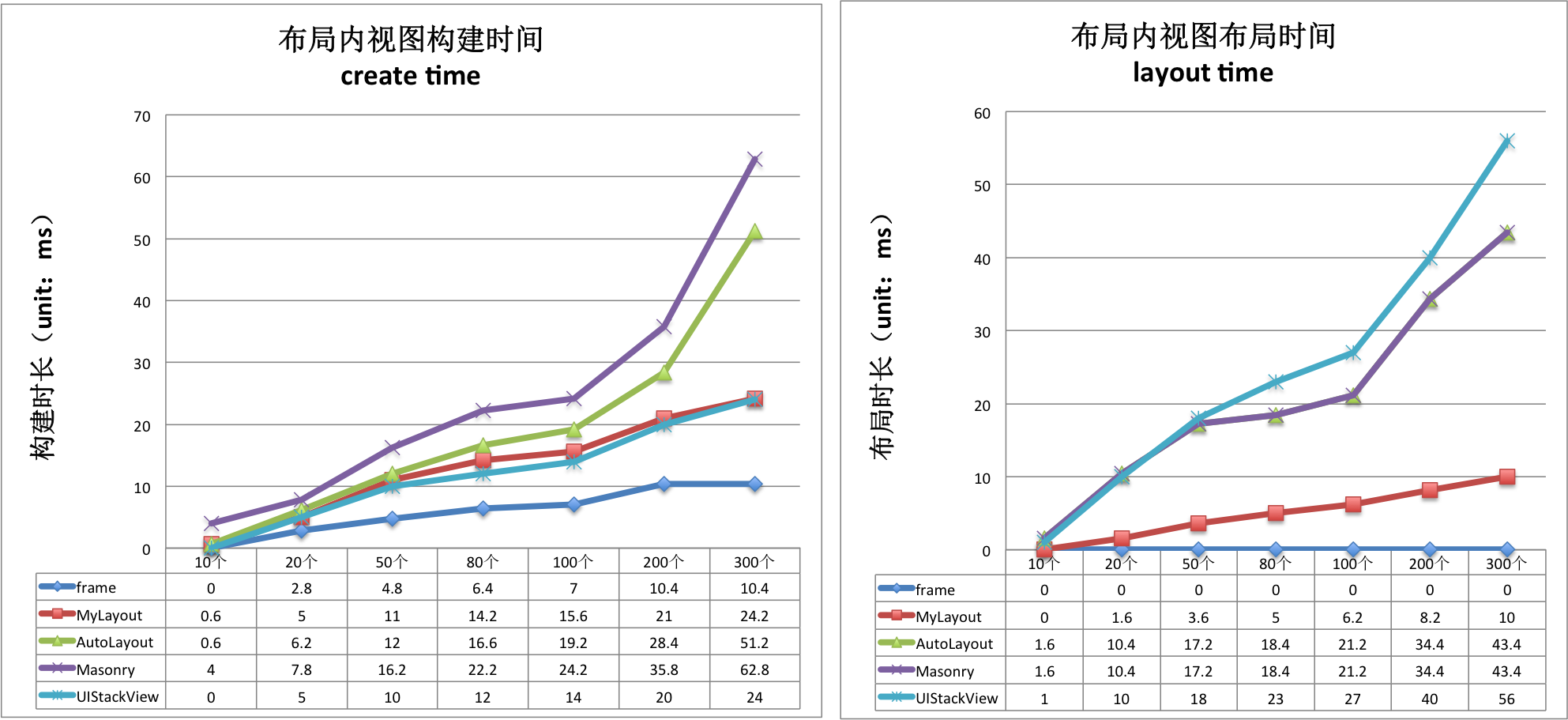
| create time(ms)/per subview | Frame | TangramKit | AutoLayout | Masonry | UIStackView |
|---|---|---|---|---|---|
| TGLinearLayout | 0.08 | 0.164 | 0.219 | 0.304 | 0.131 |
| TGFrameLayout | 0.05 | 0.149 | 0.209 | 0.273 | 0.131 |
| TGRelativeLayout | 0.079 | 0.182 | 0.116 | 0.359 | 0.131 |
| TGFlowLayout | 0.08 | 0.107 | 0.198 | 0.258 | 0.131 |
| TGFloatLayout | 0.044 | 0.148 | 0.203 | 0.250 | 0.131 |
| layout time(ms)/per subview | Frame | TangramKit | AutoLayout | Masonry | UIStackView |
|---|---|---|---|---|---|
| TGLinearLayout | 0 | 0.049 | 0.269 | 0.269 | 0.272 |
| TGFrameLayout | 0 | 0.042 | 0.243 | 0.243 | 0.272 |
| TGRelativeLayout | 0 | 0.068 | 0.274 | 0.274 | 0.272 |
| TGFlowLayout | 0 | 0.036 | 0.279 | 0.279 | 0.272 |
| TGFloatLayout | 0 | 0.055 | 0.208 | 0.208 | 0.272 |
Architecture
TGLayoutPos
TGLayoutPos is represent to the position of a view. UIView provides six extension variables:tg_left, tg_top, tg_bottom, tg_right, tg_centerX, tg_centerY to set view's margin or space distance between self and others.
TGLayoutSize
TGLayoutSize is represent to the size of a view. UIView provides two extension variables:tg_width,tg_height to set view's width and height dimension. there are three special TGLayoutSize const object: .wrap, .fill, .average mean: wrap all subviews size, fill in to superview's residual size, average the superview's size.
TGWeight
TGWeight is used to set relative position and dimension. TangramKit override operator % to easily construct a TGWeight object. e.g 20% is equal to TGWeight(20).
TGLinearLayout
Is equivalent to: UIStackView of iOS and LinearLayout of Android.
Linear layout is a single line layout view that the subviews are arranged in sequence according to the added order(from top to bottom or from left to right). So the subviews' origin&size constraints are established by the added order. Subviews arranged in top-to-bottom order is called vertical linear layout view, and the subviews arranged in left-to-right order is called horizontal linear layout.
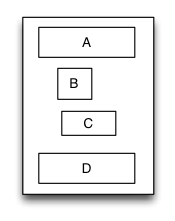
override func loadView() {


            super.loadView()

            let S = TGLinearLayout(.vert)
            S.tg_width.equal(120)
            S.tg_height.equal(.wrap)
            S.tg_vspace = 10

            let A = UIView()
            A.tg_left.equal(5)
            A.tg_right.equal(5)
            A.tg_width.equal(100)
            A.tg_height.equal(40)
            S.addSubview(A)

            let B = UIView()
            B.tg_left.equal(20)
            B.tg_width.equal(40)
            B.tg_height.equal(40)
            S.addSubview(B)

            let C = UIView()
            C.tg_right.equal(40)
            C.tg_width.equal(50)
            C.tg_height.equal(40)
            S.addSubview(C)

            let D = UIView()
            D.tg_left.equal(10)
            D.tg_right.equal(10)
            D.tg_width.equal(100)
            D.tg_height.equal(40)
            S.addSubview(D)

            self.view.addSubview(S)
            S.backgroundColor = .red
            A.backgroundColor = .green
            B.backgroundColor = .blue
            C.backgroundColor = .orange
            D.backgroundColor = .cyan
     }
TGRelativeLayout
Is equivalent to: AutoLayout of iOS and RelativeLayout of Android.
Relative layout is a layout view that the subviews layout and position through mutual constraints.The subviews in the relative layout are not depended to the adding order but layout and position by setting the subviews' constraints.
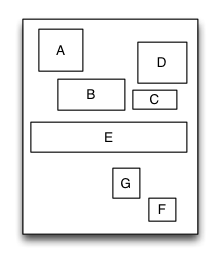
override func loadView() {


            super.loadView()

        let S = TGRelativeLayout()
        S.tg_width.equal(170).and().tg_height.equal(280)

        let A = UIView()
        A.tg_left.equal(20).and().tg_top.equal(20)
        A.tg_width.equal(40).and().tg_height.equal(A.tg_width)
        S.addSubview(A)

        let B = UIView()
        B.tg_left.equal(A.tg_centerX).and().tg_top.equal(A.tg_bottom).offset(10)
        B.tg_width.equal(60).and().tg_height.equal(A.tg_height)
        S.addSubview(B)

        let C = UIView()
        C.tg_left.equal(B.tg_right).offset(10)
        C.tg_bottom.equal(B.tg_bottom)
        C.tg_width.equal(40)
        C.tg_height.equal(B.tg_height, multiple:0.5)
        S.addSubview(C)

        let D = UIView()
        D.tg_bottom.equal(C.tg_top).offset(10)
        D.tg_right.equal(15)
        D.tg_height.equal(A.tg_height)
        D.tg_width.equal(D.tg_height)
        S.addSubview(D)

        let E = UIView()
        E.tg_centerY.equal(0)
        E.tg_centerX.equal(0)
        E.tg_height.equal(40)
        E.tg_width.equal(S.tg_width).add(-20)
        S.addSubview(E)
        //...F,G

            self.view.addSubview(S)
            S.backgroundColor = .red
            A.backgroundColor = .green
            B.backgroundColor = .blue
            C.backgroundColor = .orange
            D.backgroundColor = .cyan
            E.backgroundColor = .magenta
       }
TGFrameLayout
Is equivalent to: FrameLayout of Android.
Frame layout is a layout view that the subviews can be overlapped and gravity in a special location of the superview.The subviews' layout position&size is not depended to the adding order and establish dependency constraint with the superview. Frame layout devided the vertical orientation to top,vertical center and bottom, while horizontal orientation is devided to left,horizontal center and right. Any of the subviews is just gravity in either vertical orientation or horizontal orientation.
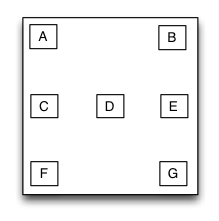
 override func loadView() {


        super.loadView()

        let S = TGFrameLayout()
        S.tg_width.equal(320)
        S.tg_height.equal(500)

        let A = UIView()
        A.tg_width.equal(40)
        A.tg_height.equal(40)
        S.addSubview(A)

        let B = UIView()
        B.tg_width.equal(40)
        B.tg_height.equal(40)
        B.tg_right.equal(0)
        S.addSubview(B)

        let C = UIView()
        C.tg_width.equal(40)
        C.tg_height.equal(40)
        C.tg_centerY.equal(0)
        S.addSubview(C)

        let D = UIView()
        D.tg_width.equal(40)
        D.tg_height.equal(40)
        D.tg_centerY.equal(0)
        D.tg_centerX.equal(0)
        S.addSubview(D)

        //..E,F,G

        self.view.addSubview(S)
        S.backgroundColor = .red
        A.backgroundColor = .green
        B.backgroundColor = .blue
        C.backgroundColor = .orange
        D.backgroundColor = .cyan
}
TGTableLayout
Is equivalent to: TableLayout of Android and table of HTML.
Table layout is a layout view that the subviews are multi-row&col arranged like a table. First you must create a rowview and add it to the table layout, then add the subview to the rowview. If the rowviews arranged in top-to-bottom order,the tableview is caled vertical table layout,in which the subviews are arranged from left to right; If the rowviews arranged in in left-to-right order,the tableview is caled horizontal table layout,in which the subviews are arranged from top to bottom.
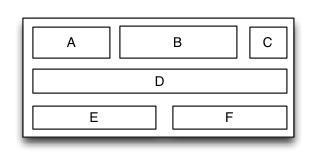
   override func loadView() {


        super.loadView()

        let S = TGTableLayout(.vert)
        S.tg_height.equal(.wrap)
        S.tg_width.equal(.wrap)
        S.tg_vspace = 10
        S.tg_hspace = 10


        S.tg_addRow(size:TGLayoutSize.wrap,colSize:TGLayoutSize.wrap)

        let A = UIView()
        A.tg_width.equal(50)
        A.tg_height.equal(40)
        S.addSubview(A)

        let B = UIView()
        B.tg_width.equal(100)
        B.tg_height.equal(40)
        S.addSubview(B)

        let C = UIView()
        C.tg_width.equal(30)
        C.tg_height.equal(40)
        S.addSubview(C)

        S.tg_addRow(si