Loading repository data…
sinanislekdemir / repository
payton
Payton! Kickstart any 3D OpenGL + GTK Ideas in a few seconds!
#3d#3d-graphics#game#graphics#graphics-programming#gtk3
Live repository statistics
★ 54Stars
⑂ 10Forks
◯ 0Open issues
◉ 54Watchers
81/100
OPENREPOHUB HEALTH SIGNAL
Strong signals
A transparent discovery signal based on current public GitHub metadata.
Recent activity35% weight
100
Community adoption25% weight
32
Maintenance state20% weight
100
License clarity10% weight
100
Project information10% weight
75
This score does not audit code, security, maintainers, documentation quality, or suitability. Verify the repository and its current documentation before adoption.
README preview
Payton 3D SDK
https://github.com/user-attachments/assets/3904c4a3-d683-4816-a31d-3af958e42813
Personally, I don't really read long descriptive documentation unless necessary. I prefer things simple and self-explanatory. Therefore, instead of writing lengthy documentation, I create simple examples to demonstrate each feature of Payton without requiring deep dives into the internals.
Examples can be downloaded from the Payton Github Page.
You can either download the entire repository as a zip file or you can simply git clone it.
🎭 Motion Capture Data
Payton includes support for BVH (Biovision Hierarchy) motion capture files. For extensive motion capture datasets, you can find thousands of BVH files from the Bandai Namco Research Motion Dataset. The example BVH files included with Payton are sourced from this dataset.
Payton is a 3D Software Development Kit designed as a general-purpose playground for programming. With Payton, users can quickly kickstart their ideas and create tools for next-level development, including map editors, small animations, algorithms, or artificial intelligence for games. Unlike complex game engines and libraries that can be time-consuming to set up, Payton comes with sensible pre-configured defaults, making it unique and simple to use.
Payton is not intended to be a full-featured game engine or complete 3D environment, as there are already plenty of excellent tools available for those purposes. Instead, it excels at rapid prototyping and tool development, allowing users to easily visualize their concepts and achieve their goals. Users can seamlessly transition from Payton to other platforms when their projects outgrow its scope.
While 2D graphs and charts are useful for reports, many scenarios require visualizing data in 3 or 4 dimensions. Payton enables users to extend their graphics into higher dimensions and process real-time data from sensors, cameras, or any other data source. These sources can include thermometers, random number generators, IoT devices with speed sensors, maps, vehicle diagnostic ports, or even time-based mathematical formulas. Although projects can become complex, Payton is designed to remain accessible to beginners who can follow the tutorials to develop their programming skills.
Why Payton?
Python 3D libraries traditionally fall into two extremes: too low-level (where you must manually implement cameras, lighting, and scene management) or too heavy (where you fight a massive production engine's learning curve before seeing results). Payton sits deliberately in the sweet spot between them.
vs Pygame: Pygame is strictly a 2D library. While you can initialize an OpenGL context within it, every standard 3D feature—camera orbit, lighting, shadows, material systems, scene hierarchies, collision detection, and UI—must be built entirely from scratch. Payton provides all of these out of the box. When your project requires true 3D (rather than 2D sprites in a 3D space), Payton saves you hundreds of lines of boilerplate code.
vs Panda3D: Panda3D is a production-grade game engine featuring a steep learning curve, a complex deployment pipeline, and an architecture heavily rooted in C++ design patterns. Payton is the exact opposite: it requires just 3 lines of code to launch an interactive 3D scene, offers a purely Pythonic API, and works with zero-config defaults. This makes Payton ideal for rapid prototyping, tool-building, data visualization, simulation, and education—scenarios where you need results in minutes, not hours. If a project eventually outgrows Payton's scope, transitioning to Panda3D, Ursina, or Unity is the natural next step.
Payton bridges the gap between "I need to see my 3D idea right now" and "I'm building a commercial game." It shines brightest when speed-to-visual, simplicity, and minimal boilerplate matter more than high-end rendering polish or deep engine extensibility.
Contents of this Document:
- Payton 3D SDK
Features:
- 3D Math Library
- Various base geometries:
- Cube
- Cylinder (tapered support)
- Capsule (tapered support)
- Triangular Mesh
- Plane / MatrixPlane
- Lines / Better Lines
- Particle System
- Sphere
- Dynamic Grid
- Clean default scene
- Screenshot capture (programmatic or via F12 key)
- Pre-defined keyboard-mouse and camera controls
- Pre-defined environment
- Clock system for parallel tasks and time-based operations
- Simple collision detection
- Optional Physics Engine
- Bullet Physics integration (cubes, joints, ragdoll, bouncing ball)
- Extendable controllers
- Pre-defined lighting with screen-space shadows (multi-light support)
- Material support
- Clickable objects and virtual planes
- Shader support (custom shaders, particle shader)
- Scene theme system with presets
- THEME_BLENDER
- THEME_STUDIO
- THEME_GAMEENGINE
- GUI System with theme support
- HUD (heads-up display)
- Window (draggable, alignable)
- Panel
- Button
- EditBox (multi-line, placeholder, cursor, clipboard)
- ProgressBar
- Slider
- Text / Rectangle / Shape2D
- UI theme presets (UI_THEME_BLENDER, UI_THEME_STUDIO, UI_THEME_GAMEENGINE)
- 3D File formats:
- AWP3D Animated High-Poly 3D Object
- Wavefront OBJ
- Quake 2 MD2 with Animations
- JSON scene export/import
- Mesh Generation Tools
- Extrude Line in 3D
- Rotate Line around an axis in 3D
- Fill between lines (lines_to_mesh)
- Sweep path along 3D curve
- Tube generation
- Loft between profiles
- Mesh modifiers:
- Merge Mesh
- Subdivide Mesh
- Mirror
- Extrude Face
- Laplacian Smooth
- Decimate
- Constructive Solid Geometry (CSG)
- Union
- Difference
- Intersection
- Motion capture data (BVH file support)
- Fog effects
- World-to-screen coordinate projection
- Extensive examples for every feature
Install
Requirements:
- LibSDL2
sudo apt install libsdl2-devfor Debian/Ubuntu-based Linux distributions. For other platforms, please consult your preferred package manager. - ImageMagick
sudo apt install imagemagickfor Debian/Ubuntu-based Linux distributions. For other platforms, please consult your preferred package manager. - Python 3.10+
- A graphics card that supports OpenGL 3.3+
Install using Pip:
From a bash terminal:
pip install payton
This should install all dependencies. If you encounter permission errors, you are likely installing the library system-wide and may be missing some permissions. If you prefer not to use pipenv or virtualenv, you might want to run the above command as sudo pip3 install payton.
Optional Bullet Physics Integration
Payton supports Bullet Physics at a basic level for solid geometries.
pip install pybullet
Once Bullet Physics is successfully installed in the same environment as Payton, it will be automatically activated, and you will be able to use its basic properties. Check out the relevant examples.
Optional GTK3 Integration
Instead of SDL2, you can use GTK3 (along with all nice GTK3 widgets) with Payton.
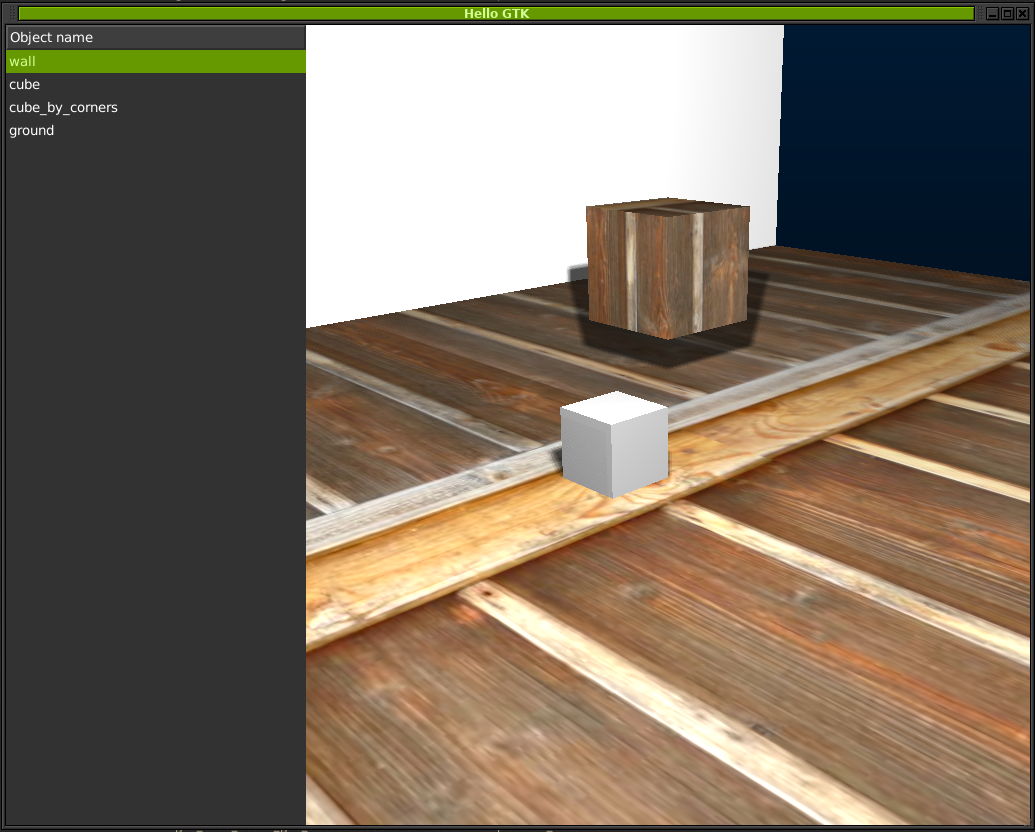
You need to install Python GTK3 Bindings.
AWP3D Format and Exporter
AWP3D is simply a ZIP file containing every frame as a Wavefront object. To export your animated Blender objects as AWP3D files, you can use the exporter add-on available here:
https://github.com/sinanislekdemir/payton/tree/master/plugins
Using Payton with Anaconda
As of version 0.0.10, Payton is installable on Anaconda. From the Anaconda Prompt:
pip install payton
This is sufficient to install Payton and its dependencies on Anaconda.
Payton will be available for use with Spyder or JupyterLab locally.

Upgrade to the latest version:
Payton is under active maintenance. This means I am spending time fixing bugs and making improvements. Therefore, you might want to upgrade it occasionally.
pip3 install payton --upgrade
This should do the trick!
Getting Started
Your first code
from payton.scene import Scene

scene = Scene()
scene.run()
This will create your first empty scene and show it inside an SDL window.
Controls
| Key / Action | Description |
|---|---|
| Mouse Wheel | Zoom In - Zoom Out |
| Right Mouse Button Drag | Rotate Scene |
| Middle Mouse Button Drag | Pan Scene |
| Escape | Quit Simulation |
| C | Change Camera Mode (Perspective / Orthographic) |
| Space | UnPause / Pause Scene Clocks |
| G | Show / Hide Grid |
| W | Change Display Mode (Solid / Wireframe / Points) |
| F2 | Previous Camera |
| F3 | Next Camera |
| F12 | Take Screenshot (saves PNG in current directory) |
| H | Open / Close Help Window |
Environment variables
Some options can be configured using environment variables.
SDL_WINDOW_WIDTH: Set window width.SDL_WINDOW_HEIGHT: Set window height.GL_MULTISAMPLEBUFFERS: Set OpenGL multisample buffer count for antialiasing. (usually 1 or 2)GL_MULTISAMPLESAMPLES: Set OpenGL multisample sampling count for antialiasing. (usually 1-16)
Without GL_MULTISAMPLEBUFFERS AND GL_MULTISAMPLESAMPLES, you may notice pixelated graphics. There are no default values set for these because they can vary between graphics cards.
Troubleshooting
On some older systems or where decent graphics drivers are not installed, you can try running Payton code with MESA. It runs fine, though there will be some performance decrease. However, this will not be noticeable for basic applications.
To enforce MESA 3.3, you can run Payton with:
MESA_GL_VERSION_OVERRIDE=3.3 python <path-to-your-payton-code>
Examples
Personally, I don’t really read the long descriptive documentation unless necessary. I like things simple and self-explaining. Therefore, instead of writing long documentations, I write simple examples to use each feature of Payton without digging much into the internals.
Examples can be downloaded from Payton Github Page.
You can either download the whole repository as a zip file or