vue-treeselect






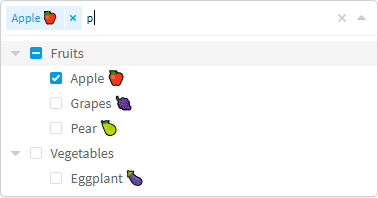
A multi-select component with nested options support for Vue.js
Features
- Single & multiple select with nested options support
- Fuzzy matching
- Async searching
- Delayed loading (load data of deep level options only when needed)
- Keyboard support (navigate using Arrow Up & Arrow Down keys, select option using Enter key, etc.)
- Rich options & highly customizable
- Supports a wide range of browsers (see below)
- RTL support
Requires Vue 2.2+
Getting Started
It's recommended to install vue-treeselect via npm, and build your app using a bundler like webpack.
npm install --save @riophae/vue-treeselect
This example shows how to integrate vue-treeselect with your Vue SFCs.
<!-- Vue SFC -->
<template>
  <div id="app">
    <treeselect v-model="value" :multiple="true" :options="options" />
  </div>
</template>

<script>
  // import the component
  import Treeselect from '@riophae/vue-treeselect'
  // import the styles
  import '@riophae/vue-treeselect/dist/vue-treeselect.css'

  export default {
    // register the component
    components: { Treeselect },
    data() {
      return {
        // define the default value
        value: null,
        // define options
        options: [ {
          id: 'a',
          label: 'a',
          children: [ {
            id: 'aa',
            label: 'aa',
          }, {
            id: 'ab',
            label: 'ab',
          } ],
        }, {
          id: 'b',
          label: 'b',
        }, {
          id: 'c',
          label: 'c',
        } ],
      }
    },
  }
</script>
If you just don't want to use webpack or any other bundlers, you can simply include the standalone UMD build in your page. In this way, make sure Vue as a dependency is included before vue-treeselect.
<html>
  <head>
    <!-- include Vue 2.x -->
    <script src="https://cdn.jsdelivr.net/npm/vue@^2"></script>
    <!-- include vue-treeselect & its styles. you can change the version tag to better suit your needs. -->
    <script src="https://cdn.jsdelivr.net/npm/@riophae/vue-treeselect@^0.4.0/dist/vue-treeselect.umd.min.js"></script>
    <link rel="stylesheet" href="https://cdn.jsdelivr.net/npm/@riophae/vue-treeselect@^0.4.0/dist/vue-treeselect.min.css">
  </head>
  <body>
    <div id="app">
      <treeselect v-model="value" :multiple="true" :options="options" />
    </div>
  </body>
  <script>
    // register the component
    Vue.component('treeselect', VueTreeselect.Treeselect)

    new Vue({
      el: '#app',
      data: {
        // define the default value
        value: null,
        // define options
        options: [ {
          id: 'a',
          label: 'a',
          children: [ {
            id: 'aa',
            label: 'aa',
          }, {
            id: 'ab',
            label: 'ab',
          } ],
        }, {
          id: 'b',
          label: 'b',
        }, {
          id: 'c',
          label: 'c',
        } ],
      },
    })
  </script>
</html>
Documentation & Live Demo
Visit the website
Note: please use a desktop browser since the website hasn't been optimized for mobile devices.
Browser Compatibility
- Chrome
- Edge
- Firefox
- IE ≥ 9
- Safari
It should function well on IE9, but the style can be slightly broken due to the lack of support of some relatively new CSS features, such as transition and animation. Nevertheless it should look 90% same as on modern browsers.
Bugs
You can use this pen to reproduce bugs and then open an issue.
Contributing
- Fork & clone the repo
- Install dependencies by
yarn or npm install
- Check out a new branch
npm run dev & hack- Make sure
npm test passes
- Push your changes & file a pull request
Credits
This project is inspired by vue-multiselect, react-select and Ant Design. Special thanks go to their respective authors!
Some icons used in this project:
License
Copyright (c) 2017-present Riophae Lee.
Released under the MIT License.