Loading repository data…
ray-lothian / repository
UserAgent-Switcher
A User-Agent spoofer browser extension that is highly configurable
#browser-extension#chrome#firefox#javascript#spoof#user-agent
Live repository statistics
★ 1.5KStars
⑂ 187Forks
◯ 147Open issues
◉ 1.5KWatchers
83/100
OPENREPOHUB HEALTH SIGNAL
Strong signals
A transparent discovery signal based on current public GitHub metadata.
Recent activity35% weight
100
Community adoption25% weight
62
Maintenance state20% weight
65
License clarity10% weight
100
Project information10% weight
100
This score does not audit code, security, maintainers, documentation quality, or suitability. Verify the repository and its current documentation before adoption.
README preview
UserAgent-Switcher
A highly configurable browser extension for spoofing your User-Agent string.
UserAgent-Switcher modifies both the User-Agent in your browser's request headers and relevant JavaScript navigator properties (e.g., navigator.userAgent, navigator.appVersion, navigator.platform). It also supports modern browser identification mechanisms such as Client Hints headers and the navigator.userAgentData object, ensuring consistent and comprehensive spoofing across all detection methods.
Key Features
- Comprehensive Spoofing: Modifies both HTTP request headers and JavaScript
navigatorobjects. - Granular Control:
- Spoof User-Agent per specific hostname.
- Set different User-Agents for individual browser tabs.
- Utilize Firefox's container feature for distinct User-Agents per container (not available on manifest v3 yet).
- Randomization: Option to randomly select a User-Agent from a user-defined list.
- Easy Import/Export: Manage your User-Agent lists with simple import and export functionality.
Demo / Review
See the extension in action:
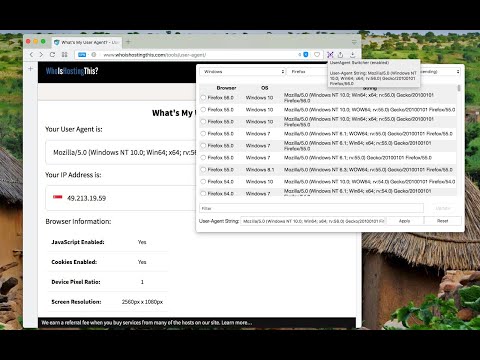
(Video: "User-Agent Switcher and Manager - Browser Extension Review")
Installation - Official Releases
You can install the latest stable version from your browser's official add-on store:
- Chrome: User-Agent Switcher and Manager
- Firefox: User-Agent String Switcher
- Edge: UserAgent Switcher and Manager
- Opera: User-Agent Switcher
Usage
For detailed instructions on how to use the extension, including configuration options and features, please visit: UserAgent-Switcher Usage Guide
Manual Installation (from Source Files)
If you have cloned or downloaded the source files from this repository, you can manually install the extension in your browser. This is useful for development, testing the latest (potentially unstable) code, or if you prefer to install extensions directly from source.
For Chromium-based Browsers (Google Chrome, Microsoft Edge, Opera)
The process for these browsers involves loading the extension as an "unpacked extension":
- Get the Source: Ensure you have the extension's source files (including
manifest.jsonat the root of the extension's directory structure) on your local machine. If you've cloned this repository, these files are typically in the main or asrc/directory. If there's a build process (e.g.,npm run build), run it first to generate the distributable files, typically in adist/orbuild/folder. - Open Browser Extensions Page:
- Chrome: Navigate to
chrome://extensions - Edge: Navigate to
edge://extensions - Opera: Navigate to
opera://extensions
- Chrome: Navigate to
- Enable Developer Mode:
- Look for a toggle switch labeled "Developer mode" (usually in the top-right or bottom-left corner of the extensions page) and turn it on.
- Load Unpacked Extension:
- Once Developer Mode is enabled, a button like "Load unpacked" will appear. Click it.
- A file dialog will open. Navigate to and select the directory containing the extension's source files (the folder that has the
manifest.jsondirectly inside it). Click "Select Folder" or "Open."
The UserAgent-Switcher extension should now be loaded and active. If you make changes to the source code, you'll typically need to return to the extensions page and click a "Reload" icon or button for the extension to apply the changes.
For Mozilla Firefox
Method 1: Load Temporary Add-on (for Development/Testing)
This method allows you to load the extension directly from the source files. It will remain installed until you restart Firefox or manually remove it.
- Get the Source: Ensure you have the extension's source files (including
manifest.jsonat the root of the extension's directory structure) on your local machine. - Open Firefox.
- Navigate to Debugging Tools: Type
about:debugginginto the Firefox address bar and press Enter. - Select "This Firefox": In the left-hand sidebar, click on "This Firefox".
- Load Add-on: Click the "Load Temporary Add-on..." button.
- Select Manifest File: Navigate to the directory where you have the extension's source code and select the
manifest.jsonfile (or any file within the extension's root directory). Click "Open."
The UserAgent-Switcher extension should now be loaded. If you make changes to the source code, you can click the "Reload" button next to the extension's entry on the about:debugging page.
Method 2: Package as an .xpi File and Install (More Persistent Local Install)
- Prepare Files:
- Ensure all necessary source files are present, with
manifest.jsonat the root. - If this repository uses a build process, run it first.
- Ensure all necessary source files are present, with
- Create a ZIP Archive:
- Navigate to the directory containing the finalized extension files.
- Select all files and subfolders inside this directory. The
manifest.jsonfile must be at the root level within the ZIP archive. - Compress the selected items into a ZIP archive (e.g.,
user_agent_switcher.zip).
- Rename to .xpi: Change the file extension from
.zipto.xpi(e.g.,user_agent_switcher.xpi). - Install in Firefox:
- Open Firefox and go to the Add-ons Manager (
about:addonsorCtrl+Shift+A/Cmd+Shift+A). - Click the gear icon (⚙️) on the Extensions panel.
- Select "Install Add-on From File..."
- Locate and select your
.xpifile and click "Open." Confirm the installation.
- Open Firefox and go to the Add-ons Manager (
Important Considerations for Manual Installation (from Source):
- Extension ID Consistency: For stable development and testing (especially if your extension uses storage or needs a consistent ID for APIs):
- Chromium-based browsers: You can add a
"key"field to yourmanifest.json. This is a Base64 encoded public key. If thekeyfield is present when loading an unpacked extension, Chrome/Edge/Opera will derive a consistent ID. Without it, the ID may change if the path to the extension folder changes. - Firefox: Ensure the
manifest.jsonincludes a unique add-on ID via thebrowser_specific_settings.gecko.idfield (e.g.,"id": "user-agent-switcher@your-domain.com").
- Chromium-based browsers: You can add a
- Persistence: Loading an unpacked extension (Chromium) or as a temporary add-on (Firefox) typically means the extension is active for the current session or until manually reloaded/removed. The Firefox
.xpimethod provides a more permanent installation for that browser. - Packaging for Distribution: If you intend to distribute the extension more widely outside of simply loading the source files:
- Chromium-based browsers: Extensions are packaged into
.crxfiles, often handled through the respective web stores (Chrome Web Store, Microsoft Edge Add-ons, Opera addons). - Firefox: Extensions are packaged as signed
.xpifiles, typically distributed via addons.mozilla.org (AMO). - Signing is a crucial step for official distribution to ensure security and integrity. Standard browser versions often restrict or warn against installing unsigned extensions from outside their official stores.
- Chromium-based browsers: Extensions are packaged into
Contributing
Contributions are welcome! If you have ideas for improvements, new features, or have found a bug, please feel free to:
- Open an issue in the repository to discuss the change or report the bug.
- Fork the repository and submit a pull request with your changes.
Please ensure any contributions align with the project's coding style and goals.
License
This project is licensed under the Mozilla Public License 2.0 (MPL-2.0).
You can find a copy of the license in the LICENSE file in this repository or at https://www.mozilla.org/en-US/MPL/2.0/.