storycraftr GitHub Details, Stars and Alternatives | OpenRepoFinder
raestrada / repository
storycraftr
StoryCraftr is an open-source AI-powered tool that helps writers craft stories, generate worldbuilding details, and create book outlines and chapters seamlessly through a simple CLI. Empower your creativity with AI!
A transparent discovery signal based on current public GitHub metadata.
Recent activity35% weight
100
Community adoption25% weight
42
Maintenance state20% weight
65
License clarity10% weight
100
Project information10% weight
75
This score does not audit code, security, maintainers, documentation quality, or suitability. Verify the repository and its current documentation before adoption.
README preview
StoryCraftr - Your AI-powered Book Creation Assistant 📚🤖
Welcome to StoryCraftr, the open-source project designed to revolutionize how books are written. With the power of AI and a streamlined command-line interface (CLI), StoryCraftr helps you craft your story, manage worldbuilding, structure your book, and generate chapters — all while keeping you in full control.
What's New? Discover AI Craftr 🌐
AI Craftr is now available as a powerful suite for AI-assisted writing, featuring specialized tools like StoryCraftr for novelists and PaperCraftr for researchers. Each tool is designed to simplify your writing process with unique features catered to different types of content. Explore PaperCraftr for structuring academic papers, or stay tuned as we add more tools to the AI Craftr suite, such as LegalCraftr for legal documents and EduCraftr for educational materials.
Release Notes v0.12.0-beta10
You can find the release notes for version v0.12.0-beta10here.
Step 1: Install StoryCraftr
First, install StoryCraftr using pipx, a tool to help you install and run Python applications in isolated environments. It works on most platforms, including macOS, Linux, and Windows. Using pipx ensures that StoryCraftr runs in its own virtual environment, keeping your system's Python installation clean.
To install StoryCraftr, run the following command:
StoryCraftr now uses LangChain and supports OpenAI, OpenRouter, and Ollama out of the box. Credentials are discovered automatically from environment variables or text files inside ~/.storycraftr/ or ~/.papercraftr/.
# OpenAI
mkdir -p ~/.storycraftr
echo "sk-your-openai-secret" > ~/.storycraftr/openai_api_key.txt

# OpenRouter
echo "or-your-openrouter-secret" > ~/.storycraftr/openrouter_api_key.txt

# Ollama usually runs locally and does not require a key.
export OLLAMA_BASE_URL="http://localhost:11434"
You can also set the variables directly (OPENAI_API_KEY, OPENROUTER_API_KEY, OLLAMA_API_KEY) before invoking the CLI.
Configure the LLM and Embeddings
Each project stores its configuration in storycraftr.json or papercraftr.json. New projects include LangChain-centric settings:
llm_provider accepts openai, openrouter, or ollama.
llm_endpoint lets you target custom bases (e.g., https://openrouter.ai/api/v1).
embed_model defaults to BAAI/bge-large-en-v1.5 for OpenAI-quality local embeddings. Use a lighter model (e.g., sentence-transformers/all-MiniLM-L6-v2) on constrained hardware.
Supported Providers
OpenAI – works with ChatOpenAI via OPENAI_API_KEY; set llm_provider=openai.
OpenRouter – set OPENROUTER_API_KEY and optionally OPENROUTER_BASE_URL; use llm_provider=openrouter.
Ollama – self-hosted models via ollama serve; set llm_provider=ollama and optionally OLLAMA_BASE_URL.
Quick Examples
Here are a few ways to get started with StoryCraftr:
storycraftr outline general-outline "Summarize the overall plot of a dystopian science fiction where advanced technology, resembling magic, has led to the fall of humanity’s elite and the rise of a manipulative villain who seeks to destroy both the ruling class and the workers."
💬 Introducing Chat!!! – A Simple Yet Powerful Tool to Supercharge Your Conversations! 💥
Whether you're brainstorming ideas, refining your story, or just need a little creative spark, Chat!!! is here to help. It's a straightforward, easy-to-use feature that lets you dive deep into meaningful discussions, unlock new insights, and get your thoughts flowing effortlessly.
🚀 Sometimes, all you need is a little chat to get the gears turning! Try it out and watch your creativity soar!
Full Guide
For a complete guide, including more examples and instructions on how to fully leverage StoryCraftr, visit our Getting Started page:
Writing a book is a journey that involves not only creativity but also structure, consistency, and planning. StoryCraftr is here to assist you with:
Worldbuilding: Define the geography, history, cultures, and more.
Outline: Generate a cohesive story outline, from character summaries to chapter synopses.
Chapters: Automatically generate chapters, cover pages, and epilogues based on your ideas.
With StoryCraftr, you'll never feel stuck again. Let AI guide your creative process, generate ideas, and help you bring your world and characters to life.
StoryCraftr Chat Feature 💬
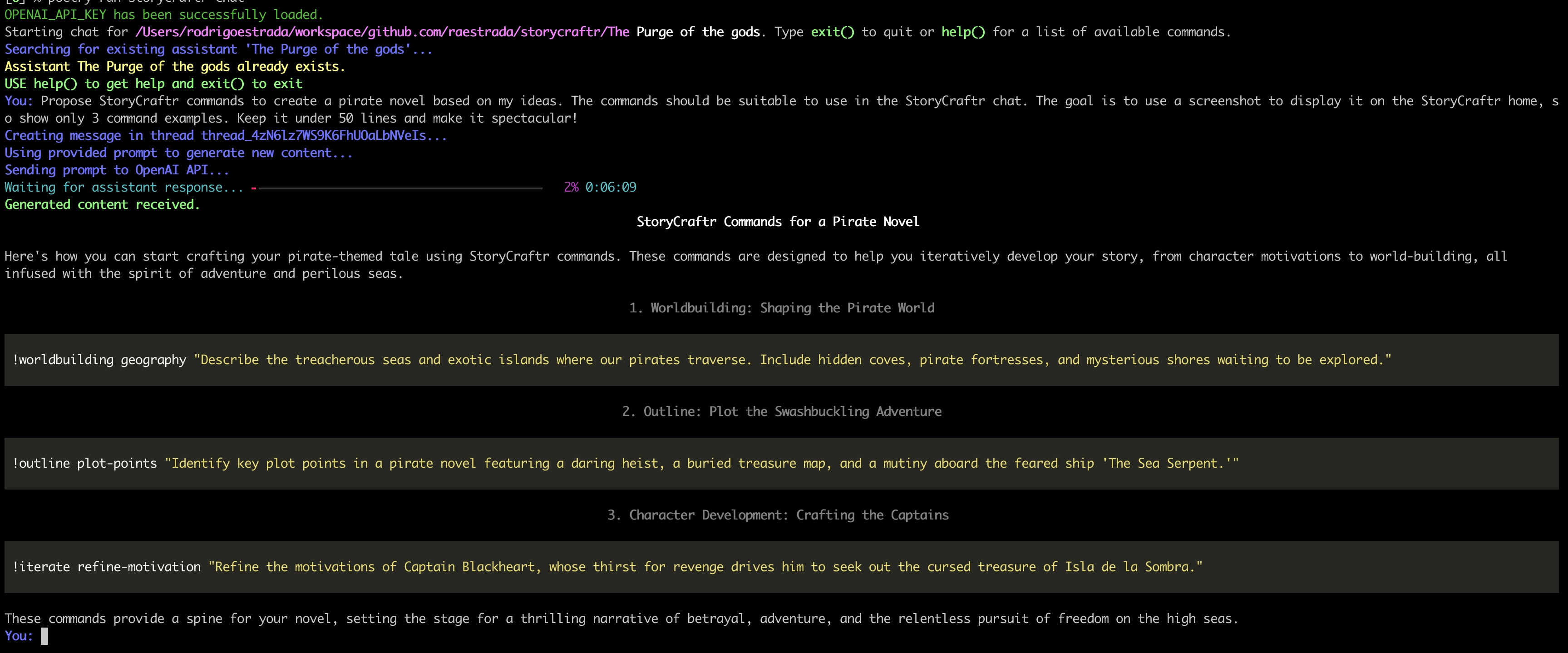
The StoryCraftr Chat feature allows users to engage directly with an AI assistant, helping to brainstorm, refine, and improve your book in real time. The chat supports various commands for outlining, iterating, and world-building, making it a powerful tool for writers to create and enhance their stories interactively.
Key Commands:
Iterate: Refine character names, motivations, and even insert new chapters mid-book.
Example:
!iterate insert-chapter 3 "Add a flashback between chapters 2 and 3."
Outline: Generate the general plot, chapter summaries, or key plot points.
Example:
!outline general-outline "Summarize the overall plot of a dystopian sci-fi novel."
Worldbuilding: Build the world’s history, geography, and technology, or develop the magic system.
Example:
!worldbuilding magic-system "Describe the 'magic' system based on advanced technology."
Chapters: Write new chapters or adjust existing ones and generate cover text.
Example:
!chapters chapter 1 "Write chapter 1 based on the synopsis."
You can start a chat session with the assistant using:
storycraftr chat --book-path /path/to/your/book
For help with available commands during the session, simply type:
help()
VSCode Extension
We are excited to introduce the StoryCraftr VSCode extension, designed to seamlessly integrate the StoryCraftr CLI into your development environment. This extension allows you to interact with StoryCraftr directly from VSCode, offering powerful tools for novel writing and AI-assisted creativity.
Key Features:
Auto-detection: Automatically detects if storycraftr.json is present in the project root, ensuring the project is ready to use.
Integrated Chat: Start interactive AI-powered chat sessions for brainstorming and refining your novel without leaving VSCode.
Simplified Setup: If StoryCraftr or its dependencies (Python, pipx) are not installed, the extension assists you in setting them up.
Check if storycraftr.json exists in the root of your project.
If it exists, you can start interacting with StoryCraftr by launching a terminal with the chat command using:
Command Palette: Run Start StoryCraftr Chat.
If not installed, it will guide you through installing Python, pipx, and StoryCraftr to get started.
Explore more about the StoryCraftr CLI and see how it can boost your storytelling workflow.
Let your creativity flow with the power of AI! ✨
Contributing
We welcome contributions of all kinds! Whether you’re a developer, writer, or simply interested in improving the tool, you can help. Here’s how you can contribute:
Fork the repository and create your branch:
git checkout -b feature/YourFeature
Make your changes, ensuring all tests pass.
Submit a pull request detailing your changes.
Join us on this journey to create an amazing open-source tool for writers everywhere. Together, we can make StoryCraftr the go-to AI writing assistant! 💡
Powered by AI Craftr
StoryCraftr is part of the AI Craftr suite, an open-source set of tools designed to assist with creative and academic writing. AI Craftr enhances the productivity of writers, researchers, and educators, providing advanced tools for content creation.
You can learn more about AI Craftr and discover other tools like PaperCraftr for academic writing at https://aicraftr.app.