Loading repository data…
nbauma109 / repository
ecd
ECD++ - Fork of Enhanced Class Decompiler - integrate modern Java decompilers seamlessly into the development workflow
#bytecode#cfr#debugging#decompilation#decompiler#eclipse
Live repository statistics
★ 15Stars
⑂ 2Forks
◯ 4Open issues
◉ 15Watchers
65/100
OPENREPOHUB HEALTH SIGNAL
Healthy signals
A transparent discovery signal based on current public GitHub metadata.
Recent activity35% weight
100
Community adoption25% weight
20
Maintenance state20% weight
40
License clarity10% weight
100
Project information10% weight
75
This score does not audit code, security, maintainers, documentation quality, or suitability. Verify the repository and its current documentation before adoption.
README preview






Downloads from Github releases :


Downloads from Jitpack :


Downloads from Sourceforge :




Downloads from Eclipse Marketplace :





ECD++ - Fork of Enhanced Class Decompiler (ECD)
ECD++ integrates multiple decompilers provided by transformer-api :
- Fernflower
- Vineflower (fork of Fernflower)
- Procyon
- CFR
- JD-Core V0 and V1
- JADX
It also allows Java developers to debug class files without source code directly. Contrary to original ECD, it uses jd-util's JAVACC parser to parse decompiled code into its own model and its code presentation technical stack to realign code. It also integrates with the eclipse class editor, m2e plugin, supports Javadoc, reference search, library source attaching, and the syntax of JDK8 lambda expression.
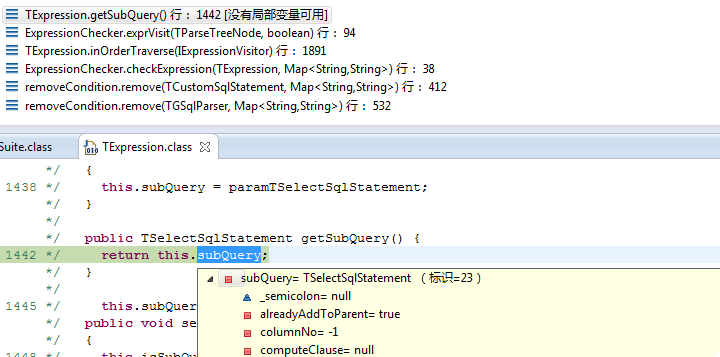
Description
ECD++ - Fork of Enhanced Class Decompiler is a plug-in for the Eclipse platform. It integrates multiple decompilers seamlessly with Eclipse, allows you to display all the Java sources during your debugging process, even if you do not have them all, and you can debug these class files without source code directly.
Why a fork?
- Compatibility with latest version of Eclipse over backward compatibility : upstream project aims at supporting all versions of Eclipse which is not maintainable from my point of view (2b13e85, b518dd3, f2b6022, 8538745, 8b47e95)
- Usage of forked versions of decompilers : I need this freedom to bring bug fixes as some of the decompilers are not maintained anymore, or rarely maintained (see also this Why a fork ? section)
- Source attach plugin comes with some enhancements (see below) but it was removed in upstream project (#103, 5a9a574)
- Broken functions "Show Byte Code" and "Show Disassembler" are removed (bytecode is available natively in Eclipse in menu
Window -> Show View -> Bytecode) but still present in upstream project - Some significant refactorings in upstream project made rebasing next to impossible not only because of conflicts but also because of the risk of regression (e3d0e4e, 94a317a, 6c3710c)
- The forked project has its own governance, major changes (such as introduction of transformer-api), its own release pace
Why is this plug-in "enhanced"?
This is an ad-free fork of the Eclipse Decompiler Plugin. So we enhanced it by removing all code which might compromise your privacy or security (to the best of our knowledge).
How to install ECD++?
If you have currently the "Eclipse" Class Decompiler installed, it is recommended to uninstall that plug-in first and remove the corresponding update site from your Eclipse installation.
Use one of the following options to install:
Install with Eclipse Marketplace
In Eclipse, click on "Help > Eclipse Marketplace...", search and install ecd++
Install with update site URL
- Launch Eclipse,
- Click on "Help > Install New Software...",
- Use the update site URL https://nbauma109.github.io/ecd/updates/latest/
- Check the components to install,
- Click on "Next" and "Finish" buttons.
- A warning dialog windows appear because plug-in is not signed. Click on "Install anyway" button.
Drag and Drop installation:
- Launch Eclipse,
- Click on "Help > Install New Software...",
- Drag and Drop enhanced-class-decompiler-x.y.z.zip
- Check the components to install,
- Click on "Next" and "Finish" buttons.
- A warning dialog windows appear because plug-in is not signed. Click on "Install anyway" button.
/!\ Drag and Drop is blocked in some corporate contexts. In this case, in "Help > Install New Software...", click "Add.." and then "Archive.." to select enhanced-class-decompiler-x.y.z.zip
How to check the file associations?
- Click on "Window > Preferences > General > Editors > File Associations"
- "*.class" : "Class Decompiler Viewer" is selected by default.
- "*.class without source" : "Class Decompiler Viewer" is selected by default.
How to configure ECD++?
- Click on "Window > Preferences > Java > Decompiler"
Source attach:
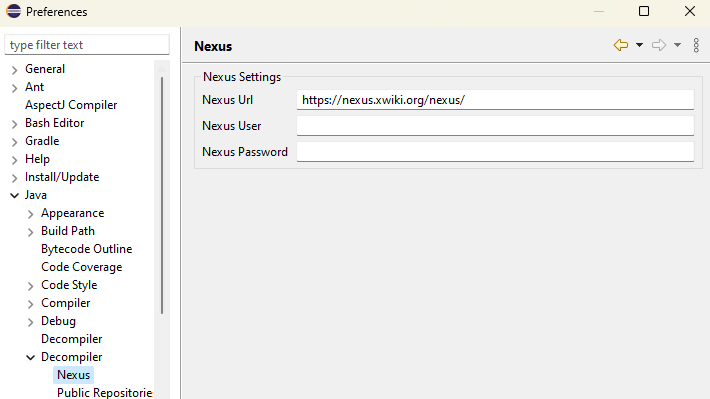
You may configure a private Nexus repository with credentials (user/password) to download and attach sources automatically :
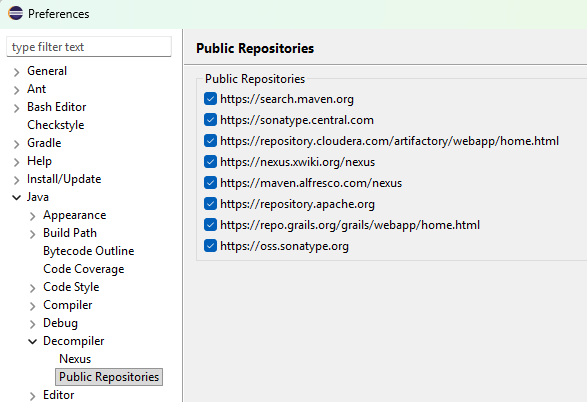
You may select from a list of available public repositories :
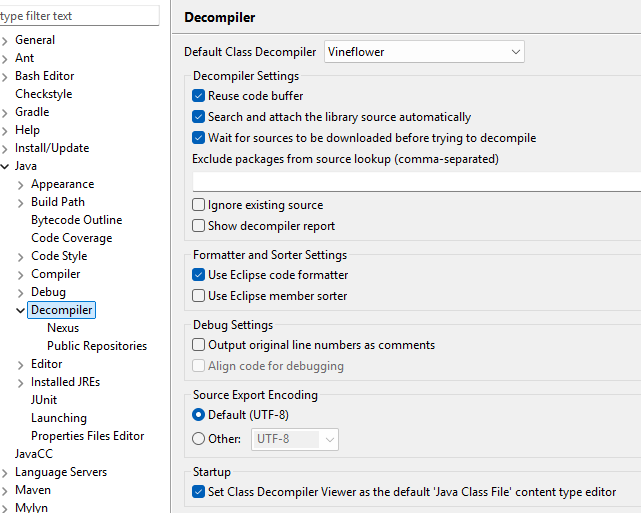
You may use this option "Wait for sources to be downloaded before trying to decompile" to avoid decompiling code for which you have sources. Also list the packages to exclude from source lookup when sources are unavailable.
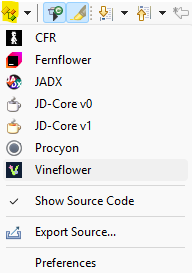
Use this icon to switch decompiler while a class file is still open. Once a file is closed and re-opened, the source is cached, it is no more possible to switch decompiler.
Features
Export Source
You can export decompiled source code to files using the Export Source action. This feature is available in two ways:
- From the toolbar: Click the
Export Source...icon in the editor toolbar when viewing a decompiled class file. - From context menu: Right-click on Java classes, packages, or JAR files in the Package Explorer or Project Explorer and select "Export Source".
The exported source files will be saved with the configured encoding (see preferences).
Mark Occurrences
Toggle the highlighting of all occurrences of the currently selected identifier in the decompiled code by clicking the Toggle Mark Occurrences icon in the toolbar. This helps you quickly identify where a variable, method, or class is used throughout the decompiled source.
Breadcrumb Navigation
Enable or disable breadcrumb navigation by clicking the Toggle Breadcrumb icon in the toolbar. The breadcrumb shows the structural path to the current code location (package, class, method) and allows quick navigation through the code hierarchy.
Open Class With
Right-click on any Java class file in the Package Explorer or Project Explorer and select "Open Class With" to choose which specific decompiler to use for opening that class file. This allows you to compare output from different decompilers for the same class.
GitHub Project Home
Access the project's GitHub repository directly from Eclipse by clicking the Project Home Page icon in the toolbar. This provides quick access to documentation, issues, and updates.
Attach Library Source
Automatically download and attach source code to library JAR files. Right-click on any JAR file or class in the Package Explorer or Project Explorer and se