Loading repository data…
missdeer / repository
codex-mcp-rs
codex-mcp-rs is a Rust-based MCP (Model Context Protocol) server that serves as a bridge for Codex CLI, enabling various AI coding assistants (such as Claude Code, Roo Code, KiloCode, etc.) to seamlessly collaborate with Codex.
Live repository statistics
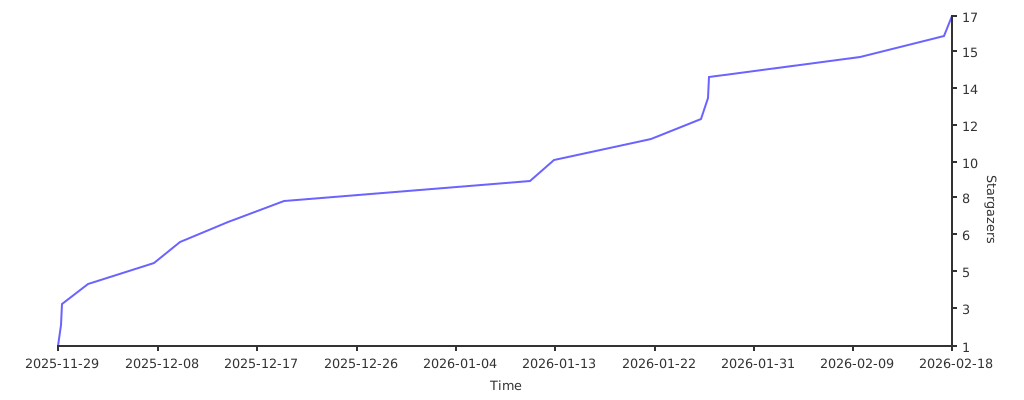
★ 16Stars
⑂ 2Forks
◯ 0Open issues
◉ 16Watchers
README preview
codex-mcp-rs



A high-performance Rust implementation of MCP (Model Context Protocol) server that wraps the Codex CLI for AI-assisted coding tasks.
Features
- MCP Protocol Support: Implements the official Model Context Protocol using the Rust SDK
- Codex Integration: Wraps the Codex CLI to enable AI-assisted coding through MCP
- Session Management: Supports multi-turn conversations via session IDs
- Sandbox Safety: Configurable sandbox policies (read-only, workspace-write, danger-full-access)
- Smart Stdin Mode: Automatically pipes prompts via stdin when they contain special characters or exceed length limits, with
force_stdinoverride - Image Support: Attach images to prompts for visual context
- Async Runtime: Built on Tokio for efficient async I/O
- Cross-Platform: Pre-built binaries for Linux, macOS, and Windows (x64 and arm64)
Supported Platforms
| Platform | Architecture | Binary |
|---|---|---|
| Linux | x86_64 | codex-mcp-rs_Linux_x86_64.tar.gz |
| Linux | arm64 | codex-mcp-rs_Linux_arm64.tar.gz |
| macOS | Universal (x64 + arm64) | codex-mcp-rs_Darwin_universal.tar.gz |
| Windows | x86_64 | codex-mcp-rs_Windows_x86_64.zip |
| Windows | arm64 | codex-mcp-rs_Windows_arm64.zip |
Prerequisites
- Rust 1.77.2+ (required for Windows command-line argument escaping fixes)
- Codex CLI installed and configured
- Claude Code or another MCP client
Building
# Debug build
cargo build

# Release build
cargo build --release
Running
The server communicates via stdio transport:
cargo run
Or after building:
./target/release/codex-mcp-rs
Quick Start
The fastest way to get started is using npx:
npx @missdeer/codex-mcp-rs
This command automatically installs the correct pre-built binary for your platform (Windows/macOS/Linux, x64/arm64) and launches the MCP server. No manual installation required.
To add it to Claude Code:
claude mcp add codex-rs -s user --transport stdio -- npx @missdeer/codex-mcp-rs
Installation
Option 1: Use via npx (Recommended)
Using npx is the simplest approach - it handles binary installation automatically:
npx @missdeer/codex-mcp-rs
What happens:
- npm installs the platform-specific binary package (
@codex-mcp-rs/darwin-universal,@codex-mcp-rs/linux-x64, etc.) - Launches the MCP server on stdio transport
Add to Claude Code MCP configuration:
claude mcp add codex-rs -s user --transport stdio -- npx @missdeer/codex-mcp-rs
Or install globally for faster startup:
npm install -g @missdeer/codex-mcp-rs
claude mcp add codex-rs -s user --transport stdio -- codex-mcp-rs
Global installation caches the binary locally for instant startup.
Option 2: Install via Install Script (Linux/macOS)
Automatically download and install the latest release binary to /opt/codex-mcp-rs/:
curl -sSL https://raw.githubusercontent.com/missdeer/codex-mcp-rs/master/scripts/install.sh | bash
This script will:
- Detect your platform and architecture
- Download the latest release from GitHub
- Install the binary to
/opt/codex-mcp-rs/codex-mcp-rs - Automatically add it to your Claude Code MCP configuration
Option 3: Install from Release
Download the appropriate binary for your platform from the releases page, extract it, and add to your MCP configuration:
claude mcp add codex-rs -s user --transport stdio -- /path/to/codex-mcp-rs
Option 4: Build from Source
git clone https://github.com/missdeer/codex-mcp-rs.git
cd codex-mcp-rs
cargo build --release
claude mcp add codex-rs -s user --transport stdio -- $(pwd)/target/release/codex-mcp-rs
Tool Usage
The server provides a single codex tool with the following parameters:
Required Parameters
PROMPT(string): Task instruction for Codexcd(string): Working directory path
Optional Parameters
sandbox(string): Sandbox policy -"read-only"(default),"workspace-write", or"danger-full-access"SESSION_ID(string): Resume a previous session for multi-turn conversationsskip_git_repo_check(bool): Allow running outside git repositories (default:false)return_all_messages(bool): Return full reasoning trace (default:false)image(array): Paths to image files to attachmodel(string): Override the Codex modelyolo(bool): Disable all prompts and sandboxingprofile(string): Load config profile from~/.codex/config.tomltimeout_secs(number): Timeout in seconds for codex execution (default: 600, max: 3600)force_stdin(bool): Force passing prompt via stdin instead of CLI argument (default:false). When enabled, the prompt is always piped through stdin regardless of content. This is also triggered automatically when the prompt exceeds 800 characters or contains shell-special characters.
Testing
The project has comprehensive test coverage:
# Run all tests
cargo test

# Run with coverage
cargo tarpaulin --out Html

# See detailed testing guide
cat TESTING.md
Test categories:
- Unit tests (10): Core functionality (escape_prompt, Options)
- Integration tests (10): End-to-end scenarios
- Server tests (5): MCP protocol implementation
- CI tests: Multi-platform validation
Total: 25 tests passing ✅
Current test coverage: See Codecov
Architecture
See CLAUDE.md for detailed architecture documentation.
Comparison with Other Implementations
| Feature | codex-mcp-rs (Rust) | codexmcp (Python) | codex-mcp-go |
|---|---|---|---|
| Language | Rust | Python | Go |
| Performance | ⭐⭐⭐⭐⭐ | ⭐⭐⭐ | ⭐⭐⭐⭐ |
| Memory Usage | ⭐⭐⭐⭐⭐ | ⭐⭐⭐ | ⭐⭐⭐⭐ |
| Binary Size | Medium | N/A | Small |
| Startup Time | ⭐⭐⭐⭐⭐ | ⭐⭐⭐ | ⭐⭐⭐⭐⭐ |
| Session Management | ✓ | ✓ | ✓ |
| Image Support | ✓ | ✓ | ✓ |
| Sandbox Policies | ✓ | ✓ | ✓ |
Related Projects
- codex-mcp-go - Go implementation
- geminimcp - Python MCP server for Gemini CLI
Contributing
Contributions are welcome! See CONTRIBUTING.md for guidelines.
License
This project is dual-licensed:
Non-Commercial / Personal Use - GNU General Public License v3.0
Free for personal projects, educational purposes, open source projects, and non-commercial use. See LICENSE for the full GPLv3 license text.
Commercial / Workplace Use - Commercial License Required
If you use codex-mcp-rs in a commercial environment, workplace, or for any commercial purpose, you must obtain a commercial license.
This includes but is not limited to:
- Using the software at work (any organization)
- Integrating into commercial products or services
- Using for client work or consulting
- Offering as part of a SaaS/cloud service
Contact: missdeer@gmail.com for commercial licensing inquiries.
See LICENSE-COMMERCIAL for more details.
Star History