Loading repository data…
mikepenz / repository
FastAdapter
The bullet proof, fast and easy to use adapter library, which minimizes developing time to a fraction...
#adapter#android#android-development#android-library#android-ui#click-listeners
Live repository statistics
★ 3.9KStars
⑂ 490Forks
◯ 8Open issues
◉ 3.9KWatchers
93/100
OPENREPOHUB HEALTH SIGNAL
Strong signals
A transparent discovery signal based on current public GitHub metadata.
Recent activity35% weight
100
Community adoption25% weight
71
Maintenance state20% weight
100
License clarity10% weight
100
Project information10% weight
100
This score does not audit code, security, maintainers, documentation quality, or suitability. Verify the repository and its current documentation before adoption.
README preview
FastAdapter
The FastAdapter is here to simplify creating adapters for RecyclerViews. Don't worry about the adapter anymore. Just write the logic for how your view/item should look like, and you are done. It's blazing fast, minimizing the code you need to write, and is easy to extend.
What's included 🚀
- Core module 100% in Kotlin
- Click / Long-Click listeners
- Selection / Multi-Selection (MultiselectSample, CheckBoxSample, RadioButtonSample)
- Expandable items (ExpandableSample, IconGridSample ,AdvancedSample)
- Write less code, get better results
- Highly optimized code
- Simple Drag & Drop (SimpleItemListSample)
- Headers (StickyHeaderSample, AdvancedSample)
- Footers
- Filter (SimpleItemListSample)
- Includes suggestions from the Android Team
- Easily extensible
- Endless Scroll (EndlessScrollSample)
- "Leave-Behind"-Pattern (SwipeListSample)
- Split item view and model (ModelItem, )
Preview
Screenshots 🎉
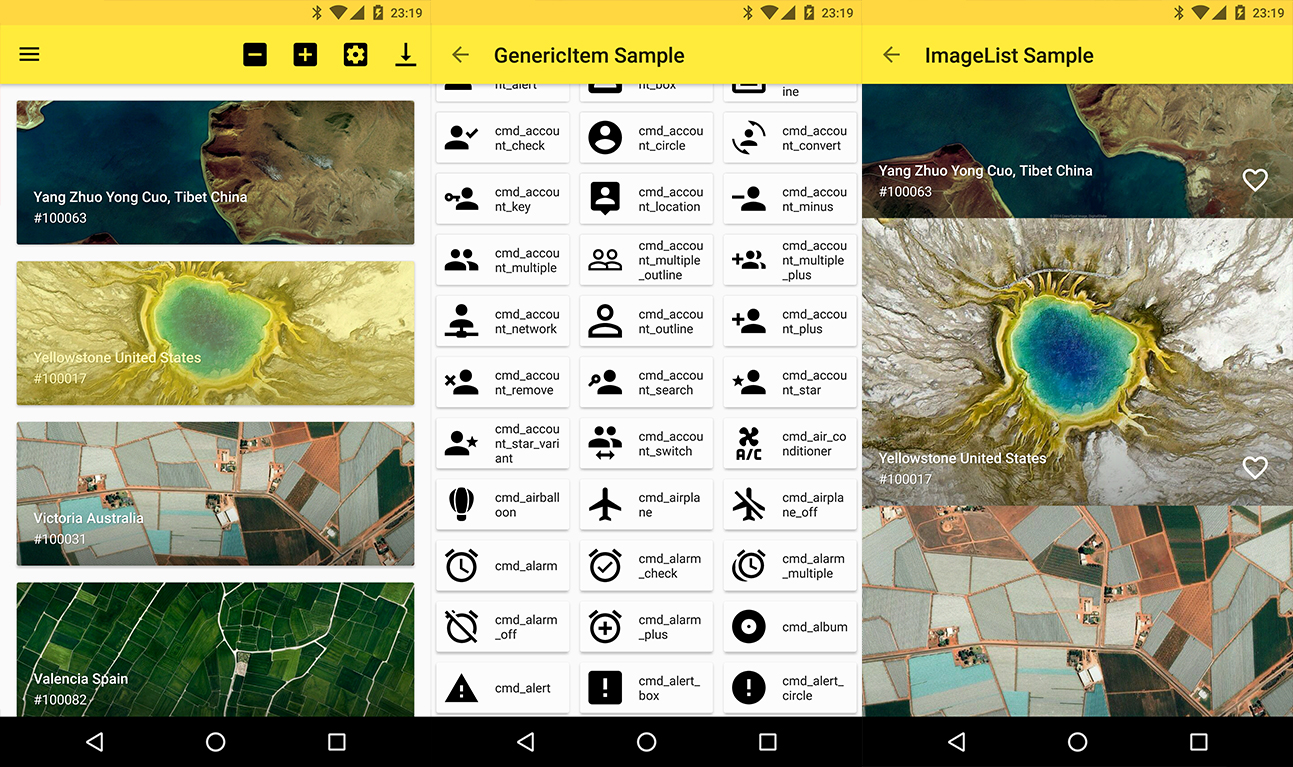
Setup
Latest releases 🛠
Provide the gradle dependency
The library is split up into core, commons, and extensions. The core functions are included in the following dependency.
implementation "com.mikepenz:fastadapter:${latestFastAdapterRelease}"
implementation "androidx.appcompat:appcompat:${androidX}"
implementation "androidx.recyclerview:recyclerview:${androidX}"
Expandable support is included and can be added via this
implementation "com.mikepenz:fastadapter-extensions-expandable:${latestFastAdapterRelease}"
Many helper classes are included in the following dependency.
implementation "com.mikepenz:fastadapter-extensions-binding:${latestFastAdapterRelease}" // view binding helpers
implementation "com.mikepenz:fastadapter-extensions-diff:${latestFastAdapterRelease}" // diff util helpers
implementation "com.mikepenz:fastadapter-extensions-drag:${latestFastAdapterRelease}" // drag support
implementation "com.mikepenz:fastadapter-extensions-paged:${latestFastAdapterRelease}" // paging support
implementation "com.mikepenz:fastadapter-extensions-scroll:${latestFastAdapterRelease}" // scroll helpers
implementation "com.mikepenz:fastadapter-extensions-swipe:${latestFastAdapterRelease}" // swipe support
implementation "com.mikepenz:fastadapter-extensions-ui:${latestFastAdapterRelease}" // pre-defined ui components
implementation "com.mikepenz:fastadapter-extensions-utils:${latestFastAdapterRelease}" // needs the `expandable`, `drag` and `scroll` extension.

// required for the ui components and the utils
implementation "com.google.android.material:material:${androidX}"
How to use
1. Implement your item
1a. Implement your item as usual (the easy way)
Just create a class which extends the AbstractItem as shown below. Implement the methods, and your item is ready.
open class SimpleItem : AbstractItem<SimpleItem.ViewHolder>() {
    var name: String? = null
    var description: String? = null

    /** defines the type defining this item. must be unique. preferably an id */
    override val type: Int
        get() = R.id.fastadapter_sample_item_id

    /** defines the layout which will be used for this item in the list */
    override val layoutRes: Int
        get() = R.layout.sample_item

    override fun getViewHolder(v: View): ViewHolder {
        return ViewHolder(v)
    }

    class ViewHolder(view: View) : FastAdapter.ViewHolder<SimpleItem>(view) {
        var name: TextView = view.findViewById(R.id.material_drawer_name)
        var description: TextView = view.findViewById(R.id.material_drawer_description)

        override fun bindView(item: SimpleItem, payloads: List<Any>) {
            name.text = item.name
            description.text = item.name
        }

        override fun unbindView(item: SimpleItem) {
            name.text = null
            description.text = null
        }
    }
}
1b. Implement item with ViewBinding (the easiest way)
class BindingIconItem : AbstractBindingItem<IconItemBinding>() {
    var name: String? = null

    override val type: Int
        get() = R.id.fastadapter_icon_item_id

    override fun bindView(binding: IconItemBinding, payloads: List<Any>) {
        binding.name.text = name
    }

    override fun createBinding(inflater: LayoutInflater, parent: ViewGroup?): IconItemBinding {
        return IconItemBinding.inflate(inflater, parent, false)
    }
}
Use the binding extension dependency in your application for this.
2. Set the Adapter to the RecyclerView
//create the ItemAdapter holding your Items
val itemAdapter = ItemAdapter<SimpleItem>()
//create the managing FastAdapter, by passing in the itemAdapter
val fastAdapter = FastAdapter.with(itemAdapter)

//set our adapters to the RecyclerView
recyclerView.setAdapter(fastAdapter)

//set the items to your ItemAdapter
itemAdapter.add(ITEMS)
3. Extensions
By default the FastAdapter only provides basic functionality, which comes with the abstraction of items as Item and Model.
And the general functionality of adding/removing/modifying elements. To enable selections, or expandables the provided extensions need to be activated.
3.1. SelectExtension
// Gets (or creates and attaches if not yet existing) the extension from the given `FastAdapter`
val selectExtension = fastAdapter.getSelectExtension()
// configure as needed
selectExtension.isSelectable = true
selectExtension.multiSelect = true
selectExtension.selectOnLongClick = false
// see the API of this class for more options.
3.2. ExpandableExtension
This requires the
fastadapter-extensions-expandableextension.
// Gets (or creates and attaches if not yet existing) the extension.
val expandableExtension = fastAdapter.getExpandableExtension()
// configure as needed
expandableExtension.isOnlyOneExpandedItem = true
For further details scroll down to the ExpandableItems (under advanced usage) section.
3. Click listener
fastAdapter.onClickListener = { view, adapter, item, position ->
    // Handle click here
    false
}
4. Click listeners for views inside your item
// just add an `EventHook` to your `FastAdapter` by implementing either a `ClickEventHook`, `LongClickEventHook`, `TouchEventHook`, `CustomEventHook`
fastAdapter.addEventHook(object : ClickEventHook<SimpleImageItem>() {
    override fun onBind(viewHolder: RecyclerView.ViewHolder): View? {
        //return the views on which you want to bind this event
        return if (viewHolder is SimpleImageItem.ViewHolder) {
            viewHolder.viewWhichReactsOnClick
        } else {
	    null
	}
    }

    override fun onClick(v: View, position: Int, fastAdapter: FastAdapter<SimpleImageItem>, item: SimpleImageItem) {
        //react on the click event
    }
})
5. Filter
// Call this in onQueryTextSubmit() & onQueryTextChange() when using SearchView
itemAdapter.filter("yourSearchTerm")
itemAdapter.itemFilter.filterPredicate = { item: SimpleItem, constraint: CharSequence? ->
    item.name?.text.toString().contains(constraint.toString(), ignoreCase = true)
}
filter() should return true for items to be retained and false for items to be removed.
6. Drag and drop
This requires the
fastadapter-extensions-dragextension.
First, attach ItemTouchHelper to RecyclerView.
val dragCallback = SimpleDragCallback()
val touchHelper = ItemTouchHelper(dragCallback)
touchHelper.attachToRecyclerView(recyclerView)
Implement ItemTouchCallback interface in your Activity, and override the itemTouchOnMove() method.
override fun itemTouchOnMove(oldPosition: Int, newPosition: Int): Boolean {
    DragDropUtil.onMove(fastItemAdapter.itemAdapter, oldPosition, newPosition) // change position
    return true
}
7. Using different ViewHolders (like HeaderView)
Start by initializing your adapters:
// Header is a model class for your header
val headerAdapter = ItemAdapter<Header>()
Initialize a Model FastAdapter:
val itemAdapter = GenericItemAdapter()
Finally, set the adapter:
val fastAdapter: GenericFastAdapter = FastAdapter.with(headerAdapter, itemAdapter) //the order defines in which order the items will show up
// alternative the super type of both item adapters can be used. e.g.:
recyclerView.setAdapter(fastAdapter)