visheratin /
web-ai
Run modern deep learning models in the browser.
32/100 healthHas homepageArchived
TypeScriptMIT#deep-learning#javascript#typescript
⑂ 43 forks◯ 11 issuesUpdated 24 days ago
Project homepage ↗Loading repository data…
micytao / repository
A modern web interface for managing and interacting with vLLM servers (www.github.com/vllm-project/vllm). Supports both GPU and CPU modes, with special optimizations for macOS Apple Silicon and enterprise deployment on OpenShift/Kubernetes.
A transparent discovery signal based on current public GitHub metadata.
This score does not audit code, security, maintainers, documentation quality, or suitability. Verify the repository and its current documentation before adoption.
A modern web interface for managing and interacting with vLLM servers (www.github.com/vllm-project/vllm). Supports GPU and CPU modes, with special optimizations for macOS Apple Silicon and enterprise deployment on OpenShift/Kubernetes.
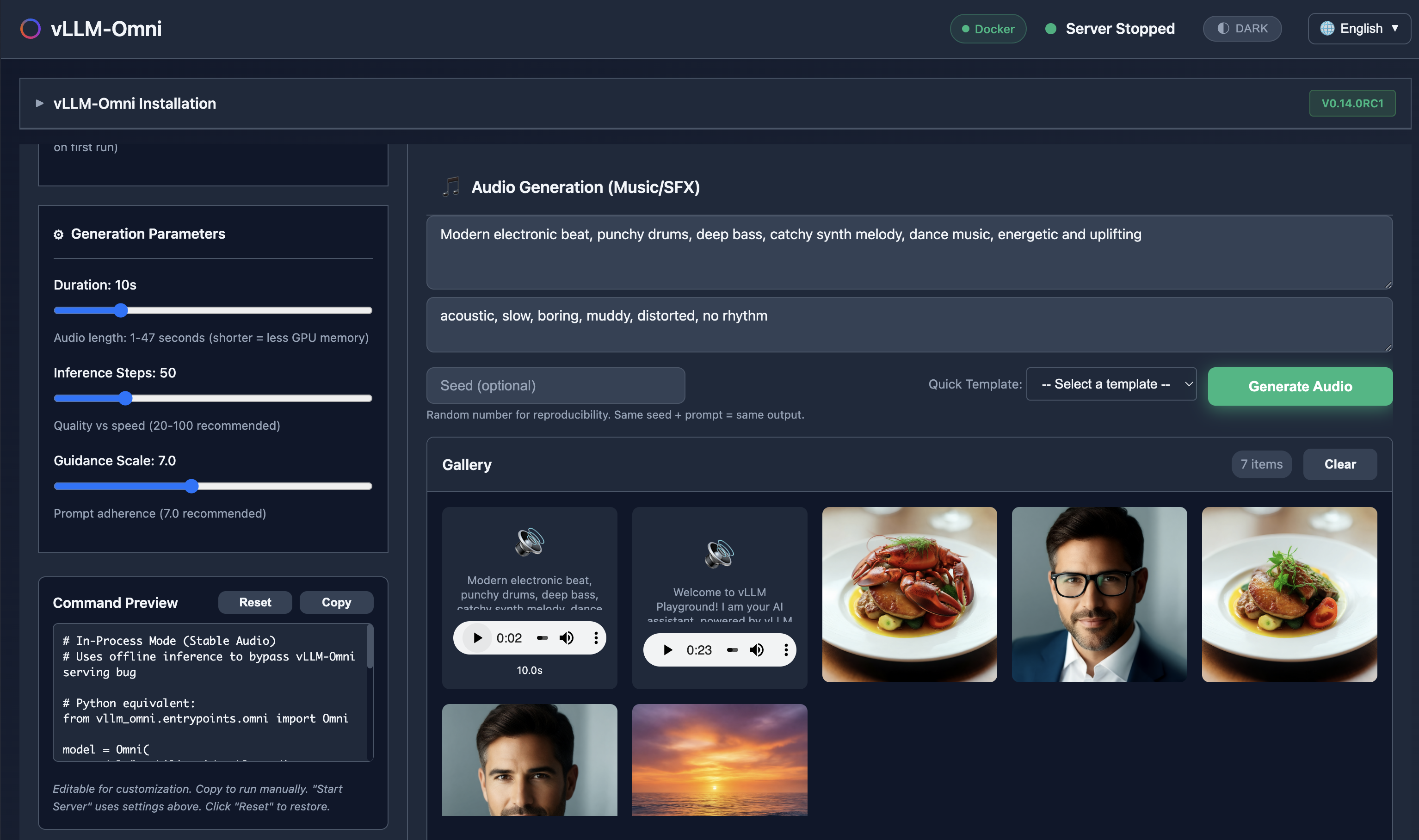
Generate images, edit photos, create speech, and produce music - all with vLLM-Omni integration.
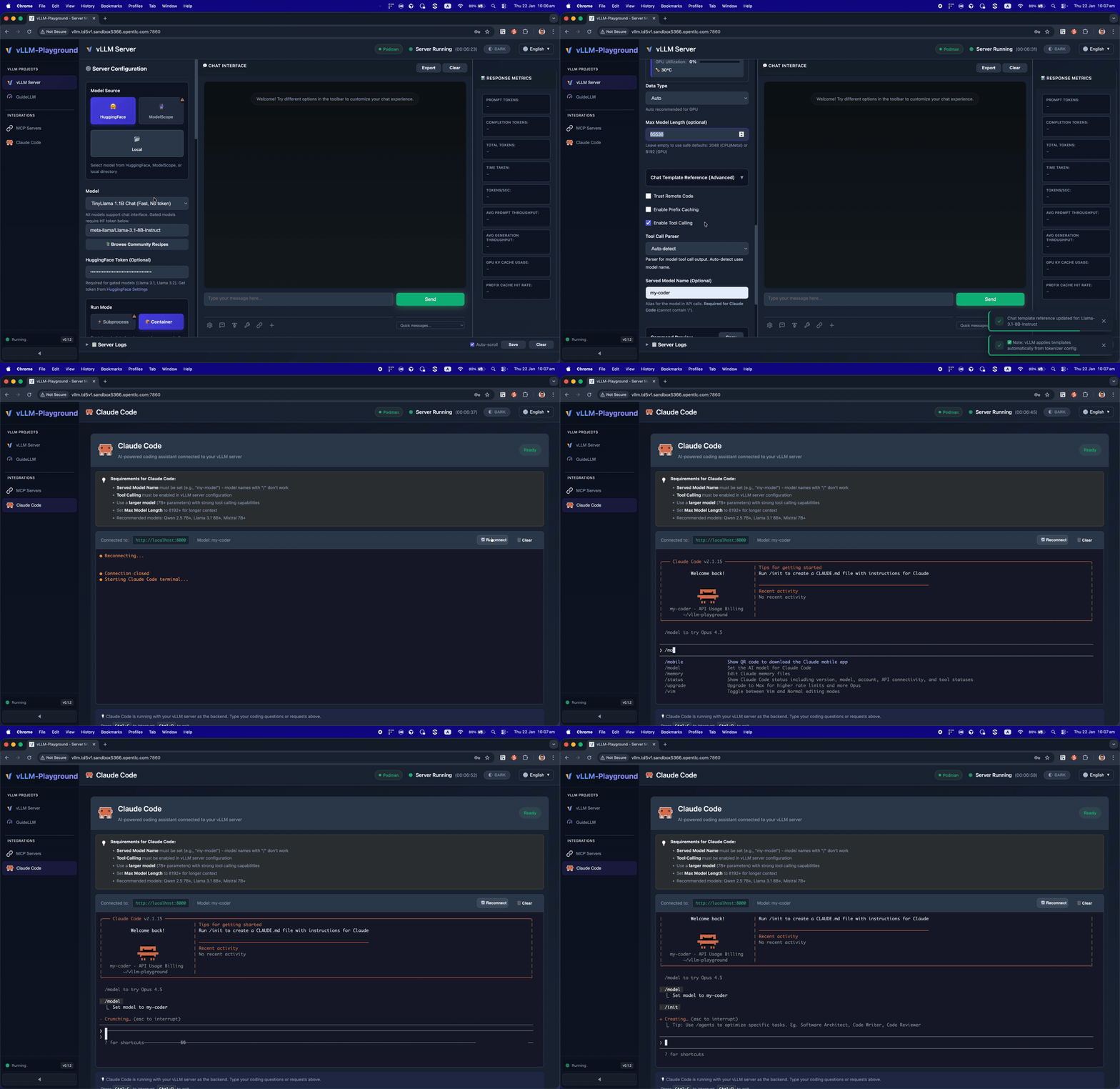
Run Claude Code with open-source models served by vLLM - your private, local coding assistant.
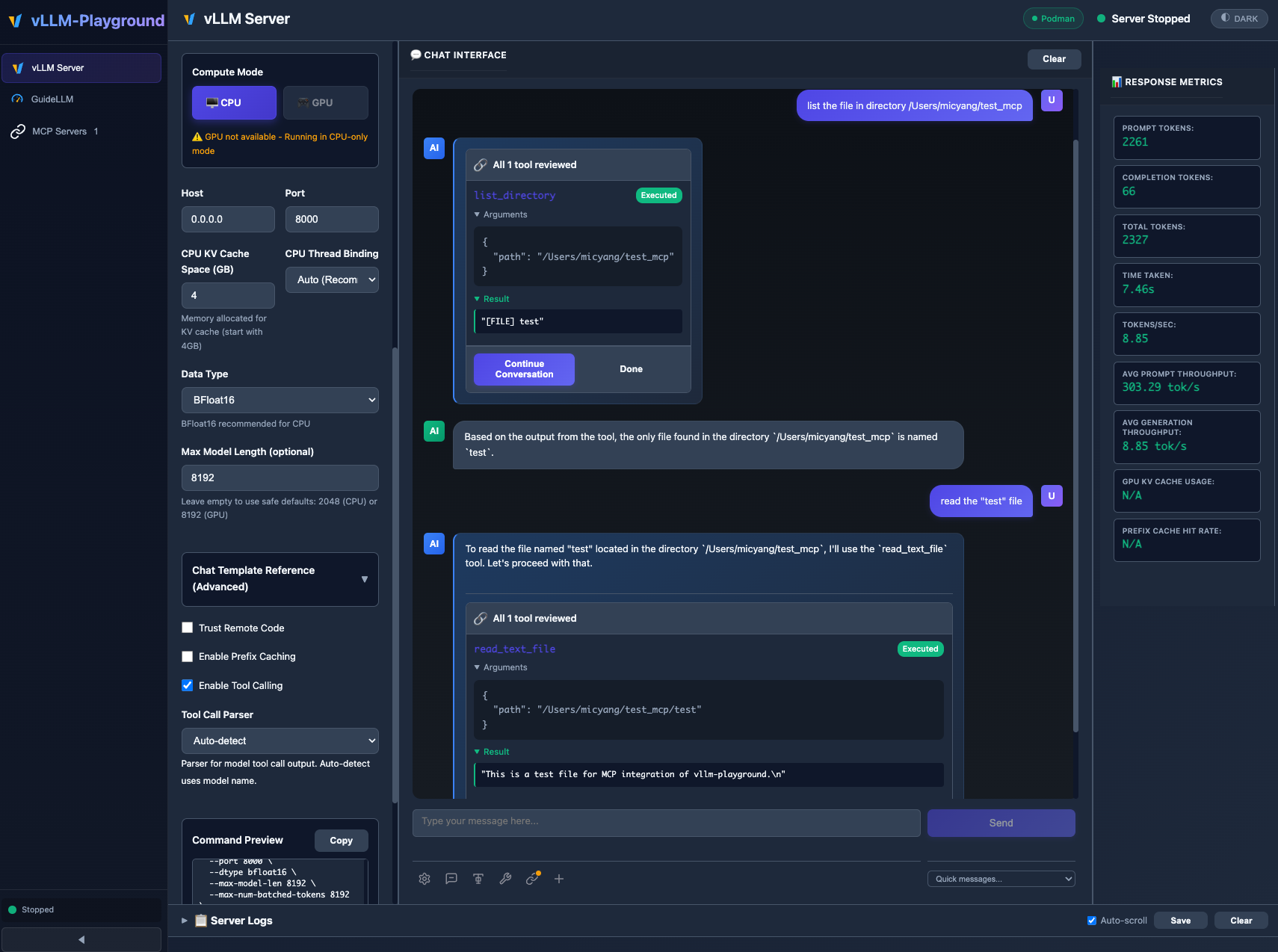
MCP (Model Context Protocol) integration enables models to use external tools with human-in-the-loop approval.
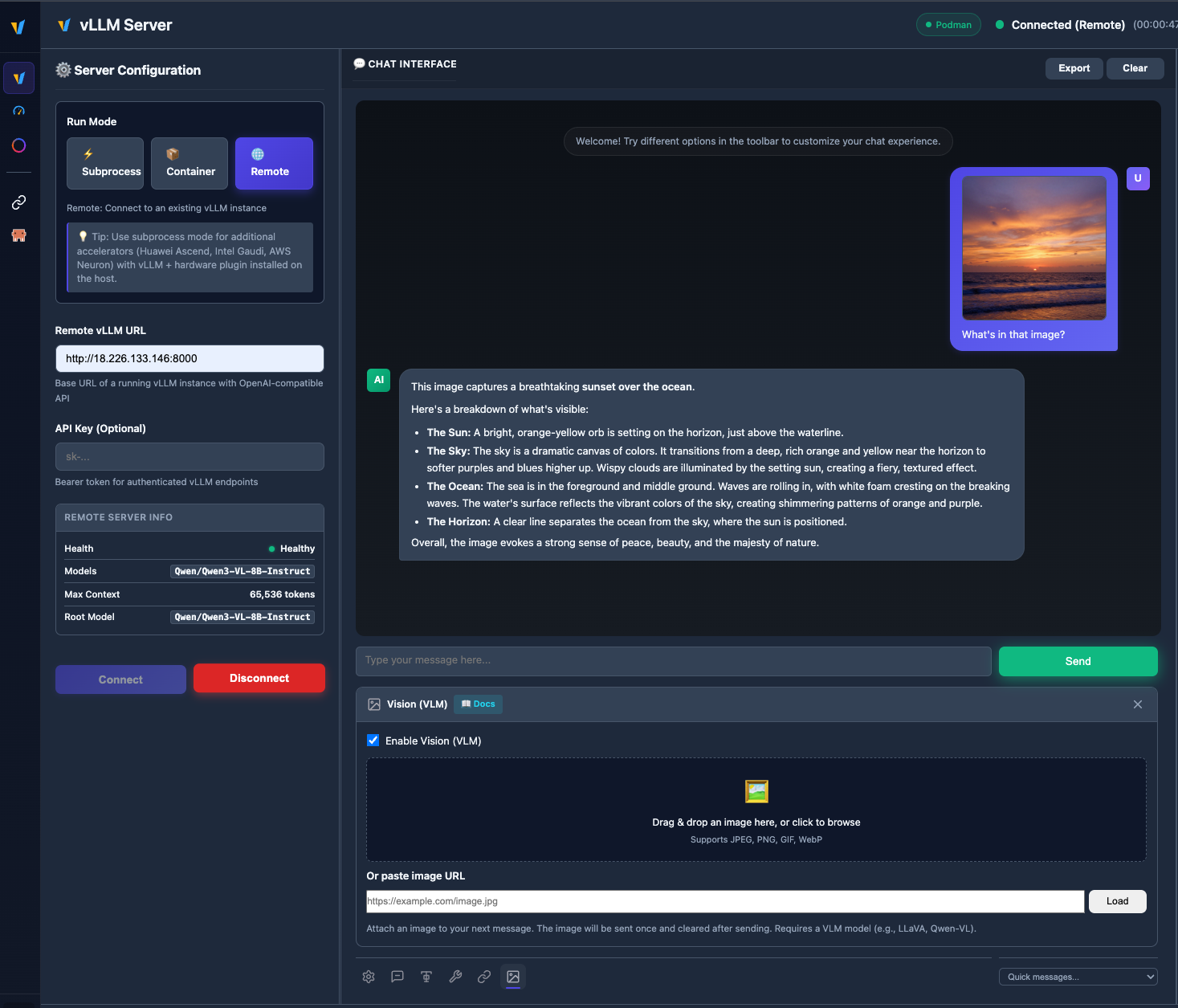
Upload images and chat with vision models like Qwen2.5-VL, LLaVA, and more.
Run subprocess, container, and remote vLLM servers side by side; switch tabs, save configs, and manage everything from Management → Instances. See Multi-Instance Guide for details.
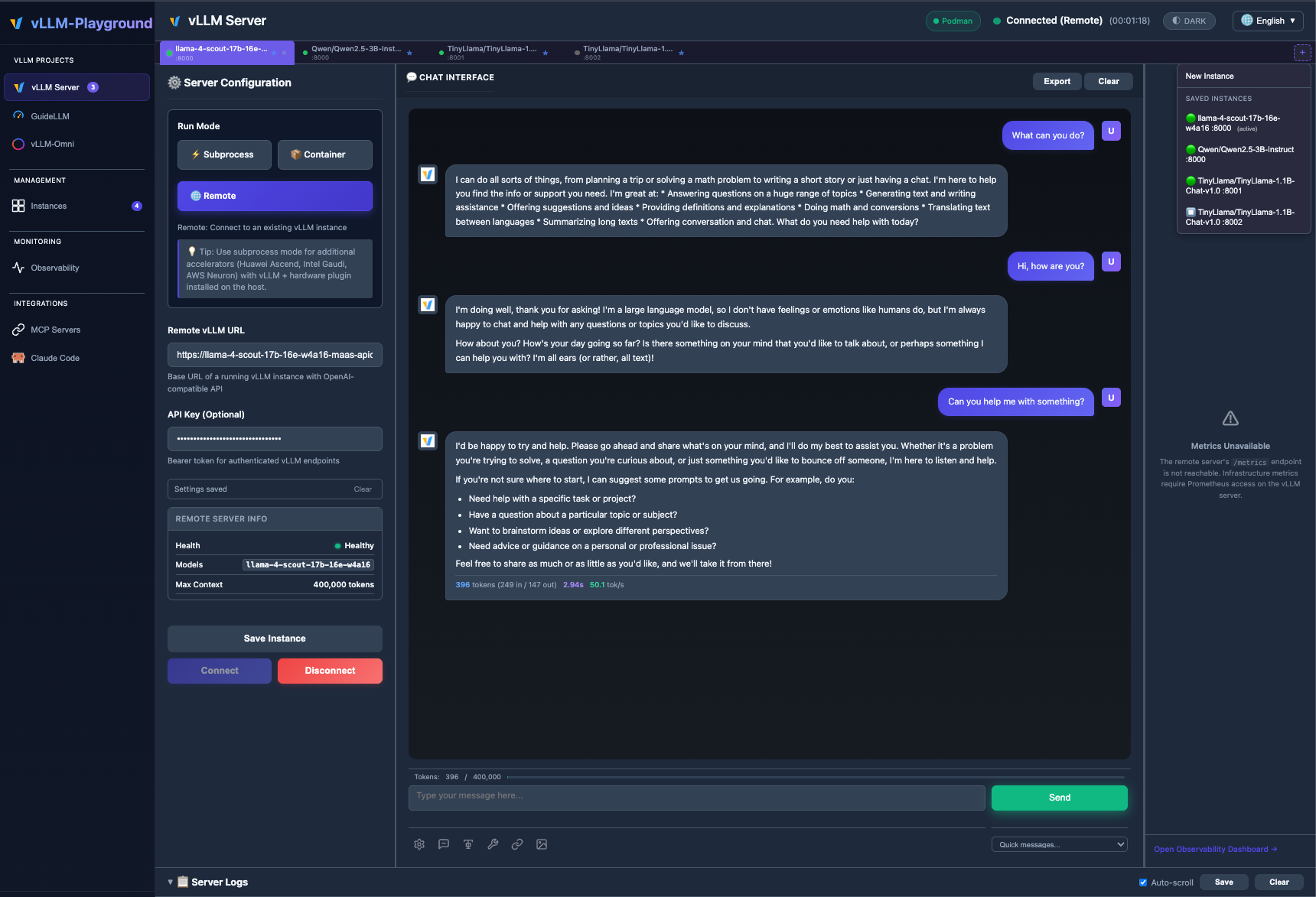
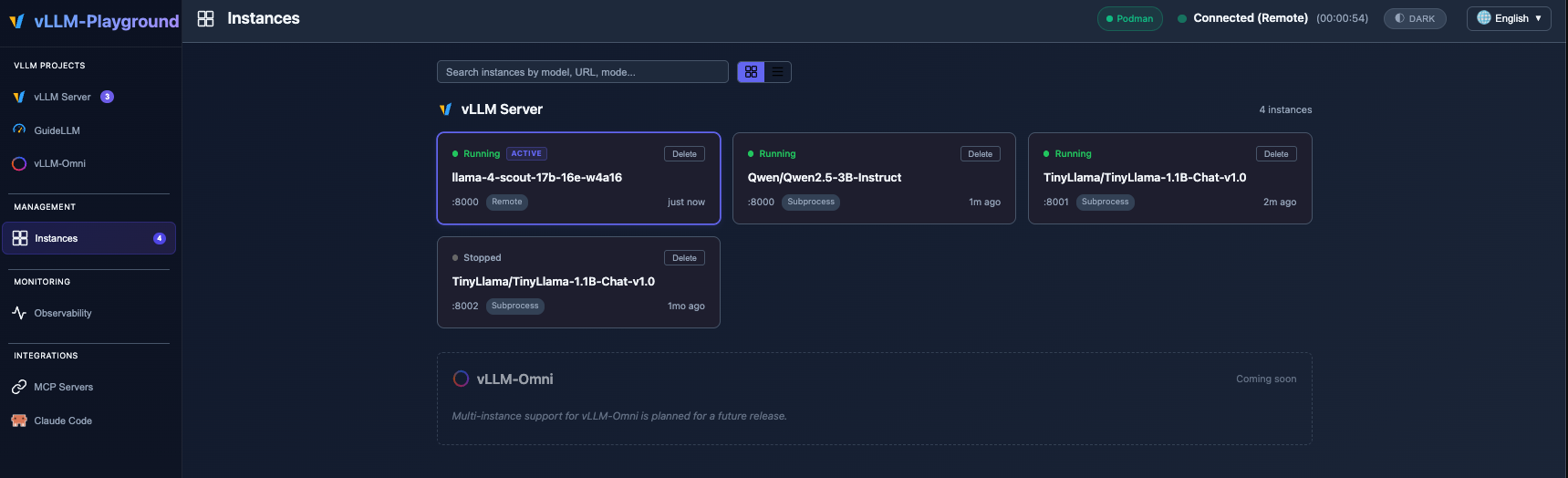
/v1/models for the chat model list, better context limits from gateway metadata.v0.1.6 introduced the Observability Dashboard, PagedAttention visualizer, token counter, logprobs, and speculative decoding — see Changelog and v0.1.6 for details.
# Install from PyPI
pip install vllm-playground

# Pre-download container image (~10GB for GPU)
vllm-playground pull

# Start the playground
vllm-playground
Open http://localhost:7860 and click "Start Server" - that's it! 🎉
vllm-playground pull                # Pre-download GPU image (NVIDIA)
vllm-playground pull --nvidia       # Pre-download NVIDIA GPU image
vllm-playground pull --amd          # Pre-download AMD ROCm image
vllm-playground pull --tpu          # Pre-download Google TPU image
vllm-playground pull --cpu          # Pre-download CPU image
vllm-playground pull --all          # Pre-download all images
vllm-playground --port 8080         # Custom port
vllm-playground stop                # Stop running instance
vllm-playground status              # Check status
| Feature | Description |
|---|---|
| 🌐 Remote Server | Connect to any remote vLLM instance via URL + API key |
| 🧩 Multi-instance | Several backends at once (subprocess, container, remote); tabs + Instances page |
| 🖼️ VLM Support | Upload images and chat with vision models (Qwen2.5-VL, LLaVA) |
| 🤖 Claude Code | Use open-source models as Claude Code backend via vLLM |
| 💬 Modern Chat UI | Markdown-rendered chat with streaming responses |
| 🔧 Tool Calling | Function calling with Llama, Mistral, Qwen, and more |
| 🔗 MCP Integration | Connect to MCP servers for agentic capabilities |
| 🏗️ Structured Outputs | Constrain responses to JSON Schema, Regex, or Grammar |
| 🐳 Container Mode | Zero-setup vLLM via automatic container management |
| ☸️ OpenShift/K8s | Enterprise deployment with dynamic pod creation |
| 📊 Benchmarking | GuideLLM integration for load testing |
| 📚 Recipes | One-click configs from vLLM community recipes |
| Method | Command | Best For |
|---|---|---|
| PyPI | pip install vllm-playground | Most users |
| With Benchmarking | pip install vllm-playground[benchmark] | Load testing |
| From Source | git clone + python run.py | Development |
| OpenShift/K8s | ./openshift/deploy.sh | Enterprise |
📖 See Installation Guide for detailed instructions.
Enable in Server Configuration before starting:
Supported Models:
llama3_json)mistral)hermes)hermes)Use vLLM to serve open-source models as a backend for Claude Code:
Requirements:
Recommended Model for most GPUs:
meta-llama/Llama-3.1-8B-Instruct
--max-model-len 65536 --enable-auto-tool-choice --tool-call-parser llama3_json
Note: This integration demonstrates using vLLM as a backend for Claude Code. Claude Code is a separate product by Anthropic - users must install it independently and comply with Anthropic's Commercial Terms of Service. vLLM Playground provides the terminal interface only.
Connect to external tools via Model Context Protocol:
⚠️ MCP requires Python 3.10+
Edit config/vllm_cpu.env:
export VLLM_CPU_KVCACHE_SPACE=40
export VLLM_CPU_OMP_THREADS_BIND=auto
vLLM Playground supports Apple Silicon GPU acceleration:
~/.venv-vllm-metal (or your installation path)See macOS Metal Guide for details.
Use specific vLLM versions or custom builds:
/path/to/your/venvSee Custom venv Guide for details.
┌──────────────────┐
│   User Browser   │
└────────┬─────────┘
         │ http://localhost:7860
         ↓
┌──────────────────┐
│   Web UI (Host)  │  ← FastAPI + JavaScript
└────────┬─────────┘
         │
    ┌────┴────┐
    ↓         ↓
┌───────-─┐ ┌────────┐
│ vLLM    │ │  MCP   │  ← Containers / External Servers
│Container│ │Servers │
└────────-┘ └────────┘
📖 See Architecture Overview for details.
| Issue | Solution |
|---|---|
| Port in use | vllm-playground stop |
| Container won't start | podman logs vllm-service |
| Tool calling fails | Restart with "Enable Tool Calling" checked |
| Image pull errors | vllm-playground pull --all |
📖 See Troubleshooting Guide for more.
Apache 2.0 License - See LICENSE file for details.
Contributions welcome! Please see CONTRIBUTING.md for setup instructions and guidelines.
Made with ❤️ for the vLLM community
Selected from shared topics, language and repository description—not editorial ratings.
visheratin /
Run modern deep learning models in the browser.
32/100 healthsanusanth /
What is C#? C# is pronounced "C-Sharp". It is an object-oriented programming language created by Microsoft that runs on the .NET Framework. C# has roots from the C family, and the language is close to other popular languages like C++ and Java. The first version was released in year 2002. The latest version, C# 8, was released in September 2019. C# is a modern object-oriented programming language developed in 2000 by Anders Hejlsberg, the principal designer and lead architect at Microsoft. It is pronounced as "C-Sharp," inspired by the musical notation “♯” which stands for a note with a slightly higher pitch. As it’s considered an incremental compilation of the C++ language, the name C “sharp” seemed most appropriate. The sharp symbol, however, has been replaced by the keyboard friendly “#” as a suffix to “C” for purposes of programming. Although the code is very similar to C++, C# is newer and has grown fast with extensive support from Microsoft. The fact that it’s so similar to Java syntactically helps explain why it has emerged as one of the most popular programming languages today. C# is pronounced "C-Sharp". It is an object-oriented programming language created by Microsoft that runs on the .NET Framework. C# has roots from the C family, and the language is close to other popular languages like C++ and Java. The first version was released in year 2002. The latest version, C# 8, was released in September 2019. C# is used for: Mobile applications Desktop applications Web applications Web services Web sites Games VR Database applications And much, much more! An Introduction to C# Programming C# is a general-purpose, object-oriented programming language that is structured and easy to learn. It runs on Microsoft’s .Net Framework and can be compiled on a variety of computer platforms. As the syntax is simple and easy to learn, developers familiar with C, C++, or Java have found a comfort zone within C#. C# is a boon for developers who want to build a wide range of applications on the .NET Framework—Windows applications, Web applications, and Web services—in addition to building mobile apps, Windows Store apps, and enterprise software. It is thus considered a powerful programming language and features in every developer’s cache of tools. Although first released in 2002, when it was introduced with .NET Framework 1.0, the C# language has evolved a great deal since then. The most recent version is C# 8.0, available in preview as part of Visual Studio. To get access to all of the new language features, you would need to install the latest preview version of .NET Core 3.0. C# is used for: Mobile applications Desktop applications Web applications Web services Web sites Games VR Database applications And much, much more! Why Use C#? It is one of the most popular programming language in the world It is easy to learn and simple to use It has a huge community support C# is an object oriented language which gives a clear structure to programs and allows code to be reused, lowering development costs. As C# is close to C, C++ and Java, it makes it easy for programmers to switch to C# or vice versa. The C# Environment You need the .NET Framework and an IDE (integrated development environment) to work with the C# language. The .NET Framework The .NET Framework platform of the Windows OS is required to write web and desktop-based applications using not only C# but also Visual Basic and Jscript, as the platform provides language interoperability. Besides, the .Net Framework allows C# to communicate with any of the other common languages, such as C++, Jscript, COBOL, and so on. IDEs Microsoft provides various IDEs for C# programming: Visual Studio 2010 (VS) Visual Studio Express Visual Web Developer Visual Studio Code (VSC) The C# source code files can be written using a basic text editor, like Notepad, and compiled using the command-line compiler of the .NET Framework. Alternative open-source versions of the .Net Framework can work on other operating systems as well. For instance, the Mono has a C# compiler and runs on several operating systems, including Linux, Mac, Android, BSD, iOS, Windows, Solaris, and UNIX. This brings enhanced development tools to the developer. As C# is part of the .Net Framework platform, it has access to its enormous library of codes and components, such as Common Language Runtime (CLR), the .Net Framework Class Library, Common Language Specification, Common Type System, Metadata and Assemblies, Windows Forms, ASP.Net and ASP.Net AJAX, Windows Workflow Foundation (WF), Windows Communication Foundation (WCF), and LINQ. C# and Java C# and Java are high-level programming languages that share several similarities (as well as many differences). They are both object-oriented languages much influenced by C++. But while C# is suitable for application development in the Microsoft ecosystem from the front, Java is considered best for client-side web applications. Also, while C# has many tools for programming, Java has a larger arsenal of tools to choose from in IDEs and Text Editors. C# is used for virtual reality projects like games, mobile, and web applications. It is built specifically for Microsoft platforms and several non-Microsoft-based operating systems, like the Mono Project that works with Linux and OS X. Java is used for creating messaging applications and developing web-based and enterprise-based applications in open-source ecosystems. Both C# and Java support arrays. However, each language uses them differently. In C#, arrays are a specialization of the system; in Java, they are a direct specialization of the object. The C# programming language executes on the CLR. The source code is interpreted into bytecode, which is further compiled by the CLR. Java runs on any platform with the assistance of JRE (Java Runtime Environment). The written source code is first compiled into bytecode and then converted into machine code to be executed on a JRE. C# and C++ Although C# and C++ are both C-based languages with similar code, there are some differences. For one, C# is considered a component-oriented programming language, while C++ is a partial object-oriented language. Also, while both languages are compiled languages, C# compiles to CLR and is interpreted by.NET, but C++ compiles to machine code. The size of binaries in C# is much larger than in C++. Other differences between the two include the following: C# gives compiler errors and warnings, but C++ doesn’t support warnings, which may cause damage to the OS. C# runs in a virtual machine for automatic memory management. C++ requires you to manage memory manually. C# can create Windows, .NET, web, desktop, and mobile applications, but not stand-alone apps. C++ can create server-side, stand-alone, and console applications as it can work directly with the hardware. C++ can be used on any platform, while C# is targeted toward Windows OS. Generally, C++ being faster than C#, the former is preferred for applications where performance is essential. Features of C# The C# programming language has many features that make it more useful and unique when compared to other languages, including: Object-oriented language Being object-oriented, C# allows the creation of modular applications and reusable codes, an advantage over C++. As an object-oriented language, C# makes development and maintenance easier when project size grows. It supports all three object-oriented features: data encapsulation, inheritance, interfaces, and polymorphism. Simplicity C# is a simple language with a structured approach to problem-solving. Unsafe operations, like direct memory manipulation, are not allowed. Speed The compilation and execution time in C# is very powerful and fast. A Modern programming language C# programming is used for building scalable and interoperable applications with support for modern features like automatic garbage collection, error handling, debugging, and robust security. It has built-in support for a web service to be invoked from any app running on any platform. Type-safe Arrays and objects are zero base indexed and bound checked. There is an automatic checking of the overflow of types. The C# type safety instances support robust programming. Interoperability Language interoperability of C# maximizes code reuse for the efficiency of the development process. C# programs can work upon almost anything as a program can call out any native API. Consistency Its unified type system enables developers to extend the type system simply and easily for consistent behavior. Updateable C# is automatically updateable. Its versioning support enables complex frameworks to be developed and evolved. Component oriented C# supports component-oriented programming through the concepts of properties, methods, events, and attributes for self-contained and self-describing components of functionality for robust and scalable applications. Structured Programming Language The structured design and modularization in C# break a problem into parts, using functions for easy implementation to solve significant problems. Rich Library C# has a standard library with many inbuilt functions for easy and fast development. Prerequisites for Learning C# Basic knowledge of C or C++ or any programming language or programming fundamentals. Additionally, the OOP concept makes for a short learning curve of C#. Advantages of C# There are many advantages to the C# language that makes it a useful programming language compared to other languages like Java, C, or C++. These include: Being an object-oriented language, C# allows you to create modular, maintainable applications and reusable codes Familiar syntax Easy to develop as it has a rich class of libraries for smooth implementation of functions Enhanced integration as an application written in .NET will integrate and interpret better when compared to other NET technologies As C# runs on CLR, it makes it easy to integrate with components written in other languages It’s safe, with no data loss as there is no type-conversion so that you can write secure codes The automatic garbage collection keeps the system clean and doesn’t hang it during execution As your machine has to install the .NET Framework to run C#, it supports cross-platform Strong memory backup prevents memory leakage Programming support of the Microsoft ecosystem makes development easy and seamless Low maintenance cost, as C# can develop iOS, Android, and Windows Phone native apps The syntax is similar to C, C++, and Java, which makes it easier to learn and work with C# Useful as it can develop iOS, Android, and Windows Phone native apps with the Xamarin Framework C# is the most powerful programming language for the .NET Framework Fast development as C# is open source steered by Microsoft with access to open source projects and tools on Github, and many active communities contributing to the improvement What Can C Sharp Do for You? C# can be used to develop a wide range of: Windows client applications Windows libraries and components Windows services Web applications Native iOS and Android mobile apps Azure cloud applications and services Gaming consoles and gaming systems Video and virtual reality games Interoperability software like SharePoint Enterprise software Backend services and database programs AI and ML applications Distributed applications Hardware-level programming Virus and malware software GUI-based applications IoT devices Blockchain and distributed ledger technology C# Programming for Beginners: Introduction, Features and Applications By Simplilearn Last updated on Jan 20, 2020674 C# Programming for Beginners As a programmer, you’re motivated to master the most popular languages that will give you an edge in your career. There’s a vast number of programming languages that you can learn, but how do you know which is the most useful? If you know C and C++, do you need to learn C# as well? How similar is C# to Java? Does it become more comfortable for you to learn C# if you already know Java? Every developer and wannabe programmer asks these types of questions. So let us explore C# programming: how it evolved as an extension of C and why you need to learn it as a part of the Master’s Program in integrated DevOps for server-side execution. Are you a web developer or someone interested to build a website? Enroll for the Javascript Certification Training. Check out the course preview now! What is C#? C# is a modern object-oriented programming language developed in 2000 by Anders Hejlsberg, the principal designer and lead architect at Microsoft. It is pronounced as "C-Sharp," inspired by the musical notation “♯” which stands for a note with a slightly higher pitch. As it’s considered an incremental compilation of the C++ language, the name C “sharp” seemed most appropriate. The sharp symbol, however, has been replaced by the keyboard friendly “#” as a suffix to “C” for purposes of programming. Although the code is very similar to C++, C# is newer and has grown fast with extensive support from Microsoft. The fact that it’s so similar to Java syntactically helps explain why it has emerged as one of the most popular programming languages today. An Introduction to C# Programming C# is a general-purpose, object-oriented programming language that is structured and easy to learn. It runs on Microsoft’s .Net Framework and can be compiled on a variety of computer platforms. As the syntax is simple and easy to learn, developers familiar with C, C++, or Java have found a comfort zone within C#. C# is a boon for developers who want to build a wide range of applications on the .NET Framework—Windows applications, Web applications, and Web services—in addition to building mobile apps, Windows Store apps, and enterprise software. It is thus considered a powerful programming language and features in every developer’s cache of tools. Although first released in 2002, when it was introduced with .NET Framework 1.0, the C# language has evolved a great deal since then. The most recent version is C# 8.0, available in preview as part of Visual Studio. To get access to all of the new language features, you would need to install the latest preview version of .NET Core 3.0. The C# Environment You need the .NET Framework and an IDE (integrated development environment) to work with the C# language. The .NET Framework The .NET Framework platform of the Windows OS is required to write web and desktop-based applications using not only C# but also Visual Basic and Jscript, as the platform provides language interoperability. Besides, the .Net Framework allows C# to communicate with any of the other common languages, such as C++, Jscript, COBOL, and so on. IDEs Microsoft provides various IDEs for C# programming: Visual Studio 2010 (VS) Visual Studio Express Visual Web Developer Visual Studio Code (VSC) The C# source code files can be written using a basic text editor, like Notepad, and compiled using the command-line compiler of the .NET Framework. Alternative open-source versions of the .Net Framework can work on other operating systems as well. For instance, the Mono has a C# compiler and runs on several operating systems, including Linux, Mac, Android, BSD, iOS, Windows, Solaris, and UNIX. This brings enhanced development tools to the developer. As C# is part of the .Net Framework platform, it has access to its enormous library of codes and components, such as Common Language Runtime (CLR), the .Net Framework Class Library, Common Language Specification, Common Type System, Metadata and Assemblies, Windows Forms, ASP.Net and ASP.Net AJAX, Windows Workflow Foundation (WF), Windows Communication Foundation (WCF), and LINQ. C# and Java C# and Java are high-level programming languages that share several similarities (as well as many differences). They are both object-oriented languages much influenced by C++. But while C# is suitable for application development in the Microsoft ecosystem from the front, Java is considered best for client-side web applications. Also, while C# has many tools for programming, Java has a larger arsenal of tools to choose from in IDEs and Text Editors. C# is used for virtual reality projects like games, mobile, and web applications. It is built specifically for Microsoft platforms and several non-Microsoft-based operating systems, like the Mono Project that works with Linux and OS X. Java is used for creating messaging applications and developing web-based and enterprise-based applications in open-source ecosystems. Both C# and Java support arrays. However, each language uses them differently. In C#, arrays are a specialization of the system; in Java, they are a direct specialization of the object. The C# programming language executes on the CLR. The source code is interpreted into bytecode, which is further compiled by the CLR. Java runs on any platform with the assistance of JRE (Java Runtime Environment). The written source code is first compiled into bytecode and then converted into machine code to be executed on a JRE. C# and C++ Although C# and C++ are both C-based languages with similar code, there are some differences. For one, C# is considered a component-oriented programming language, while C++ is a partial object-oriented language. Also, while both languages are compiled languages, C# compiles to CLR and is interpreted by.NET, but C++ compiles to machine code. The size of binaries in C# is much larger than in C++. Other differences between the two include the following: C# gives compiler errors and warnings, but C++ doesn’t support warnings, which may cause damage to the OS. C# runs in a virtual machine for automatic memory management. C++ requires you to manage memory manually. C# can create Windows, .NET, web, desktop, and mobile applications, but not stand-alone apps. C++ can create server-side, stand-alone, and console applications as it can work directly with the hardware. C++ can be used on any platform, while C# is targeted toward Windows OS. Generally, C++ being faster than C#, the former is preferred for applications where performance is essential. Features of C# The C# programming language has many features that make it more useful and unique when compared to other languages, including: Object-oriented language Being object-oriented, C# allows the creation of modular applications and reusable codes, an advantage over C++. As an object-oriented language, C# makes development and maintenance easier when project size grows. It supports all three object-oriented features: data encapsulation, inheritance, interfaces, and polymorphism. Simplicity C# is a simple language with a structured approach to problem-solving. Unsafe operations, like direct memory manipulation, are not allowed. Speed The compilation and execution time in C# is very powerful and fast. A Modern programming language C# programming is used for building scalable and interoperable applications with support for modern features like automatic garbage collection, error handling, debugging, and robust security. It has built-in support for a web service to be invoked from any app running on any platform. Type-safe Arrays and objects are zero base indexed and bound checked. There is an automatic checking of the overflow of types. The C# type safety instances support robust programming. Interoperability Language interoperability of C# maximizes code reuse for the efficiency of the development process. C# programs can work upon almost anything as a program can call out any native API. Consistency Its unified type system enables developers to extend the type system simply and easily for consistent behavior. Updateable C# is automatically updateable. Its versioning support enables complex frameworks to be developed and evolved. Component oriented C# supports component-oriented programming through the concepts of properties, methods, events, and attributes for self-contained and self-describing components of functionality for robust and scalable applications. Structured Programming Language The structured design and modularization in C# break a problem into parts, using functions for easy implementation to solve significant problems. Rich Library C# has a standard library with many inbuilt functions for easy and fast development. Full Stack Java Developer Course The Gateway to Master Web DevelopmentEXPLORE COURSEFull Stack Java Developer Course Prerequisites for Learning C# Basic knowledge of C or C++ or any programming language or programming fundamentals. Additionally, the OOP concept makes for a short learning curve of C#. Advantages of C# There are many advantages to the C# language that makes it a useful programming language compared to other languages like Java, C, or C++. These include: Being an object-oriented language, C# allows you to create modular, maintainable applications and reusable codes Familiar syntax Easy to develop as it has a rich class of libraries for smooth implementation of functions Enhanced integration as an application written in .NET will integrate and interpret better when compared to other NET technologies As C# runs on CLR, it makes it easy to integrate with components written in other languages It’s safe, with no data loss as there is no type-conversion so that you can write secure codes The automatic garbage collection keeps the system clean and doesn’t hang it during execution As your machine has to install the .NET Framework to run C#, it supports cross-platform Strong memory backup prevents memory leakage Programming support of the Microsoft ecosystem makes development easy and seamless Low maintenance cost, as C# can develop iOS, Android, and Windows Phone native apps The syntax is similar to C, C++, and Java, which makes it easier to learn and work with C# Useful as it can develop iOS, Android, and Windows Phone native apps with the Xamarin Framework C# is the most powerful programming language for the .NET Framework Fast development as C# is open source steered by Microsoft with access to open source projects and tools on Github, and many active communities contributing to the improvement What Can C Sharp Do for You? C# can be used to develop a wide range of: Windows client applications Windows libraries and components Windows services Web applications Native iOS and Android mobile apps Azure cloud applications and services Gaming consoles and gaming systems Video and virtual reality games Interoperability software like SharePoint Enterprise software Backend services and database programs AI and ML applications Distributed applications Hardware-level programming Virus and malware software GUI-based applications IoT devices Blockchain and distributed ledger technology Who Should Learn the C# Programming Language and Why? C# is one of the most popular programming languages as it can be used for a variety of applications: mobile apps, game development, and enterprise software. What’s more, the C# 8.0 version is packed with several new features and enhancements to the C# language that can change the way developers write their C# code. The most important new features available are ‘null reference types,’ enhanced ‘pattern matching,’ and ‘async streams’ that help you to write more reliable and readable code. As you’re exposed to the fundamental programming concepts of C# in this course, you can work on projects that open the doors for you as a Full Stack Java Developer. So, upskill and master the C# language for a faster career trajectory and salary scope.
KosimovM /
KosimovM is a personal developer profile and project space showcasing modern frontend and full-stack web development work. Focused on building AI-powered SaaS applications, interactive UI/UX designs, and scalable web solutions using JavaScript, TypeScript, and React ecosystem technologies. The repository reflects continuous learning, practical code
52/100 healthrimi-sudo434 /
CAD Copilot is an AI-powered chatbot web application built using Flask, Gemini 2.0 Flash, HTML, CSS, and JavaScript. The system provides intelligent real-time responses through modern AI integration and an interactive user-friendly interface. Developed as a smart assistant project for learning, innovation, and technical problem-solving.
72/100 healththeengineerashrafulbd /
Building modern web applications with HTML, CSS, JavaScript & React. Learning AI and open-source development.
59/100 healthpathskill24-design /
The frontend for SkillPath is a modern, responsive web application built with React and Vite. It provides an intuitive interface for users to define their learning goals, answer profiling questions, and view their personalized AI-generated learning roadmaps.
41/100 health