TinyTuya






Python module to interface with Tuya WiFi smart devices
Description
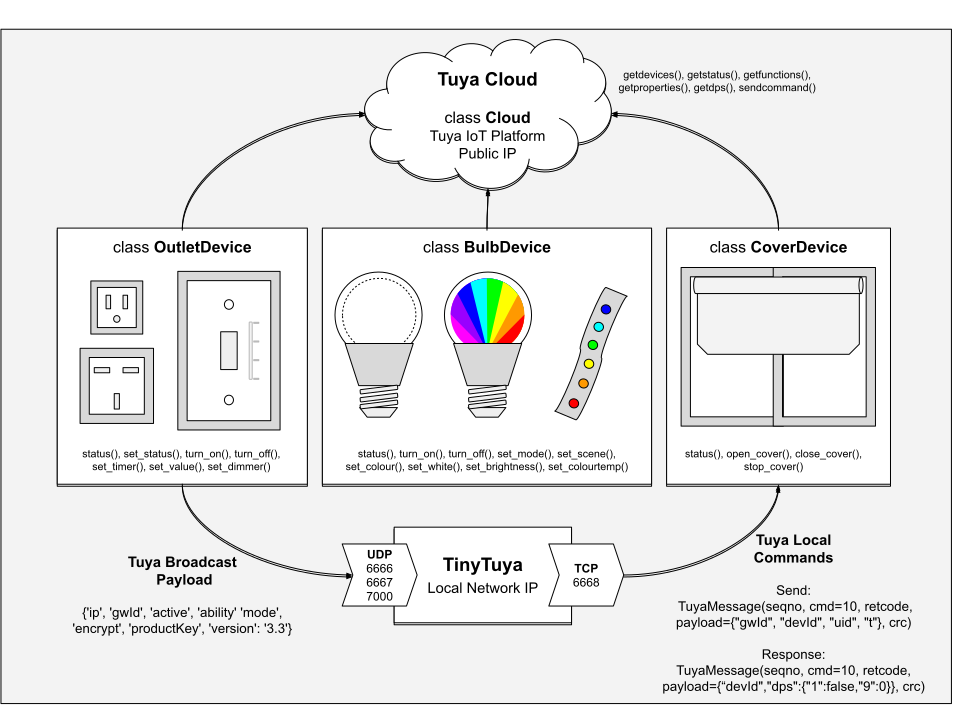
This python module controls and reads state of Tuya compatible WiFi Smart Devices (Plugs, Switches, Lights, Window Covers, etc.) using the local area network (LAN) or the cloud (TuyaCloud API). This is a compatible replacement for the pytuya PyPI module and currently supports Tuya Protocols 3.1, 3.2, 3.3, 3.4 and 3.5.
Tuya devices are designed to communicate with the TuyaCloud but most also expose a local area network API. This allows us to directly control the devices without using the cloud. This python module provides a way to poll status and issue commands to these devices.
TinyTuya can also connect to the Tuya Cloud to poll status and issue commands to Tuya devices.
# Example Usage of TinyTuya
import tinytuya

d = tinytuya.Device('DEVICE_ID_HERE', 'IP_ADDRESS_HERE', 'LOCAL_KEY_HERE', version=3.3)  # Set version to match your device (3.1, 3.2, 3.3, 3.4, or 3.5)
data = d.status()
print('Device status: %r' % data)
NOTE: Devices need to be activated by Smart Life App.
TinyTuya Installation
# Install TinyTuya Library
python -m pip install tinytuya

# Optional: Install Command Line Tool
pipx install tinytuya
Pip will attempt to install cryptography, requests and colorama if not already installed.
Alternate Install on Space- or Dependency-Limited Systems
On systems with limited space (such as an OpenWRT router), or if you would like to use a different cryptography library, you can install TinyTuya without automatic dependencies and manually install them yourself.
First, install a cryptography library. TinyTuya supports:
- cryptography - Newest, requires OpenSSL -
python -m pip install cryptography
- PyCryptodome - Another good alternative, does not require OpenSSL, still actively developed -
python -m pip install pycryptodome or python -m pip install pycryptodomex
- pyaes - Pure Python, but is abandoned and does not support v3.5+ devices -
python -m pip install pyaes
- PyCrypto - Predecessor to PyCryptodome, is also abandoned and does not support v3.5+ devices -
python -m pip install pycrypto
Optional: install colorama for terminal color support: python -m pip install colorama
Required for Wizard or Cloud functionality, Optional otherwise: install requests for Cloud functions to work: python -m pip install requests
Finally, install TinyTuya without dependencies: python -m pip install --no-deps tinytuya
Tuya Device Preparation
Controlling and monitoring Tuya devices on your network requires the following:
- Address - Network address (IPv4) of the device e.g. 10.0.1.100
- Device ID - Unique identifier for the Tuya device
- Version - Tuya protocol version used (3.1, 3.2, 3.3, 3.4 or 3.5)
- Local_Key - Security key needed to access the Tuya device. See Setup Wizard to get these keys.
Network Scanner
TinyTuya has a built in network scanner that can be used to find Tuya Devices on your local network. It will show Address, Device ID and Version for each device. Your LAN and firewall will need to allow UDP (6666, 6667 and 7000) and TCP (6668) traffic.
python -m tinytuya scan
Setup Wizard - Getting Local Keys
TinyTuya has a built-in setup Wizard that uses the Tuya IoT Cloud Platform to generate a JSON list (devices.json) of all your registered devices, including secret Local_Key and Name of your devices. Follow the steps below:
-
PAIR - Download the Smart Life App or Tuya Smart App, available for iPhone or Android. Set up your SmartLife account and pair all of your Tuya devices (this is important as you cannot access a device that has not been paired). Do not use a 'guest' account, otherwise it will get deleted without confirmation at step 3.
-
SCAN (Optional) - Run the TinyTuya scan to get a list of Tuya devices on your network. It will show device Address, Device ID and Version number (3.x):
python -m tinytuya scan
NOTE: You will need to use one of the displayed Device IDs for step 4.
-
TUYA ACCOUNT - Set up a Tuya Account (see PDF Instructions):
- NOTE: Tuya often changes their portal and services. Please open an issue with screenshots if we need to update these instructions.
- Create a Tuya Developer account on iot.tuya.com. When it asks for the "Account Type", select "Skip this step..." (see screenshot).
- Click on "Cloud" icon -> "Create Cloud Project"
- Pick the correct Data Center "Region" for your location (check HERE to find your Region). This will be used by TinyTuya Wizard (screenshot).
- Skip the configuration wizard but remember the Authorization Key: API ID and Secret for below (screenshot).
- Click on "Cloud" icon -> Select your project -> Devices -> Link Tuya App Account ()
Notes:
- If you ever reset or re-pair your smart devices, the Local_Key will be reset and you will need to repeat the steps above.
- The TinyTuya Wizard was inspired by the TuyAPI CLI which is an alternative way to fetch the Local_Keys:
npm i @tuyapi/cli -g and run tuya-cli wizard
Programming with TinyTuya
After importing tinytuya, you create a device handle for the device you want to read or control. Here is an example for a Tuya smart switch or plug:
import tinytuya

# Connect to Device
d = tinytuya.OutletDevice(
    dev_id='DEVICE_ID_HERE',
    address='IP_ADDRESS_HERE',      # Or set to 'Auto' to auto-discover IP address
    local_key='LOCAL_KEY_HERE',
    version=3.3)                    # Set to your device's actual version (3.1, 3.2, 3.3, 3.4, or 3.5)

# Get Status
data = d.status()
print('set_status() result %r' % data)

# Turn On
d.turn_on()

# Turn Off
d.turn_off()
TinyTuya Module Classes and Functions
Classes

  AESCipher - Cryptography Helpers
  XenonDevice(args...) - Base Class
    Device(args...) - Tuya Class for Devices
      OutletDevice(args...)
      CoverDevice(args...)
      BulbDevice(ar