Loading repository data…
initdebugs / repository
Beginner-Traffic-Light-Detection-OpenCV-YOLOv3
This is a python program using YOLO and OpenCV to detect traffic lights. Works in The Netherlands, possibly other countries
#beginner-code#computer-vision#computervision#dataset#object-detection#opencv-python
Live repository statistics
★ 38Stars
⑂ 7Forks
◯ 1Open issues
◉ 38Watchers
README preview
Traffic Light Detection For Beginners Using OpenCV And YOLOv3
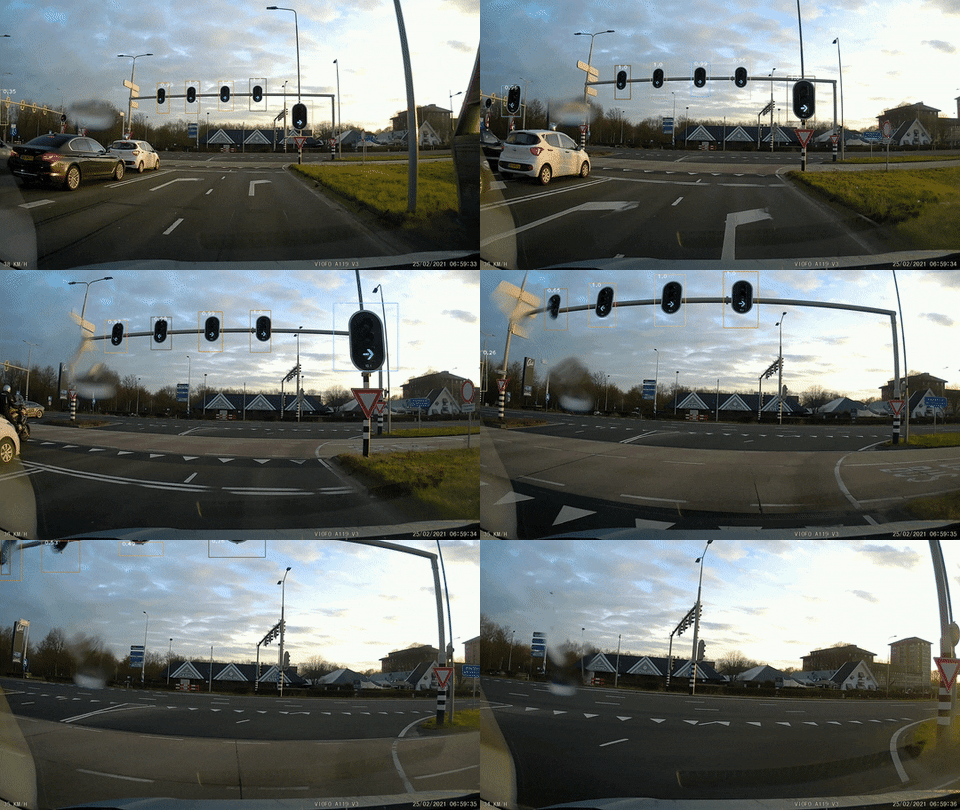
To start, I'm a complete beginner with Computer Vision and I made this project following multiple tutorials. I wanted to create a simple program that would take any input video (in my case, my dashcam footage) and detect/recognize the traffic lights in real-time. For some people, this would be an easy task and would build the program in hours, not me.
This version takes any footage (video) and checks frame-by-frame if there're any traffic lights. The program saves the video (with detected (or not) traffic lights) to another video. This works on (most) Dutch traffic lights, and some traffic lights from other countries that look like Dutch traffic lights. Why? Because I trained the model myself, using my own dashcam footage. There are hundreds of images containing traffic lights. I labeled them myself and trained them using the free GPU from Google Colab. This training process took around 3 days. The AVG loss is around: 0.11
Project Demo
Full Demo: Youtube
Instructions
- Install python (https://www.python.org/downloads/)
- Install pip (https://phoenixnap.com/kb/install-pip-windows)
- Download the code of this repository as .zip file (top of the page, green button 'Code')
- Extract the .zip file to any folder of your choosing
- Open a terminal (CMD, Powershell, ect.)
- Type the following command:
pip install opencv-python numpyand press 'enter' - Download the traffic light weights file from my Google Drive (Google Drive)
- Put the .weights file into the same folder as the rest of the files (DON'T rename any of the files, because then the code won't work)
- Put the video of your choosing (.mp4) into the same folder as the rest of the files
- Open the 'Object_Detection.py' file with any code editor of your choosing (I use Visual Studie Code)
- Look for line 7, where it says
cap = cv2.VideoCapture('test1'.mp4)and replace the 'test1.mp4' with your video name - Go to the folder with all the files and copy the file path
- Open your terminal again (CMD, Powershell, etc.) and enter the following:
cd path\of\your\filesand press 'enter' - To run the program, enter the following:
python Object_Detection.pyand press 'enter' - If all went well, you should now see your video being analyzed frame-by-frame. It takes a while (depending of the video size/quality) before it's done processing. If you want to exit the program while it's running, press
esc
I hope the instructions are clear and easy to follow. With every project, I will try to make the instructions as beginner-friendly as possible.
Future
I will keep updating the program, to make it as accurate as possible. I will keep creating additional images of traffic lights using my own dashcam so they can be trained as well. My goal is to have around 2500 hand-made, hand-labeled images of traffic lights in a lot of different lighting situations. This takes up a lot of time and I will be working on this (and other) projects for the upcoming months so it's as accurate and fast as possible.
Initdebug
My name is Lesley, and I'm 20 years old. My goal on Github is to help beginning programmers to learn programming by experimenting with my projects. I'm mainly focussing on Computer Vision projects at the moment and I'm training the programs myself, using my own images. The training costs a lot of time and energy, but I think it's worth it, for you! My projects are ready to use and the 'Readme' files contain clear instructions on how to use the code in the project. If you like what I'm doing, please consider 'Buying me a coffee', it would be massively appreciated (Buy me a coffee)