Loading repository data…
haidaraM / repository
ansible-playbook-grapher
A command line tool to create a graph representing your Ansible playbook tasks and roles
#ansible#ansible-playbook#ansible-role#grapher#graphviz#playbook
Live repository statistics
★ 754Stars
⑂ 56Forks
◯ 8Open issues
◉ 754Watchers
83/100
OPENREPOHUB HEALTH SIGNAL
Strong signals
A transparent discovery signal based on current public GitHub metadata.
Recent activity35% weight
100
Community adoption25% weight
54
Maintenance state20% weight
85
License clarity10% weight
100
Project information10% weight
75
This score does not audit code, security, maintainers, documentation quality, or suitability. Verify the repository and its current documentation before adoption.
README preview
Ansible Playbook Grapher




ansible-playbook-grapher is a command line tool to create a graph representing your Ansible playbooks, plays, tasks and roles. The aim of this project is to have an overview of your playbooks that you can use as documentation.
Inspired by Ansible Inventory Grapher.
Features
- Multiple rendering formats: graphviz, mermaid and JSON.
- Automatically find all your installed roles and collection.
- Native support for Ansible filters based on tags.
- Variables interpolation (when possible).
- Support for
import_*andinclude_*. - Multiple flags to hide empty plays, group roles by name, etc...
- Support for playbooks in collections.
- Collapsible play, role and block nodes in the SVG output with (
--collapsible-nodes).
The following features are available when opening the SVGs in a browser (recommended) or a viewer that supports JavaScript:
- Highlighting of all the related nodes of a given node when clicking or hovering. Example: Click on a role to select
all its tasks when
--include-role-tasksis set. - A double click on a node opens the corresponding file or folder depending on whether it's a playbook, a play, a task
or a role. By default, the browser will open folders and download files since it may not be able to render the YAML
file.
Optionally, you can set the open protocol to use VSCode with--open-protocol-handler vscode: it will open the folders when double-clicking on roles (notinclude_role) and the files for the other nodes. The cursor will be at the task exact position in the file.
Lastly, you can provide your own protocol formats with--open-protocol-handler custom --open-protocol-custom-formats '{}'. See the help and an example. To not confuse with Ansible Handlers. - Export the dot file used to generate the graph with Graphviz.
Prerequisites
- Python 3.10 at least. It might work with previous versions, but the code is NOT tested against them. See the support matrix and the matrix in the testing workflow.
- A virtual environment from which to run the grapher. This is highly recommended because the grapher depends on
some versions of ansible-core which are not necessarily installed in your environment and may cause issues if you use
some older versions of Ansible (
since
ansiblepackage has been split). - Graphviz: The tool used to generate the graph in SVG. Optional if you don't plan to use the
graphvizrenderer.sudo apt-get install graphviz # or yum install or brew install
I try to respect Red Hat Ansible Engine Life Cycle for the supported Ansible version.
Installation
Using uv (recommended)
uv tool install ansible-playbook-grapher
Using pip
pip install ansible-playbook-grapher
You can also install the unpublished version from GitHub directly. Examples:
# Using uv
uv tool install "ansible-playbook-grapher @ git+https://github.com/haidaraM/ansible-playbook-grapher"

# Using pip
pip install "ansible-playbook-grapher @ git+https://github.com/haidaraM/ansible-playbook-grapher"
Renderers
At the time of writing, two renderers are supported:
graphviz(default): Generate the graph in SVG. Has more features than the other renderers.mermaid-flowchart: Generate the graph in Mermaid format. You can directly embed the graph in your Markdown and GitHub ( and other integrations) will render it.json: Generate a JSON representation of the graph. The corresponding JSON schema is here. The JSON output will give you more flexibility to create your own renderer outside the grapher.
Comparison of the renderers:
graphviz (.svg) | mermaid-flowchart (.mmd) | json (.json) | |
|---|---|---|---|
| Click on nodes to open the files (open protocol handler) | ✅ | ❌ | ✅: the file location is in the output |
| Highlight on hover | ✅ | ❌ | ❌: NA |
| Change graph orientation | ❌ | ✅ | ❌: NA |
| Group roles by name | ✅ | ✅ | ✅: the roles with the same names will have the same IDs. |
| View the output file in your the OS default viewer | ✅ | ✅ on https://mermaid.live/ | ✅ |
| Tests of the output | Automatic | Manual (need a parser) | Automatic |
If you are interested to support more renderers, feel free to create an issue or raise a PR based on the existing renderers.
Usage
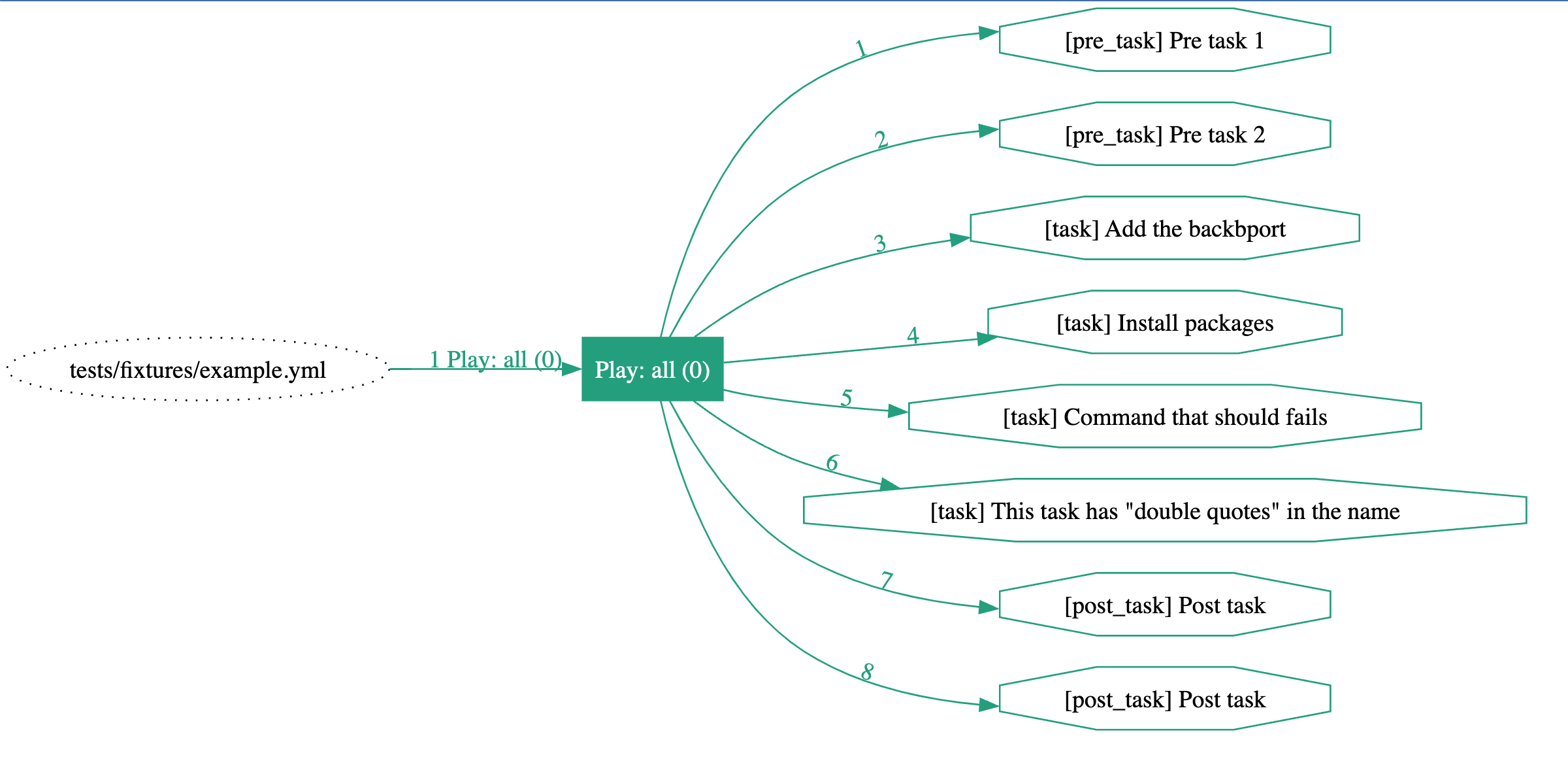
ansible-playbook-grapher tests/fixtures/example.yml
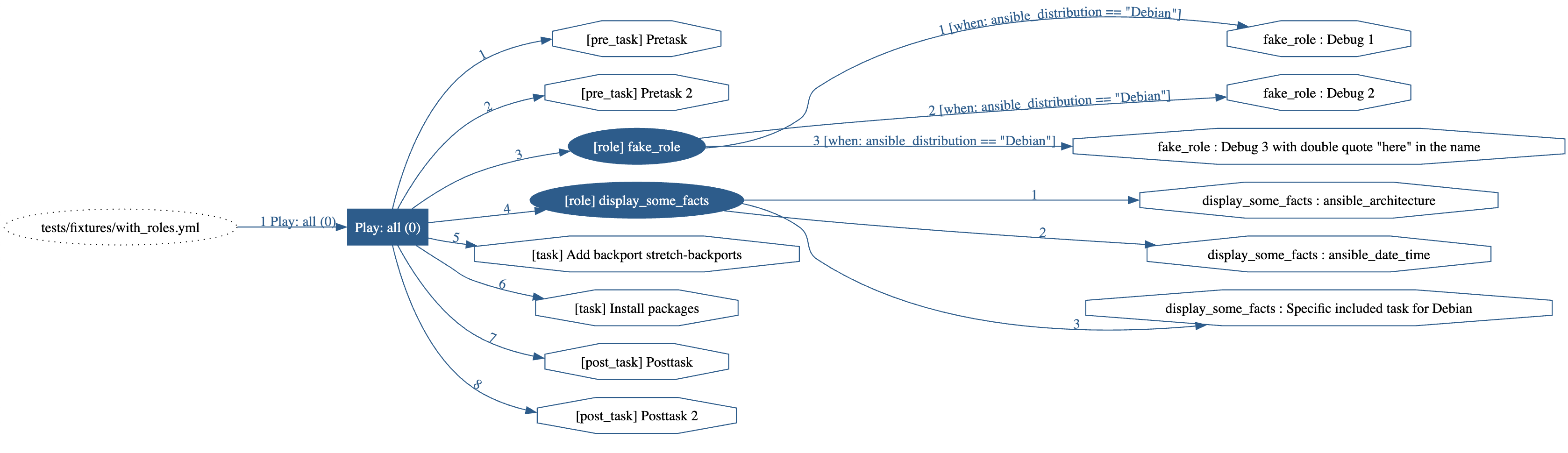
ansible-playbook-grapher --include-role-tasks tests/fixtures/with_roles.yml
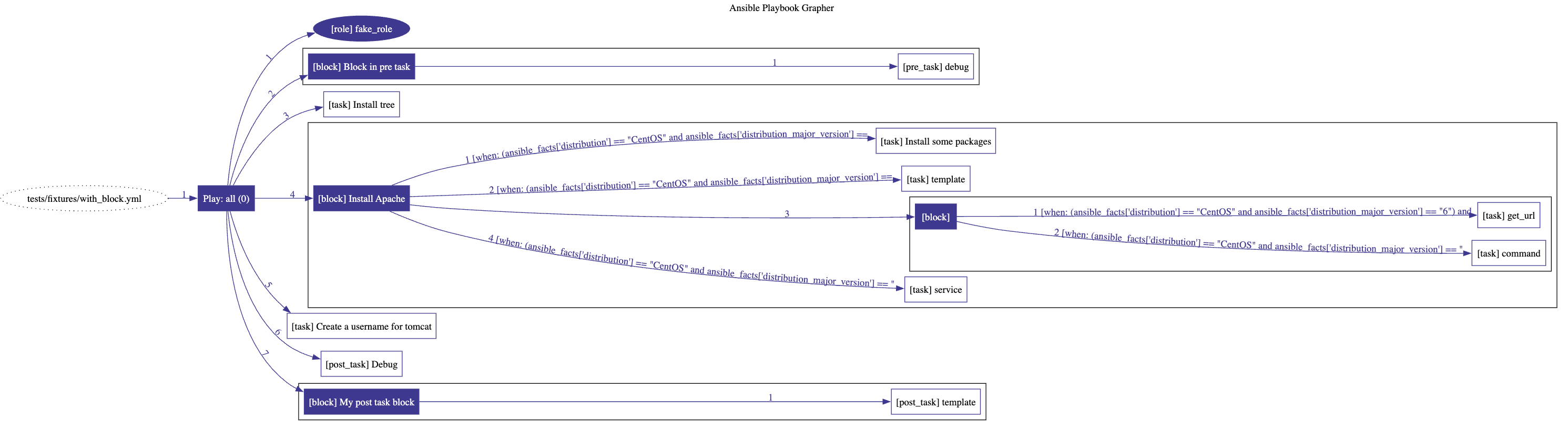
ansible-playbook-grapher tests/fixtures/with_block.yml
ansible-playbook-grapher --include-role-tasks --renderer mermaid-flowchart tests/fixtures/multi-plays.yml
---
title: Ansible Playbook Grapher
---
%%{ init: { "flowchart": { "curve": "bumpX" } } }%%
flowchart LR
	%% Start of the playbook 'tests/fixtures/multi-plays.yml'
	playbook_a27d9bec("tests/fixtures/multi-plays.yml")
		%% Start of the play 'Play: all (0)'
		play_d6dd122d["Play: all (0)"]
		style play_d6dd122d stroke:#ba1a12,fill:#ba1a12,color:#ffffff
		playbook_a27d9bec --> |"1"| play_d6dd122d
		linkStyle 0 stroke:#ba1a12,color:#ba1a12
			pre_task_676cdcb1["[pre_task] Pretask"]
			style pre_task_676cdcb1 stroke:#ba1a12,fill:#ffffff
			play_d6dd122d --> |"1"| pre_task_676cdcb1
			linkStyle 1 stroke:#ba1a12,color:#ba1a12
			pre_task_44476583["[pre_task] Pretask 2"]
			style pre_task_44476583 stroke:#ba1a12,fill:#ffffff
			play_d6dd122d --> |"2"| pre_task_44476583
			linkStyle 2 stroke:#ba1a12,color:#ba1a12
			%% Start of the role '[role] fake_role'
			play_d6dd122d --> |"3"| role_f0c07194
			linkStyle 3 stroke:#ba1a12,color:#ba1a12
			role_f0c07194(["[role] fake_role"])
			style role_f0c07194 fill:#ba1a12,color:#ffffff,stroke:#ba1a12
				task_90876ffc["[task] fake_role : Debug 1"]
				style task_90876ffc stroke:#ba1a12,fill:#ffffff
				role_f0c07194 --> |"1 [when: ansible_distribution == 'Debian']"| task_90876ffc
				linkStyle 4 stroke:#ba1a12,color:#ba1a12
				task_bb701882["[task] fake_role : Debug 2"]
				style task_bb701882 stroke:#ba1a12,fill:#ffffff
				role_f0c07194 --> |"2 [when: ansible_distribution == 'Debian']"| task_bb701882
				linkStyle 5 stroke:#ba1a12,color:#ba1a12
				task_c00c5d61["[task] fake_role : Debug 3 with double quote "here" in the name"]
				style task_c00c5d61 stroke:#ba1a12,fill:#ffffff
				role_f0c07194 --> |"3 [when: ansible_distribution == 'Debian']"| task_c00c5d61
				linkStyle 6 stroke:#ba1a12,color:#ba1a12
			%% End of the role '[role] fake_role'
			%% Start of the role '[role] display_some_facts'
			play_d6dd122d --> |"4"| role_a168caef
			linkStyle 7 stroke:#ba1a12,color:#ba1a12
			role_a168caef(["[role] display_some_facts"])
			style role_a168caef fill:#ba1a12,color:#ffffff,stroke:#ba1a12
				task_737e2be9["[task] display_some_facts : ansible_architecture"]
				style task_737e2be9 stroke:#ba1a12,fill:#ffffff
				role_a168caef --> |"1"| task_737e2be9
				linkStyle 8 stroke:#ba1a12,color:#ba1a12
				task_61bbb3fb["[task] display_some_facts : ansible_date_time"]
				style task_61bbb3fb stroke:#ba1a12,fill:#ffffff
				role_a168caef --> |"2"| task_61bbb3fb
				linkStyle 9 stroke:#ba1a12,color:#ba1a12
				task_3b7308dc["[task] display_some_facts : Specific included task for Debian"]
				style task_3b7308dc stroke:#ba1a12,fill:#ffffff
				role_a168caef --> |"3"| task_3b7308dc
				linkStyle 10 stroke:#ba1a12,color:#ba1a12
			%% End of the role '[role] display_some_facts'
			task_c8b76065["[task] Add backport {{backport}}"]
			style task_c8b76065 stroke:#ba1a12,fill:#ffffff
			play_d6dd122d --> |"5"| task_c8b76065
			linkStyle 11 stroke:#ba1a12,color:#ba1a12
			task_f7cebcbb["[task] Install packages"]
			style task_f7cebcbb stroke:#ba1a12,fill:#ffffff
			play_d6dd122d --> |"6"| task_f7cebcbb
			linkStyle 12 stroke:#ba1a12,color:#ba1a12
			post_task_caafa665["[post_task] Posttask"]
			style post_task_caafa665 stroke:#ba1a12,fill:#ffffff
			play_d6dd122d --> |"7"| post_task_caafa665
			linkStyle 13 stroke:#ba1a12,color:#ba1a12
			post_task_b5ade468["[post_task] Posttask 2"]
			style post_task_b5ade468 stroke:#ba1a12,fill:#ffffff
			play_d6dd122d --> |"8"| post_task_b5ade468
			linkStyle 14 stroke:#ba1a12,color:#ba1a12
		%% End of the play 'Play: all (0)'
		%% Start of the play 'Play: database (0)'
		play_d780677e["Play: database (0)"]
		style play_d780677e stroke:#686864,fill:#686864,color:#ffffff
		playbook_a27d9bec --> |"2"| play_d780677e
		linkStyle 15 stroke:#686864,color:#686864
			%% Start of the role '[role] fake_role'
			play_d780677e --> |"1"| role_1e6bf323
			linkStyle 16 stroke:#686864,color:#686864
			role_1e6bf323(["[role] fake_role"])
			style role_1e6bf323 fill:#686864,color:#ffffff,stroke:#686864
				task_3cb17d25["[task] fake_role : Debug 1"]
				style task_3cb17d25 stroke:#686864,fill:#ffffff
				role_1e6bf323 --> |"1 [when: ansible_distribution == 'Debian']"| task_3cb17d25
				linkStyle 17 stroke:#686864,color:#686864
				task_1f6232f4["[task] fake_role : Debug 2"]
				style task_1f6232f4 stroke:#686864,fill:#ffffff
				role_1e6bf323 --> |"2 [when: ansible_distribution == 'Debian']"| task_1f6232f4
				linkStyle 18 stroke:#686864,color:#686864
				task_0361ffa3["[task] fake_role : Debug 3 with double quote "here" in the name"]