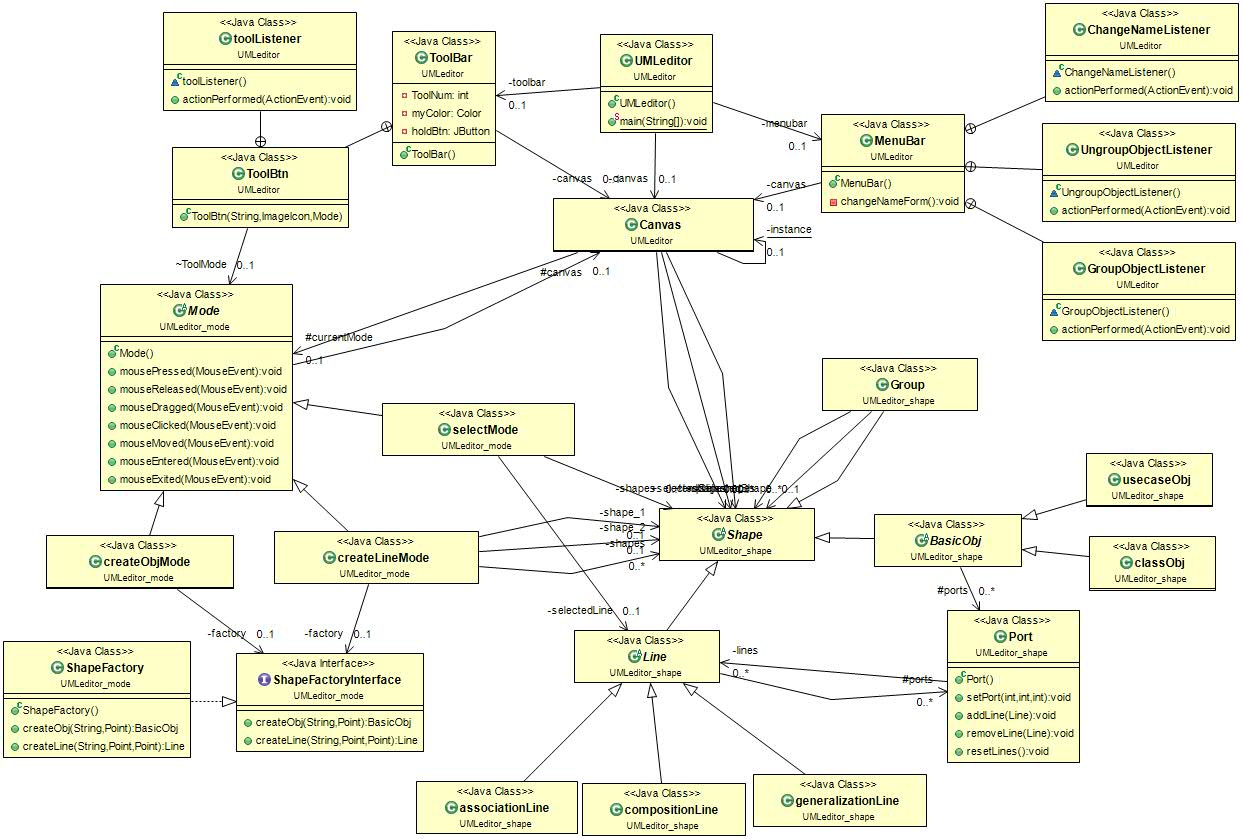
I specifically cover the following topics: Java primitive data types, declaration statements, expression statements, importing class libraries, excepting user input, checking for valid input, catching errors in input, math functions, if statement, relational operators, logical operators, ternary operator, switch statement, and looping. How class variables differ from local variables, Java Exception handling, the difference between run time and checked exceptions, Arrays, and UML Diagrams. Monsters gameboard, Java collection classes, Java ArrayLists, Linked Lists, manipulating Strings and StringBuilders, Polymorphism, Inheritance, Protected, Final, Instanceof, interfaces, abstract classes, abstract methods. You need interfaces and abstract classes because Java doesn't allow you to inherit from more than one other class. Java threads, Regular Expressions, Graphical User Interfaces (GUI) using Java Swing and its components, GUI Event Handling, ChangeListener, JOptionPane, combo boxes, list boxes, JLists, DefaultListModel, using JScrollpane with JList, JSpinner, JTree, Flow, Border, and Box Layout Managers. Created a calculator layout with Java Swing's GridLayout, GridBagLayout, GridBagConstraints, Font, and Insets. JLabel, JTextField, JComboBox, JSpinner, JSlider, JRadioButton, ButtonGroup, JCheckBox, JTextArea, JScrollPane, ChangeListener, pack, create and delete files and directories. How to pull lists of files from directories and manipulate them, write to and read character streams from files. PrintWriter, BufferedWriter, FileWriter, BufferedReader, FileReader, common file exceptions Binary Streams - DataOutputStream, FileOutputStream, BufferedOutputStream, all of the reading and writing primitive type methods, setup Java JDBC in Eclipse, connect to a MySQL database, query it and get the results of a query. JTables, JEditorPane Swing component. HyperlinkEvent and HyperlinkListener. Java JApplet, Java Servlets with Tomcat, GET and POST methods, Java Server Pages, parsing XML with Java, Java XPath, JDOM2 library, and 2D graphics. *Created a Java Paint Application using swing, events, mouse events, Graphics2D, ArrayList *Designed a Java Video Game like Asteroids with collision detection and shooting torpedos which also played sound in a JFrame, and removed items from the screen when they were destroyed. Rotating polygons, and Making Java Executable. Model View Controller (MVC) The Model is the class that contains the data and the methods needed to use the data. The View is the interface. The Controller coordinates interactions between the Model and View. DESIGN PATTERNS: Strategy design patternis used if you need to dynamically change an algorithm used by an object at run time. The pattern also allows you to eliminate code duplication. It separates behavior from super and subclasses. The Observer pattern is a software design pattern in which an object, called the subject (Publisher), maintains a list of its dependents, called observers (Subscribers), and notifies them automatically of any state changes, usually by calling one of their methods. The Factory design pattern is used when you want to define the class of an object at runtime. It also allows you to encapsulate object creation so that you can keep all object creation code in one place The Abstract Factory Design Pattern is like a factory, but everything is encapsulated. The Singleton pattern is used when you want to eliminate the option of instantiating more than one object. (Scrabble letters app) The Builder Design Pattern is used when you want to have many classes help in the creation of an object. By having different classes build the object you can then easily create many different types of objects without being forced to rewrite code. The Builder pattern provides a different way to make complex objects like you'd make using the Abstract Factory design pattern. The Prototype design pattern is used for creating new objects (instances) by cloning (copying) other objects. It allows for the adding of any subclass instance of a known super class at run time. It is used when there are numerous potential classes that you want to only use if needed at runtime. The major benefit of using the Prototype pattern is that it reduces the need for creating potentially unneeded subclasses. Java Reflection is an API and it's used to manipulate classes and everything in a class including fields, methods, constructors, private data, etc. (TestingReflection.java) The Decorator allows you to modify an object dynamically. You would use it when you want the capabilities of inheritance with subclasses, but you need to add functionality at run time. It is more flexible than inheritance. The Decorator Design Pattern simplifies code because you add functionality using many simple classes. Also, rather than rewrite old code you can extend it with new code and that is always good. (Pizza app) The Command design pattern allows you to store a list of commands for later use. With it you can store multiple commands in a class to use over and over. (ElectronicDevice app) The Adapter pattern is used when you want to translate one interface of a class into another interface. Allows 2 incompatible interfaces to work together. It allows the use of the available interface and the target interface. Any class can work together as long as the Adapter solves the issue that all classes must implement every method defined by the shared interface. (EnemyAttacker app) The Facade pattern basically says that you should simplify your methods so that much of what is done is in the background. In technical terms you should decouple the client from the sub components needed to perform an operation. (Bank app) The Bridge Pattern is used to decouple an abstraction from its implementation so that the two can vary independently. Progressively adding functionality while separating out major differences using abstract classes. (EntertainmentDevice app) In a Template Method pattern, you define a method (algorithm) in an abstract class. It contains both abstract methods and non-abstract methods. The subclasses that extend this abstract class then override those methods that don't make sense for them to use in the default way. (Sandwich app) The Iterator pattern provides you with a uniform way to access different collections of Objects. You can also write polymorphic code because you can refer to each collection of objects because they'll implement the same interface. (SongIterator app) The Composite design pattern is used to structure data into its individual parts as well as represent the inner workings of every part of a larger object. The composite pattern also allows you to treat both groups of parts in the same way as you treat the parts polymorphically. You can structure data, or represent the inner working of every part of a whole object individually. (SongComponent app) The flyweight design pattern is used to dramatically increase the speed of your code when you are using many similar objects. To reduce memory usage the flyweight design pattern shares Objects that are the same rather than creating new ones. (FlyWeightTest app) State Pattern allows an object to alter its behavior when its internal state changes. The object will appear to change its class. (ATMState) The Proxy design pattern limits access to just the methods you want made accessible in another class. It can be used for security reasons, because an Object is intensive to create, or is accessed from a remote location. You can think of it as a gate keeper that blocks access to another Object. (TestATMMachine) The Chain of Responsibility pattern has a group of objects that are expected to between them be able to solve a problem. If the first Object can't solve it, it passes the data to the next Object in the chain. (TestCalcChain) The Interpreter pattern is used to convert one representation of data into another. The context cantains the information that will be interpreted. The expression is an abstract class that defines all the methods needed to perform the different conversions. The terminal or concrete expressions provide specific conversions on different types of data. (MeasurementConversion) The Mediator design pattern is used to handle communication between related objects (Colleagues). All communication is handled by a Mediator Object and the Colleagues don't need to know anything about each other to work together. (TestStockMediator) The Memento design pattern provides a way to store previous states of an Object easily. It has 3 main classes: 1) Memento: The basic object that is stored in different states. 2) Originator: Sets and Gets values from the currently targeted Memento. Creates new Mementos and assigns current values to them. 3) Caretaker: Holds an ArrayList that contains all previous versions of the Memento. It can store and retrieve stored Mementos. (TestMemento) The Visitor design pattern allows you to add methods to classes of different types without much altering to those classes. You can make completely different methods depending on the class used with this pattern. (VisitorTest)
Active repository
JavaNo license
⑂ 40 forks◯ 6 issuesUpdated May 28, 2026
NClass is a free tool to easily create UML class diagrams with full C# and Java language support. The user interface is designed to be simple and user-friendly for easy and fast development. Properties, enums, delegates and other language specific elements are fully supported with strict syntactical and semantical verification.
Active repositoryHas homepage
C#GPL-3.0#class-diagram#code-generation#liquid#nhibernate
⑂ 5 forks◯ 1 issuesUpdated Jun 3, 2024
Project homepage ↗Simple Parser which uses Compiler design concepts. Lexical analysis, symbol table formation, parse the code using symbol table. This code works for any OOP based Code. It can be made for other languages too using the same concepts. Create UML diagrams with class code. Convert your code into UML direclty using this tool. It can convert any OOP based code into UML.
Active repository
JavaNo license#compiler-design#java#java-8#languages
⑂ 2 forks◯ 0 issuesUpdated Aug 22, 2024
WGU-Software-I-C482 COMPETENCIES 430.02.05 : Classes and Interfaces The graduate designs software solutions with appropriate classes, objects, methods, and interfaces to achieve specific goals. 430.02.06 : Object-Oriented Principles The graduate implements object-oriented design principles (e.g., inheritance, encapsulation, and abstraction) in developing applications for ensuring the application’s scalability. 430.02.07 : Application Development The graduate produces applications using Java programming language constructs to meet business requirements. 430.02.08 : Exception Handling The graduate incorporates simple exception handling in application development for improving user experience and application stability. 430.02.09 : User Interface Development The graduate develops user interfaces to meet project requirements. INTRODUCTION Throughout your career in software design and development, you will be asked to create applications with various features and functionality based on business requirements. For this assessment, you will create a Java desktop application using the solution statements provided in the requirements section of this assessment. The skills you showcase in your completed application will be useful in responding to technical interview questions for future employment. This application may also be added to your portfolio to show to future employers. The preferred integrated development environment (IDE) for this assignment is NetBeans version 11.1 or later or IntelliJ IDEA (Community Edition). Use the links in the web links section of this assessment to install one of these IDEs. If you choose to use another IDE, you must export your project into NetBeans 11.1 or later or IntelliJ IDEA format or your submission will be returned. This assessment also requires the following software: JDK 11 and JavaFX SDK or Module (for NetBeans or IntelliJ IDEA), and Scene Builder, which are also available for download in the web links section of this assessment, as well as a video demonstration of the completed application. Your submission should include a zip file with all the necessary code files to compile, support, and run your application. Your submission should also include a folder with descriptive Javadoc comments in the .java files. The zip file submission must keep the project file and folder structure intact for the IDE. In NetBeans, zip your file by going to File > Export Project > To ZIP and click Export. In IntelliJ IDEA, go to File > Export to Zip File and click OK. If you try to zip your project files with an external program, it will include the build files and make the zip files too large for submission. Note: You may receive an error message upon submitting your files because the automated plagiarism detectors will not be able to access the zipped file, but the evaluation team members will run their checks manually when evaluating your submission. SCENARIO You are working for a small manufacturing organization that has outgrown its current inventory system. Members of the organization have been using a spreadsheet program to manually enter inventory additions, deletions, and other data from a paper-based system but would now like you to develop a more sophisticated inventory program. You have been provided with a mock-up of the user interface to use in the design and development of the system (see the attached “Software 1 GUI Mock-Up”) and a class diagram to assist you in your work (see the attached “UML Class Diagram”). The organization also has specific business requirements that must be considered for the application. A systems analyst created the solution statements outlined in the requirements section of this task based on the business requirements. You will use these solution statements to develop your application. REQUIREMENTS Your submission must be your original work. No more than a combined total of 30% of the submission and no more than a 10% match to any one individual source can be directly quoted or closely paraphrased from sources, even if cited correctly. The originality report that is provided when you submit your task can be used as a guide. You must use the rubric to direct the creation of your submission because it provides detailed criteria that will be used to evaluate your work. Each requirement below may be evaluated by more than one rubric aspect. The rubric aspect titles may contain hyperlinks to relevant portions of the course. Tasks may not be submitted as cloud links, such as links to Google Docs, Google Slides, OneDrive, etc., unless specified in the task requirements. All other submissions must be file types that are uploaded and submitted as attachments (e.g., .docx, .pdf, .ppt). I. User Interface A. Create a JavaFX application with a graphical user interface (GUI) based on the attached “Software 1 GUI Mock-Up.” You may use JavaFX with or without FXML to create your GUI, or you may use Scene Builder to create your FXML file; use of Swing is not permitted. The user interface (UI) should closely match the organization of the GUI layout and contain all UI components (buttons, text fields, etc.) in each of the following GUI mock-up forms: 1. Main form 2. Add Part form 3. Modify Part form 4. Add Product form 5. Modify Product form Note: You may use one FXML file for forms with an identical UI component structure. You may also use a single window that can be switched to a different menu, or a new window can be launched for each form. As of JDK 11, JavaFX is no longer included in the JDK API but is available as an SDK or module. B. Provide Javadoc comments for each class member throughout the code, and include a detailed description of the following in your comments: • a logical or runtime error that you corrected in the code and how it was corrected • a future enhancement that would extend the functionality of the application if it were to be updated Note: For these comments to accurately export to the Javadoc comments, please add the logical and runtime error comments in the method header declaration comments where the error that was corrected occurred, and include the future enhancement comments in the comments of the main class. Please start these comments with “RUNTIME ERROR” or “FUTURE ENHANCEMENT” as applicable. II. Application C. Create classes with data and logic that map to the UML class diagram and include the supplied Part class provided in the attached “Part.java.” Do not alter the provided class. Include all the classes and members as shown in the UML diagram. Your code should demonstrate the following: • inheritance • abstract and concrete classes • instance and static variables • instance and static methods D. Add the following functionalities to the Main form: 1. The Parts pane • The Add button under the Parts TableView opens the Add Part form. • The Modify button under the Parts TableView opens the Modify Part form. • The Delete button under the Parts TableView deletes the selected part from the Parts TableView or displays a descriptive error message in the UI or in a dialog box if a part is not deleted. • When the user searches for parts by ID or name (partial or full name) using the text field, the application displays matching results in the Parts TableView. (Including a search button is optional.) If the part or parts are found, the application highlights a single part or filters multiple parts. If the part is not found, the application displays an error message in the UI or in a dialog box. • If the search field is set to empty, the table should be repopulated with all available parts. 2. The Products pane • The Add button under the Products TableView opens the Add Product form. • The Modify button under the Products TableView opens the Modify Product form. • The Delete button under the Products TableView deletes the selected product (if appropriate) from the Products TableView or displays a descriptive error message in the UI or in a dialog box if a product is not deleted. • When the user searches for products by ID or name (partial or full name) using the text field, the application displays matching results in the Products TableView. (Including a search button is optional.) If a product or products are found, the application highlights a single product or products or filters multiple products. If a product or products are not found, the application displays an error message in the UI or in a dialog box. • If the search field is set to empty, the table should be repopulated with all available products. Note: A product’s associated parts can exist independent of current inventory of parts. You are not required to display sample data upon launching your application. You do not need to save your data to a database or a file; data for this application is nonpersistent and will reside in computer memory while in use. 3. Exit button • The Exit button closes the application. E. Add the listed functionalities to the following parts forms: 1. The Add Part form • The In-House and Outsourced radio buttons switch the bottom label to the correct value (Machine ID or Company Name). • The application auto-generates a unique part ID. The part IDs can be, but do not need to be, contiguous. - The part ID text field must be disabled. • The user should be able to enter a part name, inventory level or stock, a price, maximum and minimum values, and company name or machine ID values into active text fields. • After saving the data, users are automatically redirected to the Main form. • Canceling or exiting this form redirects users to the Main form. 2. The Modify Part form • The text fields populate with the data from the chosen part. • The In-House and Outsourced radio buttons switch the bottom label to the correct value (Machine ID or Company Name) and swap In-House parts and Outsourced parts. When new objects need to be created after the Save button is clicked, the part ID should be retained. • The user can modify data values in the text fields sent from the Main form except the part ID. • After saving modifications to the part, the user is automatically redirected to the Main form. • Canceling or exiting this form redirects users to the Main form. F. Add the following functionalities to the following product forms: 1. The Add Product form • The application auto-generates a unique product ID. The product IDs can be, but do not need to be, contiguous. - The product ID text field must be disabled and cannot be edited or changed. • The user should be able to enter a product name, inventory level or stock, a price, and maximum and minimum values. • The user can search for parts (top table) by ID or name (partial or full name). If the part or parts are found, the application highlights a single part or filters multiple parts. If the part or parts are not found, the application displays an error message in the UI or in a dialog box. • If the search field is set to empty, the table should be repopulated with all available parts. • The top table should be identical to the Parts TableView in the Main form. • The user can select a part from the top table. The user then clicks the Add button, and the part is copied to the bottom table. (This associates one or more parts with a product.) • The Remove Associated Part button removes a selected part from the bottom table. (This dissociates or removes a part from a product.) • After saving the data, the user is automatically redirected to the Main form. • Canceling or exiting this form redirects users to the Main form. Note: When a product is deleted, so can its associated parts without affecting the part inventory. The Remove Associated Part button removes a selected part from the bottom table. (This dissociates or removes a part from a product.) 2. The Modify Product form • The text fields populate with the data from the chosen product, and the bottom TableView populates with the associated parts. • The user can search for parts (top table) by ID or name (partial or full name). If the part or parts are found, the application highlights a single part or filters multiple parts. If the part is not found, the application displays an error message in the UI or a dialog box. • If the search text field is set to empty, the table should be repopulated with all available parts. • The top table should be identical to the Parts TableView in the Main form. • The user may modify or change data values. - The product ID text field must be disabled and cannot be edited or changed. • The user can select a part from the top table. The user then clicks the Add button, and the part is copied to the bottom table. (This associates one or more parts with a product.) • The user may associate zero, one, or more parts with a product. • The user may remove or disassociate a part from a product. • After saving modifications to the product, the user is automatically redirected to the Main form. • Canceling or exiting this form redirects users to the Main form. Note: The Remove Associated Part button removes a selected part from the bottom table. (This dissociates or removes a part from a product.) G. Write code to implement input validation and logical error checks using a dialog box or message in the UI displaying a descriptive error message for each of the following circumstances: • Min should be less than Max; and Inv should be between those two values. • The user should not delete a product that has a part associated with it. • The application confirms the “Delete” and “Remove” actions. • The application will not crash when inappropriate user data is entered in the forms; instead, error messages should be generated. H. Provide a folder containing Javadoc files that were generated from the IDE or via the command prompt from part B. In a comment above the main method header declaration, please specify where this folder is located. I. Demonstrate professional communication in the content and presentation of your submission. File Restrictions File name may contain only letters, numbers, spaces, and these symbols: ! - _ . * ' ( ) File size limit: 200 MB File types allowed: doc, docx, rtf, xls, xlsx, ppt, pptx, odt, pdf, txt, qt, mov, mpg, avi, mp3, wav, mp4, wma, flv, asf, mpeg, wmv, m4v, svg, tif, tiff, jpeg, jpg, gif, png, zip, rar, tar, 7z
The UML Parser is a web-based application that receives Java source codes as input, analyzes the Java source codes, and finally produces UML Class and Sequence Diagrams. This application uses MySQL data base, I have created a simple database (this application purpose was Revese Engineering NOT a Complex database :D )
Active repository
CSSNo license
⑂ 0 forks◯ 0 issuesUpdated Dec 31, 2023
First projet of the Java projects arc. Implementation of a simple Java program according to a given class diagram written in UML.
Active repository
JavaNo license
⑂ 0 forks◯ 0 issuesUpdated Apr 28, 2023