Loading repository data…
gerencianet / repository
gn-api-sdk-flutter-examples
SDK em Flutter integrado a API Gerencianet. Este SDK está preparado para integração à API Pix e API Boletos da Gerencianet, que permite realizar o gerenciamento de cobranças Pix com QR Code e Pix Copia e Cola, boleto / Bolix, carnê, cartão de crédito e muito mais.
#assinatura#billet#boleto#bolix#card#carne
Live repository statistics
★ 7Stars
⑂ 2Forks
◯ 0Open issues
◉ 7Watchers
47/100
OPENREPOHUB HEALTH SIGNAL
Mixed signals
A transparent discovery signal based on current public GitHub metadata.
Recent activity35% weight
10
Community adoption25% weight
15
Maintenance state20% weight
100
License clarity10% weight
100
Project information10% weight
100
This score does not audit code, security, maintainers, documentation quality, or suitability. Verify the repository and its current documentation before adoption.
README preview

gn-api-sdk-flutter-examples
SDK for Gerencianet Pagamentos' API. For more informations about parameters and values, please refer to Gerencianet documentation.
Getting started
Add the PIX certificate and its key in assets/certs.
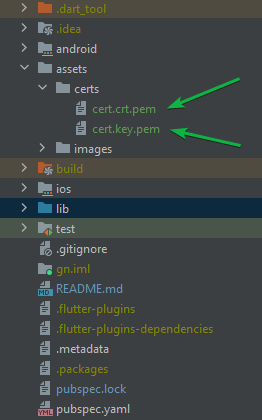
After adding, run the flutter pub get command.
The credentials of your application (client_id and client_secret) must be informed in the credentials.dart file
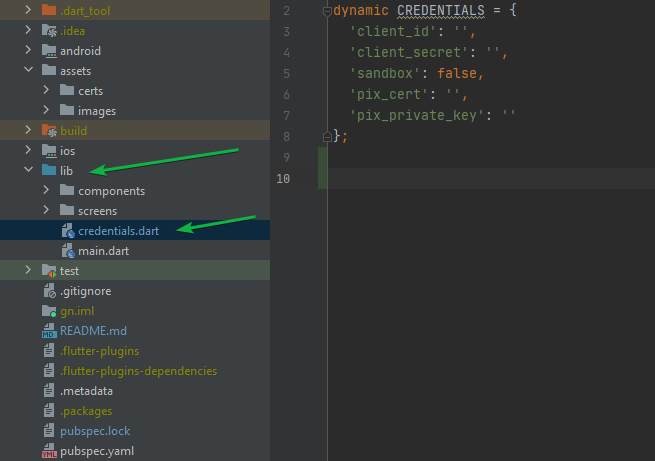
dynamic CREDENTIALS = {
  'client_id': '',        # Enter your client id
  'client_secret': '',    # Enter your client secret
  'sandbox': false,       # Enable or disable sandbox mode
  'pix_cert': 'assets/certs/cert.crt.pem',         # Enter the certificate directory
  'pix_private_key': 'assets/certs/cert.key.pem'   # Enter the certificate key directory
};
To generate your certificate: Access the menu API (1)-> Meus Certificados (2) and choose the environment you want the certificate: Produção or Homologação -> click in Novo Certificado (3).

Create a new application to use the Pix API: Access the menu API (1)-> Minhas Aplicações -> Nova Aplicação(2) -> Ative API Pix (3) and choose the scopes you want to release in Produção e/ou Homologação (remembering that these can be changed later). -> click in Criar Nova aplicação(4).
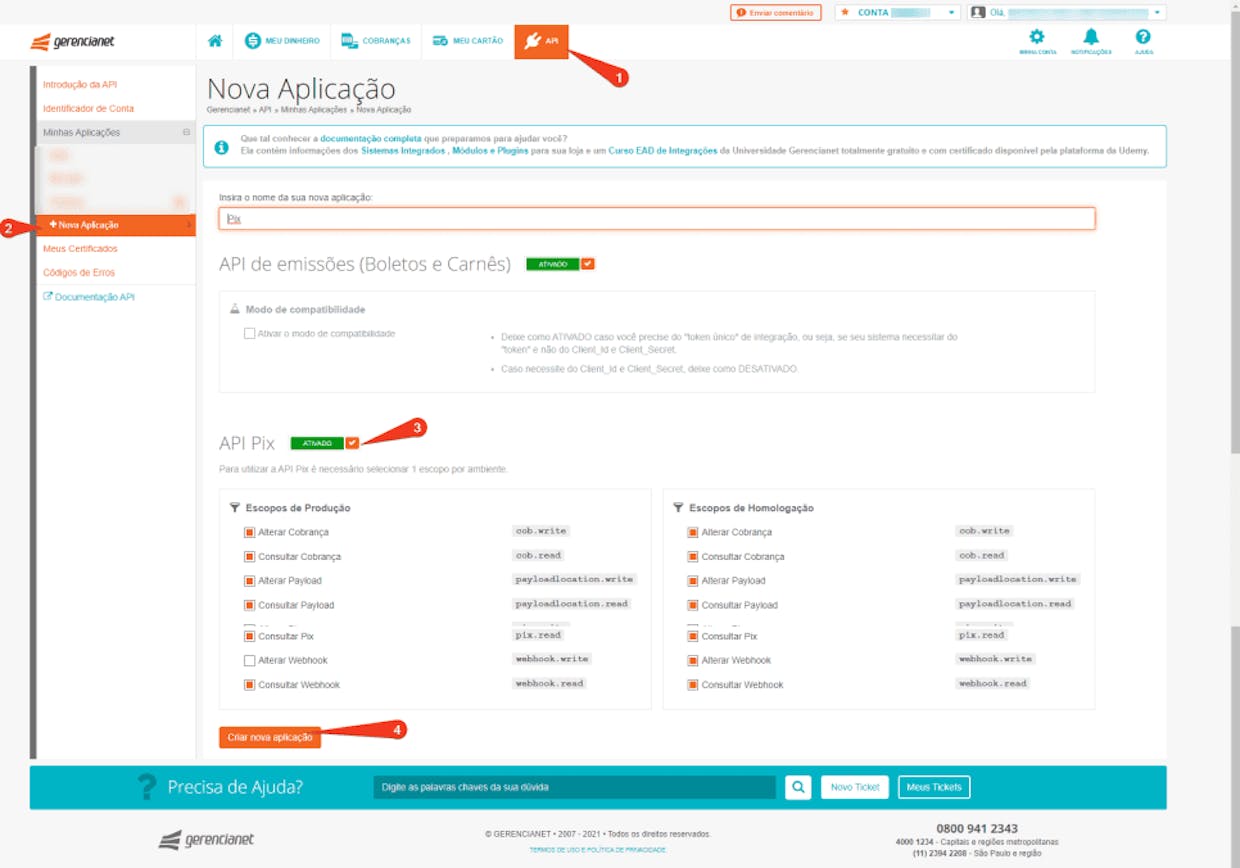
Change an existing application to use the Pix API: Access the menu API (1)-> Minhas Aplicações e escolha a sua aplicação (2) -> Editar(Botão laranja) -> Ative API Pix (3) and choose the scopes you want to release in Produção e/ou Homologação. -> click in Atualizar aplicação (4).
