ai-trading-agent-gemini GitHub Details, Stars and Alternatives | OpenRepoFinder
danilobatson / repository
ai-trading-agent-gemini
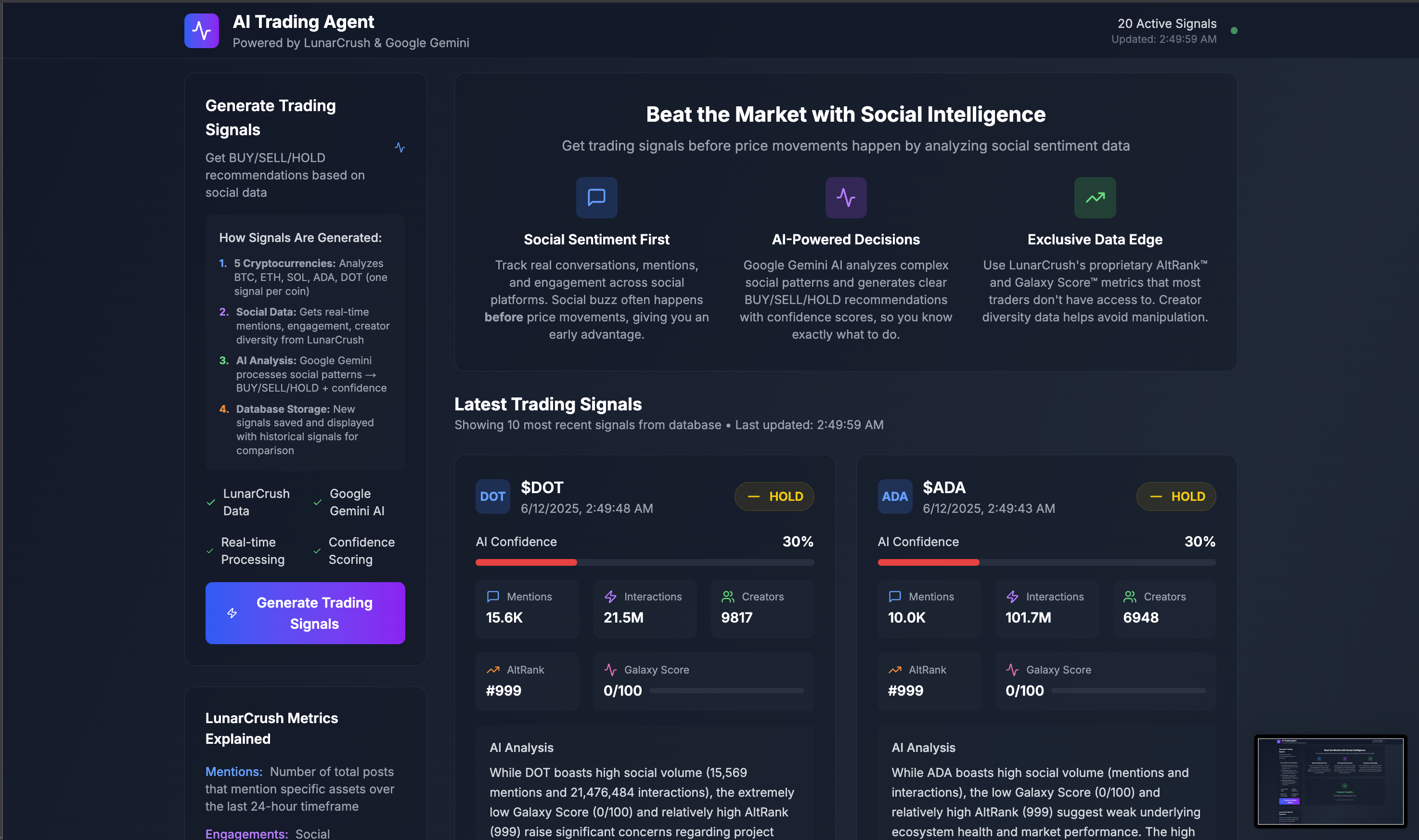
AI Trading Agent that transforms social media sentiment into actionable trading signals using LunarCrush analytics and Google Gemini AI. Features real-time progress tracking, background job processing with Inngest, and live dashboard updates via Supabase subscriptions. Built with Next.js 15, TypeScript, and modern AI integration patterns.
A transparent discovery signal based on current public GitHub metadata.
Recent activity35% weight
100
Community adoption25% weight
47
Maintenance state20% weight
100
License clarity10% weight
0
Project information10% weight
100
This score does not audit code, security, maintainers, documentation quality, or suitability. Verify the repository and its current documentation before adoption.
README preview
🤖 AI Trading Agent with Real-Time Social Sentiment Analysis
Transform social media buzz into actionable trading signals using AI-powered analysis
🎯 What This Does
This AI Trading Agent analyzes real-time social media sentiment from LunarCrush's API and generates intelligent trading signals using Google's Gemini AI. Watch as it processes social data through a 7-step background workflow with live progress tracking.
For experienced developers who want to get running fast:
# 1. Clone and install
git clone https://github.com/danilobatson/ai-trading-agent-gemini.git
cd ai-trading-agent-gemini
npm install

# 2. Copy environment template
cp .env.example .env.local

# 3. Add your API keys (see detailed setup below)
# Edit .env.local with your 5 required API keys

# 4. Set up database tables
# Copy SQL schema below → paste in Supabase SQL Editor

# 5. Start development
npm run dev          # Next.js app (localhost:3000)
npm run inngest:dev  # Inngest dev server (localhost:8288)
🎯 Need the detailed setup? Continue reading for step-by-step instructions with account creation guides. Review our guide on dev.to if you need more assistance
📋 Prerequisites
You'll Need:
Node.js 18+ installed
Basic knowledge of React/TypeScript
A code editor (VS Code recommended)
20 minutes for complete setup
5 API Keys Required:
🌙 LunarCrush APISubscription required
🤖 Google Gemini API (AI analysis) - Free tier available
🗄️ Supabase (database & real-time) - Free tier available
💡 Why Supabase? Real-time database updates power our live progress tracking without polling.
Step 5: Database Schema Creation 📊
In your Supabase dashboard:
Go to SQL Editor
Click "New query"
Copy and paste this entire script:
-- AI Trading Agent Database Schema
-- Copy and paste this entire script into your Supabase SQL Editor

-- Table: trading_signals
-- Stores AI-generated trading signals with confidence scores and reasoning
CREATE TABLE trading_signals (
  id TEXT PRIMARY KEY,
  symbol TEXT NOT NULL,
  signal TEXT NOT NULL CHECK (signal IN ('BUY', 'SELL', 'HOLD')),
  confidence INTEGER NOT NULL CHECK (confidence >= 0 AND confidence <= 100),
  reasoning TEXT NOT NULL,
  metrics JSONB NOT NULL,
  created_at TIMESTAMP WITH TIME ZONE DEFAULT NOW()
);

-- Indexes for trading_signals table (for performance)
CREATE INDEX idx_trading_signals_symbol ON trading_signals (symbol);
CREATE INDEX idx_trading_signals_created_at ON trading_signals (created_at DESC);
CREATE INDEX idx_trading_signals_signal ON trading_signals (signal);

-- Table: analysis_jobs
-- Tracks background job progress and status for real-time UI updates
CREATE TABLE analysis_jobs (
  id TEXT PRIMARY KEY,
  status TEXT NOT NULL DEFAULT 'started',
  current_step TEXT DEFAULT 'Initializing...',
  step_message TEXT DEFAULT 'Starting analysis...',
  progress_percentage INTEGER DEFAULT 0,
  event_data JSONB,
  signals_generated INTEGER DEFAULT 0,
  alerts_generated INTEGER DEFAULT 0,
  duration_ms INTEGER,
  started_at TIMESTAMP WITH TIME ZONE DEFAULT NOW(),
  completed_at TIMESTAMP WITH TIME ZONE,
  updated_at TIMESTAMP WITH TIME ZONE DEFAULT NOW()
);

-- Indexes for analysis_jobs table (for performance)
CREATE INDEX idx_analysis_jobs_status ON analysis_jobs (status);
CREATE INDEX analysis_jobs_progress_idx ON analysis_jobs (status, started_at DESC, progress_percentage);
Click "Run" to execute the script
Verify tables: Go to Table Editor → you should see trading_signals and analysis_jobs tables
Step 6: Inngest Background Jobs Setup ⚡
Inngest handles our AI analysis pipeline with real-time progress tracking.
Watch real-time progress: 7-step analysis with live progress tracking
Monitor Inngest: Check localhost:8288 for detailed job execution
View results: Trading signals appear automatically when complete
Expected Flow:
Initialize Analysis (14%) →
Prepare Symbol List (28%) →
Fetch Social Data (42%) →
AI Signal Generation (57%) →
Save to Database (71%) →
Generate Summary (85%) →
Complete Analysis (100%)
🏗️ Architecture Overview
Technology Stack
Component
Technology
Purpose
Frontend
Next.js 15 + React 19 + TypeScript
Modern web application with server components
Styling
Tailwind CSS v4
Responsive, professional UI
Background Jobs
Inngest
Multi-step AI workflow processing
Database
Supabase (PostgreSQL)
Real-time data storage with subscriptions
AI Analysis
Google Gemini
Trading signal generation
Social Data
LunarCrush API
Crypto sentiment analysis with unique metrics
Data Flow Architecture
    A[User Triggers Analysis] --> B[Inngest Background Job]
    B --> C[LunarCrush API]
    C --> D[Social Metrics]
    D --> E[Google Gemini AI]
    E --> F[Trading Signals]
    F --> G[Supabase Database]
    G --> H[Real-time UI Updates]
A Model Context Protocol (MCP) server for Binance.com API. Offers standardized access to spot trading, wallets, staking, simple earn, convert, mining, algo trading, VIP loans, NFTs, pay, copy trading, dual investments, C2C/P2P, fiat ops, and rebates. Built in TypeScript/Node.js. Manages auth, requests, and errors for AI agents/devs.
AI powered automation toolkit which acts as an agent that discovers MCP servers for you. Point it at GitHub/npm/configure your own discovery, let GPT or Claude analyze the API or MCP or any tool, get ready-to-ship plugin configs. Zero manual work.