Solution
The solution has been made using the Apache Airflow tool, working with the DAG (Directed Acyclic Graph) system that groups and organizes the tasks so that they occur interdependently.
-
To configure all the environments necessary for the pipeline to start, make sure you run the install.sh file.
-
After that, you will enter the Airflow environment, where you can test the tasks and run the pipeline.
Testing
Tasks can be independently tested in the airflow environment by entering the task name and a past date as a reference.
airflow test pipeline task_1 2022-01-01
To run the pipeline in the past days.
airflow backfill pipeline -s 2022-01-01 -e 2022-01-02
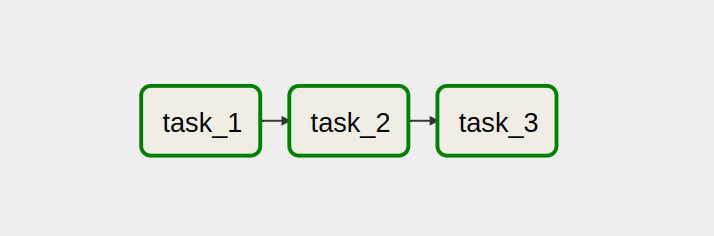
The process flow consists of 3 tasks performed interdependently as shown in the image below.
-
The northwind.sql database and the order_details.csv table will be downloaded into the local filesystem according to their respective code execution date.
-
All tables saved in the local directory will be persisted in a mysql database.
-
A query is made in the database seeking data from the orders and orders_detais tables and a query_result.csv file is generated in the dags directory
Code Challenge
Code challenge for Software Developer with focus in data projects.
Context
As a software developer with focus in data projects your mission is to plan, develop, deploy, and maintain a data pipeline.
The Challenge
We are going to provide 2 data sources, a Postgres database and a CSV file.
The CSV file represents details of orders from a ecommerce system.
The database provided is a sample database provided by microsoft for education purposes called northwind, the only difference is that the order_detail table does not exists in this database you are beeing provided with.This order_details table is represented by the CSV file we provide.
Schema of the original Northwind Database:

Your mission is to build a pipeline that extracts the data everyday from both sources and write the data first to local disk, and second to a database of your choice. For this challenge, the CSV file and the database will be static, but in any real world project, both data sources would be changing constantly.
Its important that all writing steps are isolated from each other, you shoud be able to run any step without executing the others.
For the first step, where you write data to local disk, you should write one file for each table and one file for the input CSV file. This pipeline will run everyday, so there should be a separation in the file paths you will create for each source(CSV or Postgres), table and execution day combination, e.g.:
/data/postgres/{table}/2021-01-01/file.format
/data/postgres/{table}/2021-01-02/file.format
/data/csv/2021-01-02/file.format
you are free to chose the naming and the format of the file you are going to save.
At step 2, you should load the data from the local filesystem to the final database that you chosed.
The final goal is to be able to run a query that shows the orders and its details. The Orders are placed in a table called orders at the postgres Northwind database. The details are placed at the csv file provided, and each line has an order_id field pointing the orders table.
How you are going to build this query will heavily depend on which database you choose and how you will load the data this database.
The pipeline will look something like this:

Requirements
- All tasks should be idempotent, you should be able the whole pipeline for a day and the result should be always the same
- Step 2 depends on both tasks of step 1, so you should not be able to run step 2 for a day if the tasks from step 1 did not succeed
- You should extract all the tables from the source database, it does not matter that you will not use most of them for the final step.
- You should be able to tell where the pipeline failed clearly, so you know from which step you should rerun the pipeline
- You have to provide clear instructions on how to run the whole pipeline. The easier the better.
- You have to provide a csv or json file with the result of the final query at the final database.
- You dont have to actually schedule the pipeline, but you should assume that it will run for different days.
- Your pipeline should be prepared to run for past days, meaning you should be able to pass an argument to the pipeline with a day from the past, and it should reprocess the data for that day. Since the data for this challenge is static, the only difference for each day of execution will be the output paths.
Things that Matters
- Clean and organized code.
- Good decisions at which step (which database, which file format..) and good arguments to back those decisions up.
Setup of the source database
The source database can be set up using docker compose.
You can install following the instructions at
https://docs.docker.com/compose/install/
With docker compose installed simply run
docker-compose up
You can find the credentials at the docker-compose.yml file
Final Instruction
You can use any language you like, but keep in mind that we will have to run your pipeline, so choosing some languague or tooling that requires a complex environment might not be a good idea.
You are free to use opensource libs and frameworks, but also keep in mind that you have to write code. Point and click tools are not allowed.