cookiecutter-python-package GitHub Details, Stars and Alternatives | OpenRepoFinder
boromir674 / repository
cookiecutter-python-package
:globe_with_meridians: Scaffold modern Python Package Project, from a configurable Template, delivering public releases to PyPI and Dockerhub and having a CI/CD Pipeline, which supports DevOps processes with best practices.
A transparent discovery signal based on current public GitHub metadata.
Recent activity35% weight
72
Community adoption25% weight
17
Maintenance state20% weight
40
License clarity10% weight
100
Project information10% weight
100
This score does not audit code, security, maintainers, documentation quality, or suitability. Verify the repository and its current documentation before adoption.
README preview
Python Package Generator
Create Python Projects swiftly, and enjoy streamlined "DevOps" using a powerful CI/CD Pipeline.
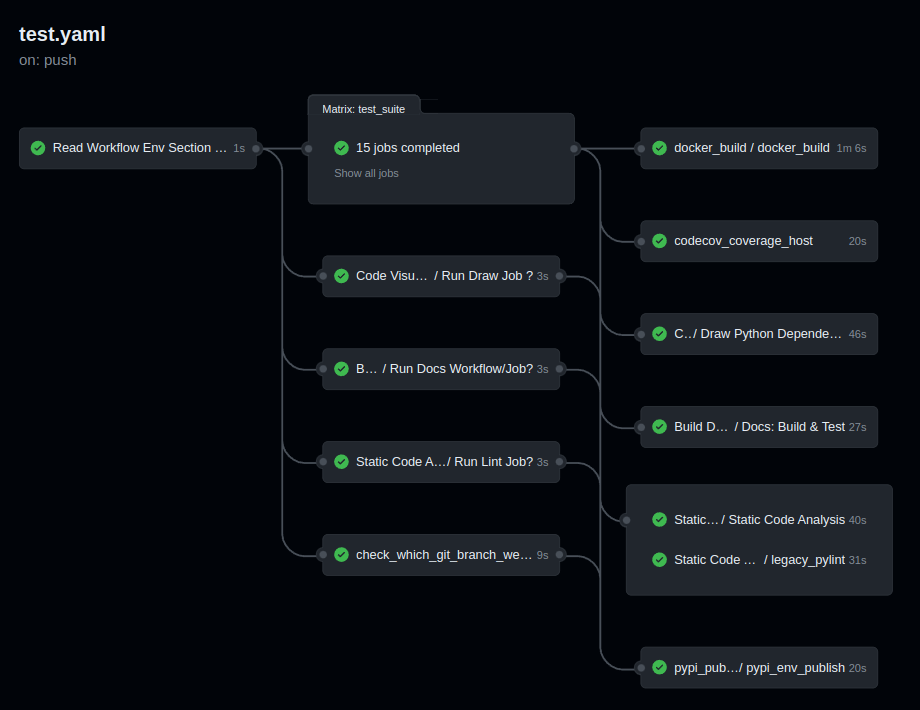
You can be up and running with a new Python Package, and run workflows on Github Actions, such as:
CI Pipeline, running on Github Actions, defined in .github/
Job Matrix, spanning different platforms and python versions:
Platforms: ubuntu-latest, macos-latest
Python Interpreters: 3.8, 3.9, 3.10, 3.11, 3.12
Parallel Job execution, generated from the matrix, that runs the Test Suite
Artifact store of Source and Wheel Distributions, factoring Platform and Python Version
Auto Generated Sample Package Biskotaki
Check the BiskotakiPython Package Project on github, which is Continuously generated by this CLI, for a taste of how a project looks and the files this Template can generate!
git remote add origin <remote-repository-url>
git push -u origin main
To trigger the CI/CD Pipeline, run:
git push
Navigate to your github.com/username/your-repo/actions page, to see the
CI Pipeline running!
Develop your package's Source Code (business logic) inside src/my_great_python_package :)
Develop your package's Test Suite (ie unit-tests, integration tests, etc) inside tests dir :-)
Read the Documentation's Use Cases section for more on how to leverage your generated Python Package features.
Next Steps
To prepare for an Open Source Project Development Lifecycle, you should visit the following websites:
PyPI, test.pypi.org, Dockerhub, and Read the Docs, for setting up Release and Documentation Pipelines
github.com/your-account to configure Actions, through the web UI
Codecov, Codacy, and Codeclimate, for setting up Automated Code Quality, with CI Pipelines