[!IMPORTANT]
This SQLModel boilerplate is no longer actively maintained. For a maintained FastAPI starter, use the Fastro FastAPI-boilerplate (free, SQLAlchemy) or FastroAI - the complete FastAPI SaaS template (auth, payments, AI, a frontend).
0. About
FastAPI boilerplate creates an extendable async API using FastAPI, SQLModel and PostgreSQL:
FastAPI: modern Python web framework for building APIsSQLModel: SQL databases in Python, designed for simplicity, compatibility, and robustness.PostgreSQL: The World's Most Advanced Open Source Relational DatabaseRedis: Source Available, in-memory data store used by millions as a cache, message broker and more.ARQ Job queues and RPC in python with asyncio and redis.Docker Compose With a single command, create and start all the services from your configuration.NGINX High-performance low resource consumption web server used for Reverse Proxy and Load Balancing.
1. Features
- ⚡️ Fully async
- 🚀 SQLModel with Pydantic V2 and SQLAlchemy 2.0 support
- 🔐 User authentication with JWT
- 🍪 Cookie based refresh token
- 🏬 Easy redis caching
- 👜 Easy client-side caching
- 🚦 ARQ integration for task queue
- ⚙️ Efficient and robust queries with fastcrud
- ⎘ Out of the box offset and cursor pagination support with fastcrud
- 🛑 Rate Limiter dependency
- 👮 FastAPI docs behind authentication and hidden based on the environment
- 🦾 Easily extendable
- 🤸♂️ Flexible
- 🚚 Easy running with docker compose
- ⚖️ NGINX Reverse Proxy and Load Balancing
2. Contents
- About
- Features
- Contents
- Prerequisites
- Environment Variables (.env)
- Docker Compose
- From Scratch
- Usage
- Docker Compose
- From Scratch
- Packages
- Running PostgreSQL With Docker
- Running Redis with Docker
- Running the API
- Creating the first superuser
- Database Migrations
- Extending
- Project Structure
- Database Model
- DB Models
- Validation Models
- Alembic Migrations
- CRUD
- Routes
- Paginated Responses
- HTTP Exceptions
3. Prerequisites
3.0 Start
Start by using the template, and naming the repository to what you want.
Then clone your created repository (I'm using the base for the example)
git clone https://github.com/igormagalhaesr/SQLModel-boilerplate
[!TIP]
If you are in a hurry, you may use one of the following templates (containing a .env, docker-compose.yml and Dockerfile):
[!WARNING]
Do not forget to place docker-compose.yml and Dockerfile in the root folder, while .env should be in the src folder.
3.1 Environment Variables (.env)
Then create a .env file inside src directory:
touch .env
Inside of .env, create the following app settings variables:
# ------------- app settings -------------
APP_NAME="Your app name here"
APP_DESCRIPTION="Your app description here"
APP_VERSION="0.1"
CONTACT_NAME="Your name"
CONTACT_EMAIL="Your email"
LICENSE_NAME="The license you picked"
For the database (if you don't have a database yet, click here), create:
# ------------- database -------------
POSTGRES_USER="your_postgres_user"
POSTGRES_PASSWORD="your_password"
POSTGRES_SERVER="your_server" # default "localhost", if using docker compose you should use "db"
POSTGRES_PORT=5432 # default "5432", if using docker compose you should use "5432"
POSTGRES_DB="your_db"
For database administration using PGAdmin create the following variables in the .env file
# ------------- pgadmin -------------
PGADMIN_DEFAULT_EMAIL="your_email_address"
PGADMIN_DEFAULT_PASSWORD="your_password"
PGADMIN_LISTEN_PORT=80
To connect to the database, log into the PGAdmin console with the values specified in PGADMIN_DEFAULT_EMAIL and PGADMIN_DEFAULT_PASSWORD.
Once in the main PGAdmin screen, click Add Server:
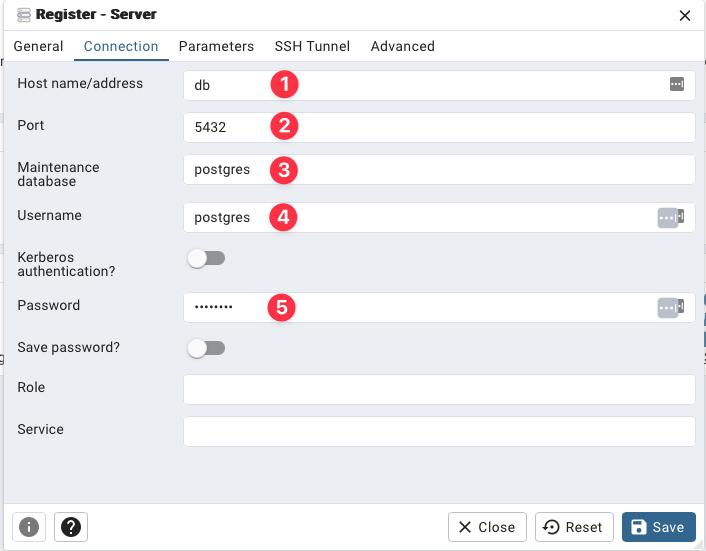
- Hostname/address is
db (if using containers)
- Is the value you specified in
POSTGRES_PORT
- Leave this value as
postgres
- is the value you specified in
POSTGRES_USER
- Is the value you specified in
POSTGRES_PASSWORD
For crypt:
Start by running
openssl rand -hex 32
And then create in .env:
# ------------- crypt -------------
SECRET_KEY= # result of openssl rand -hex 32
ALGORITHM= # pick an algorithm, default HS256
ACCESS_TOKEN_EXPIRE_MINUTES= # minutes until token expires, default 30
REFRESH_TOKEN_EXPIRE_DAYS= # days until token expires, default 7
Then for the first admin user:
# ------------- admin -------------
ADMIN_NAME="your_name"
ADMIN_EMAIL="your_email"
ADMIN_USERNAME="your_username"
ADMIN_PASSWORD="your_password"
For redis caching:
# ------------- redis cache-------------
REDIS_CACHE_HOST="your_host" # default "localhost", if using docker compose you should use "redis"
REDIS_CACHE_PORT=6379 # default "6379", if using docker compose you should use "6379"
And for client-side caching:
# ------------- redis client-side cache -------------
CLIENT_CACHE_MAX_AGE=30 # default "30"
For ARQ Job Queues:
# ------------- redis queue -------------
REDIS_QUEUE_HOST="your_host" # default "localhost", if using docker compose you should use "redis"
REDIS_QUEUE_PORT=6379 # default "6379", if using docker compose you should use "6379"
[!WARNING]
You may use the same redis for both caching and queue while developing, but the recommendation is using two separate containers for production.
To create the first tier:
# ------------- first tier -------------
TIER_NAME="free"
For the rate limiter:
# ------------- redis rate limit -------------
REDIS_RATE_LIMIT_HOST="localhost"   # default="localhost", if using docker compose you should use "redis"
REDIS_RATE_LIMIT_PORT=6379          # default=6379, if using docker compose you should use "6379"


# ------------- default rate limit settings -------------
DEFAULT_RATE_LIMIT_LIMIT=10         # default=10
DEFAULT_RATE_LIMIT_PERIOD=3600      # default=3600
For tests (optional to run):
# ------------- test -------------
TEST_NAME="Tester User"
TEST_EMAIL="test@tester.com"
TEST_USERNAME="testeruser"
TEST_PASSWORD="Str1ng$t"
And Finally the environment:
# ------------- environment -------------
ENVIRONMENT="local"
ENVIRONMENT can be one of local, staging and production, defaults to local, and changes the behavior of api docs endpoints:
- local:
/docs, /redoc and /openapi.json available
- staging:
/docs, /redoc and /openapi.json available for superusers
- production:
/docs, /redoc and /openapi.json not available
3.2 Docker Compose (preferred)
To do it using docker compose, ensure you have docker and docker compose installed, then:
While in the base project directory (FastAPI-boilerplate here), run:
docker compose up
You should have a web container, postgres container, a worker container and a redis container running.
Then head to http://127.0.0.1:8000/docs.
3.3 From Scratch
Install poetry:
pip install poetry
4. Usage
4.1 Docker Compose
If you used docker compose, your setup is done. You just need to ensure that when you run (while in the base folder):
docker compose up
You get the following outputs (in addition to many other outputs):
fastapi-boilerplate-worker-1  | ... redis_version=x.x.x mem_usage=999K clients_connected=1 db_keys=0
...
fastapi-boilerplate-db-1      | ... [1] LOG:  database system is ready to accept connections
...
fastapi-boilerplate-web-1     | INFO:     Application startup complete.
So you may skip to 5. Extending.
4.2 Fro