Loading repository data…
bahricanyesil / repository
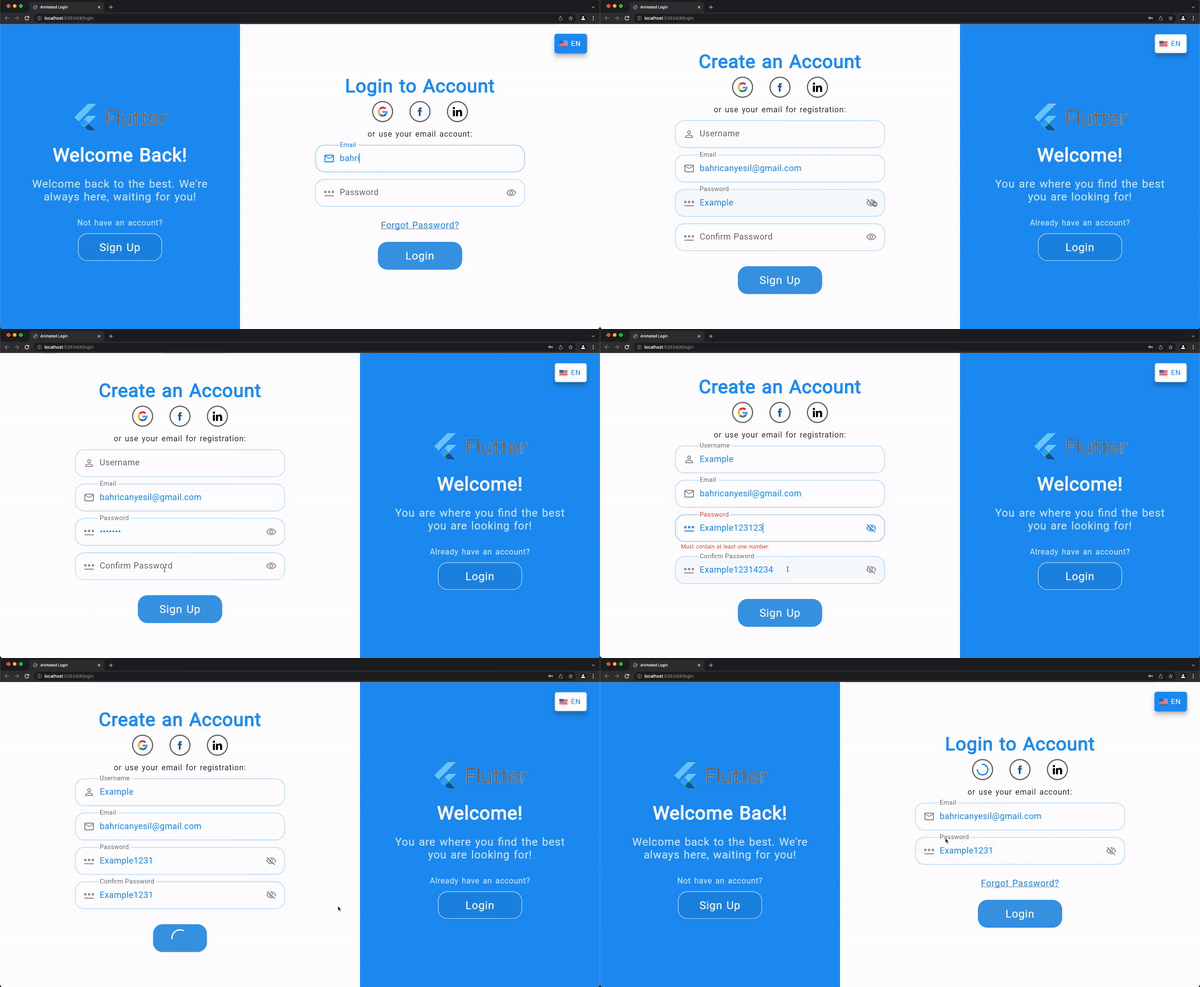
Fully responsive ready-made both login and signup screen with soft and pleasant animations.
A transparent discovery signal based on current public GitHub metadata.
This score does not audit code, security, maintainers, documentation quality, or suitability. Verify the repository and its current documentation before adoption.
Animated Login for Flutter is a ready-made login/signup screen with soft and pleasant animations.
It is fully responsive to be able to use on both web and mobile apps. You can welcome your users with this beautiful animated screen that gives functionality for both login and sign up.

You can follow the instructions for installation here
Add any URL schemes passed to canLaunchUrl as LSApplicationQueriesSchemes
entries in your Info.plist file, otherwise it will return false.
Example:
<key>LSApplicationQueriesSchemes</key>
<array>
<string>sms</string>
<string>tel</string>
</array>
See -[UIApplication canOpenURL:] for more details.
Add any URL schemes passed to canLaunchUrl as <queries> entries in your
AndroidManifest.xml, otherwise it will return false in most cases starting
on Android 11 (API 30) or higher. A <queries>
element must be added to your manifest as a child of the root element.
Example:
<!-- Provide required visibility configuration for API level 30 and above -->
<queries>
<!-- If your app checks for SMS support -->
<intent>
<action android:name="android.intent.action.VIEW" />
<data android:scheme="sms" />
</intent>
<!-- If your app checks for call support -->
<intent>
<action android:name="android.intent.action.VIEW" />
<data android:scheme="tel" />
</intent>
</queries>
See the Android documentation for examples of other queries.
| Property | Type | Description |
|---|---|---|
| onSignup | SignupCallback | Signup callback that will be called after signup button pressed. |
| onLogin | LoginCallback | Login callback that will be called after login button pressed. |
| socialLogins | List<SocialLogin> | List of social login options that will be provided. |
| loginTexts | LoginTexts | Determines all of the texts on the screen. |
| loginDesktopTheme | LoginViewTheme | Determines all of the theme related things for desktop view. |
| loginMobileTheme | LoginViewTheme | Determines all of the theme related things for mobile view. |
| onForgotPassword | ForgotPasswordCallback | Callback that will be called after on tap of forgot password text. Commonly it navigates user to a screen to reset the password. |
| formKey | GlobalKey<FormState> | The optional custom form key, if not provided will be created locally. |
| checkError | bool | Indicates whether the login screen should handle errors, show the error messages returned from the callbacks in a dialog. |
| showForgotPassword | bool | Indicates whether the forgot password option will be enabled. |
| showChangeActionTitle | bool | Indicates whether the change action title should be displayed. |
| showPasswordVisibility | bool | Indicates whether the user can show the password text without obscuring. |
| nameValidator | ValidatorModel | Custom input validator for name field. |
| emailValidator | ValidatorModel | Custom input validator for email field. |
| passwordValidator | ValidatorModel | Custom input validator for password field. |
| validateName | bool | Indicates whether the name field should be validated. |
| validateEmail | bool | Indicates whether the email field should be validated. |
| validatePassword | bool | Indicates whether the password fields should be validated. |
| nameController | TextEditingController | Optional TextEditingController for name input field. |
| emailController | TextEditingController | Optional TextEditingController for email input field. |
| passwordController | TextEditingController | Optional TextEditingController for password input field. |
| confirmPasswordController | TextEditingController | Optional TextEditingController for confirm password input field. |
| backgroundImage | String | Full asset image path for background of the welcome part. |
| logo | Widget | Custom widget to display a logo. Its size is constrained. |
| signUpMode | SignUpModes | Enum to determine which text form fields should be displayed in addition to the email and password fields: Name / Confirm Password / Both. |
| languageOptions | List<LanguageOption> | List of languages that user can select. |
| changeLanguageCallback | ChangeLanguageCallback | Callback that will be called when a language is selected. |
| selectedLanguage | LanguageOption | Selected language that is stored in your side. |
| changeLangOnPressed | ChangeLangOnPressedCallback | Optional function will be called on pressed to the change language button. It should prompt a dialog to select a language and return the selected language. |
| Property | Type | Description |
|---|---|---|
| welcome | String | Welcome title in signUp mode for the informing part. |
| welcomeDescription | String | Welcome description in signUp mode for the informing part. |
| signUp | String | Action button text for sign up mode. |
| signUpFormTitle | String | Form title for sign up mode. |
| signUpUseEmail | String | Use email CTA for sign up mode. |
| welcomeBack | String | Welcome title in login mode for the informing part. |
| welcomeBackDescription | String | Welcome description in login mode for the informing part. |
| login | String | Action button text for login mode. |
| loginFormTitle | String | Form title for login mode. |
| loginUseEmail | String | Use email CTA for login mode. |
| forgotPassword | String | Forgot password text for login mode. |
| notHaveAnAccount | String | Text above the sign up button to direct users who don't have an account. |
| alreadyHaveAnAccount | String | Text above the login button to direct users who already have an account. |
| nameHint | String | Hint text for name [TextFormField] |
| emailHint | String | Hint text for email [TextFormField] |
| passwordHint | String | Hint text for password [TextFormField] |
| confirmPasswordHint | String | Hint text for confirm password [TextFormField] |
| passwordMatchingError | String | The error text for not matching password and confirm password inputs. |
| dialogButtonText |