Loading repository data…
arturoeanton / repository
go-notebook
Go-Notebook is inspired by Jupyter Project (link) in order to document Golang code.
#data#data-science#data-visualization#documentation#gobook#godoc
Live repository statistics
★ 41Stars
⑂ 3Forks
◯ 1Open issues
◉ 41Watchers
README preview
Go-Notebook
Go-Notebook is an app that was developed using go-echo-live-view framework, developed also by us.
GitHub repository is here.
For this project we using https://github.com/cosmos72/gomacro too
About
Go-Notebook is inspired by Jupyter Project (link) in order to document Golang code.
You can add code and text depends your needs.
Features
- Modern UI with light/dark theme, CodeMirror editor with Go syntax highlighting, and keyboard shortcuts (run cells with
Shift+Enter). - Jupyter-style workflow: execution counter (
[n],[*]while running), Run all, Clear output per cell or for the whole notebook, move/insert/duplicate cells from the hover toolbar, and collapsible outputs. ShowPlot(p)works out of the box for gonum plots (host-side via reflection, no gonum dependency in the binary).- Notebook manager sidebar: create, rename, duplicate and delete notebooks.
- Per-tab sessions: each browser tab gets its own notebook and interpreter.
- Cell outputs are persisted with the notebook and survive reloads; saving is automatic (debounced).
- Export any notebook as a standalone HTML page (
Exportbutton or/export/<name>). - Headless, parameterized runs:
go-notebook run <name> -p key=value -o report.htmlexecutes every cell and writes the HTML report — schedule it with cron for automated reporting. - Variables panel (
Varsbutton): live view of the interpreter's variables with name, type and value, refreshed after every cell run. - Markdown cells rendered server-side.
- Bundled libraries, importable from any cell with no network access or plugin compilation (precompiled gomacro bindings in
bindings/): - Interactive data grid:
ShowGrid(df)renders a live, server-side grid with sorting, filtering and pagination — only the visible page travels to the browser. - SQL built in:
ReadSQL(driver, dsn, query)returns a go-pandas DataFrame andSQLExecruns statements, with sqlite (no cgo) and postgres drivers compiled into the binary. - Native SVG charts with hover tooltips:
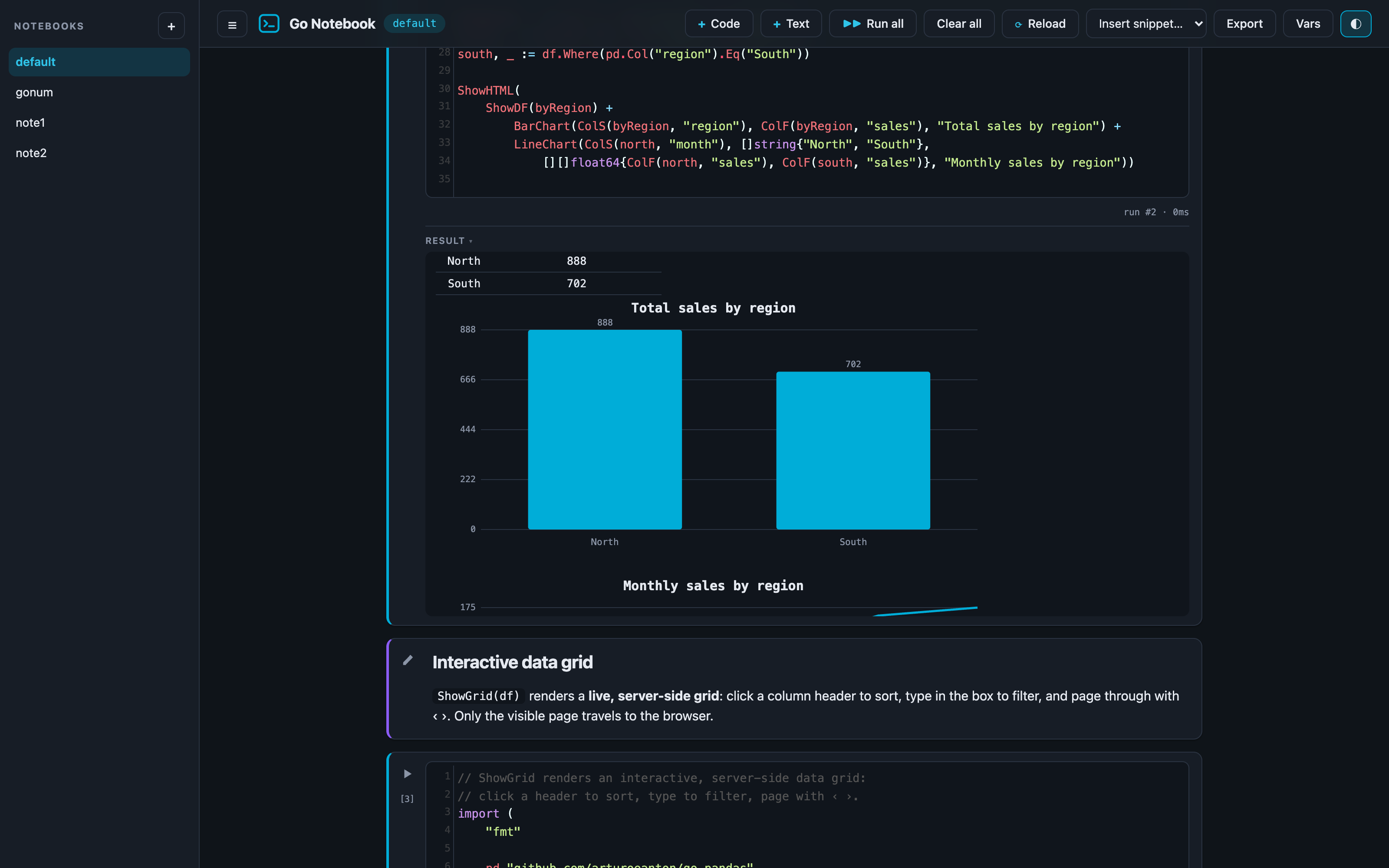
BarChart,LineChart,AreaChart,ScatterChart,Histogram,PieChart— no plotting engine to compile. - Helpers available in every cell (defined in
default.gonote):ShowDF(df)renders a DataFrame as an HTML table,ShowHTML(s)renders raw HTML,ColF/ColSpull DataFrame columns as slices. - Other third-party packages can still be imported at runtime through gomacro module imports (requires the Go toolchain and network).
- The default notebook demos the bundled libraries and runs instantly. The
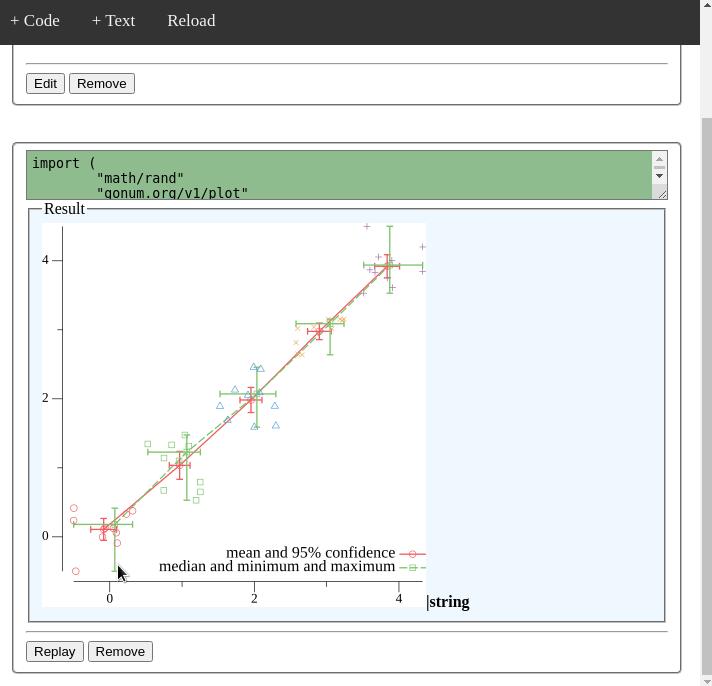
gonumnotebook (pick it from the toolbar) demos gonum/plot: its first run downloads and compiles the package on the fly, which can take a minute or two.
Multi-user mode
Authentication is off by default (open mode, for local use). Enable it by creating users:
go run . user add ana            # prompts for a password
go run . user list
go run . user del ana
With at least one user in users.json, the server requires signing in and
gives each user their own workspace (workspaces/<user>/), seeded with
the default notebook on first login. Passwords are stored as bcrypt hashes
and sessions use HMAC-signed cookies. users.json and workspaces/ are
gitignored.
Security
Notebook cells run arbitrary Go code with the server's privileges — that is the point of the tool, and also the reason to be careful:
- The server listens on
localhost:1323by default. To expose it use-p 0.0.0.0:1323, enable authentication, and put it behind TLS. - Authentication controls who gets in, not what code can do: any signed-in user can read files, open network connections and consume resources on the host. Only give accounts to people you would give shell access to.
- For anything beyond a trusted team, run one instance per trust boundary in the provided Docker container (it drops to a non-root user).
Requirements
Go 1.25.5 or newer.
Run
git clone https://github.com/arturoeanton/go-notebook.git
cd go-notebook
go run .
Wait
⇨ http server started on [::]:1323
Go to
Run on docker
The image is published on Docker Hub as
arturoeanton/go-notebook
with the tags latest and v2 (current stable). Inside the container the
server listens on 0.0.0.0:1323 and runs as a non-root user.
docker pull arturoeanton/go-notebook:v2
docker run --rm -p 1323:1323 arturoeanton/go-notebook:v2
Run it in the background instead:
docker run -d --name gonote -p 1323:1323 arturoeanton/go-notebook:v2
docker logs -f gonote   # follow the logs
docker stop gonote      # stop it
Go to
Build the image yourself
docker build . -t arturoeanton/go-notebook:v2 -t arturoeanton/go-notebook:latest
docker push arturoeanton/go-notebook:v2
docker push arturoeanton/go-notebook:latest
Change notebooks and snippet folders
Docker
docker run --rm -p 1323:1323 --volume ./notebooks:/app/notebooks --volume ./snippet:/app/snippet arturoeanton/go-notebook:v2
Podman
podman run --rm -p 1323:1323 --volume ./notebooks:/app/notebooks:Z --volume ./snippet:/app/snippet:Z arturoeanton/go-notebook:v2
Regenerating the bundled bindings
The files in bindings/ are generated with the gomacro CLI (mode _3) and
registered at startup through imports.Packages.Merge. To update them after
bumping a library version:
go install github.com/cosmos72/gomacro@latest
echo 'import _3 "github.com/arturoeanton/go-pandas"' | GODEBUG=gotypesalias=0 gomacro
then copy the generated file from $GOPATH/src/github.com/cosmos72/gomacro/imports/thirdparty/
into bindings/, changing the package clause to bindings.
Screenshots
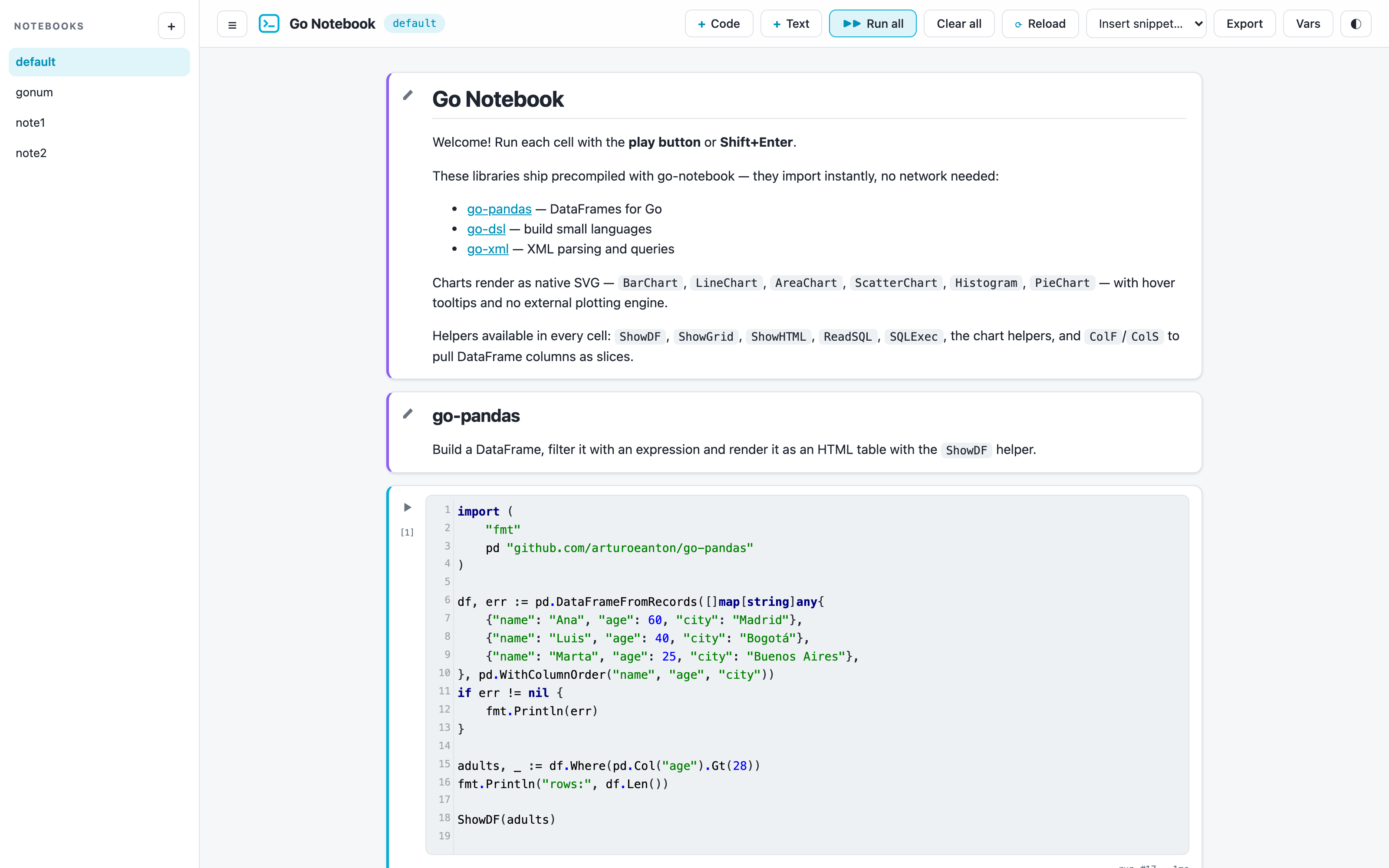
The default notebook, with markdown cells, Go code with syntax highlighting and Jupyter-style execution counters:
Native SVG charts, in dark mode:
The interactive server-side data grid (ShowGrid), with sorting, filtering
and pagination:
To Do
This project is still in progress, we are working in the following features.
- Add examples.
- Save snippet
- default.gonote.json convert in folder, and run files in this folder.
Contributing
Pull requests are welcome. For major changes, please open an issue first to discuss what you would like to change.