SebOuellette /
LiveBot
An app that allows you to be inside a bot!
84/100 healthRecently updatedActive repository
JavaScriptApache-2.0#app#application#bot#discord
⑂ 179 forks◯ 38 issuesUpdated 1 day ago
Loading repository data…
Siddhart / repository
Discord bot that uses the Twitch API to send a message whenever a streamer goes live.
A transparent discovery signal based on current public GitHub metadata.
This score does not audit code, security, maintainers, documentation quality, or suitability. Verify the repository and its current documentation before adoption.
This Discord bot will automatically send a message and tag the assigned role whenever a streamer went live. The notifications will update every 10 minutes(default) while the streamer is live.
This Discord bot uses The Official Twitch Api. You will be able to assign unlimited streamers to the bot. The bot uses the api to fetch the channel data to see if the streamer is live. If the streamer is live it will send a message in the assigned channel and it will also tag the assigned role. You will be able to choose the update time. If the streamer is still live the bot will update the message after X amount of time (default 10 minutes).
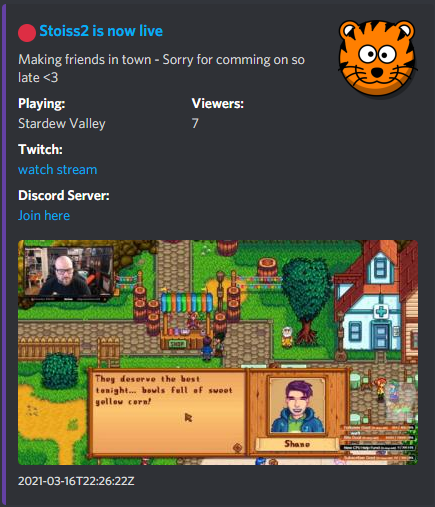
First you will have to clone the project.
$ git clone https://github.com/Siddhart/Twitch-Discord-Bot
After that open the config.json file
{
    "DiscordServerId": "DISCORD_GUILD_ID(REQUIRED)",
    "token": "DISCORD_API_BOT_TOKEN(REQUIRED)",
    "twitch_clientID": "TWITCH_API_CLIENT_ID(REQUIRED)",
    "twitch_secret": "TWITCH_API_SECRET(REQUIRED)",
    "cron": "*/10 * * * * *",
    "channelID": "CHANNELD_ID(REQUIRED)",
    "roleID": "ROLE_ID(NOT REQUIRED)",
    "channels": [
        {
            "ChannelName": "STREAMER_NAME(REQUIRED)",
            "DiscordServer": "DISCORD_SERVER_INVITE_URL(NOT REQUIRED)",
            "twitch_stream_id": "",
            "discord_message_id": ""
        }
    ],
    "authToken": ""
}
NOTE: Do NOT add anything in the fields that are already empty. These fields will automatically update.
Some of values in the config.json template have "(NOT REQUIRED)" in it. If you are not using this replace it with an empty string.
"DISCORD_SERVER_INVITE_URL(NOT REQUIRED)" --> ""
In the config.json there is a channels array. If you want to add streamers you just add new objects to this array.
{
   "ChannelName": "STREAMER_NAME(REQUIRED)",
   "DiscordServer": "DISCORD_SERVER_INVITE_URL(NOT REQUIRED)",
   "twitch_stream_id": "",
   "discord_message_id": ""
}
An array with multiple streamers will look something like this:
{
   "ChannelName": "STREAMER1",
   "DiscordServer": "Some Discord invite url here",
   "twitch_stream_id": "",
   "discord_message_id": ""
},
{
   "ChannelName": "STREAMER2",
   "DiscordServer": "",
   "twitch_stream_id": "",
   "discord_message_id": ""
}
In order for the bot to work properly you will have to install the node packages discord.js, cron and request. Use the following command to install the dependencies.
$ npm install discord.js cron request
After you updated the config.json and installed the dependencies you can run the final command. Use the command in the same directory as the index.js file.
$ node index.js
Congratulations! You have successfully setup the bot. If there are any errors please send me a dm on Discord siddhartt
Selected from shared topics, language and repository description—not editorial ratings.
SebOuellette /
An app that allows you to be inside a bot!
84/100 healthChristopherBThai /
A Discord bot that will keep track of your OwO
68/100 healthSwitchbladeBot /
The open source Discord bot that solves all of your problems.
alexemanuelol /
A NodeJS Discord Bot that uses the rustplus.js library to utilize the power of the Rust+ Companion App with additional Quality-of-Life features.
74/100 healthFKLC /
WhatsAppToDiscord is a Discord bot that uses WhatsApp Web as a bridge between Discord and WhatsApp.
32/100 healthiTzArshia /
🧠 Example Discord Bot written in JavaScript that uses OpenAIs models such as ,`GPT 4`, `GPT-3.5-Turbo`, `Dall-E`, and `Text-Moderation-Stable` with many features such as ChatGPT-Style Conversation, image-Generator, Auto-Moderator and more!
78/100 health