Voter-Machine-Using-MATLAB
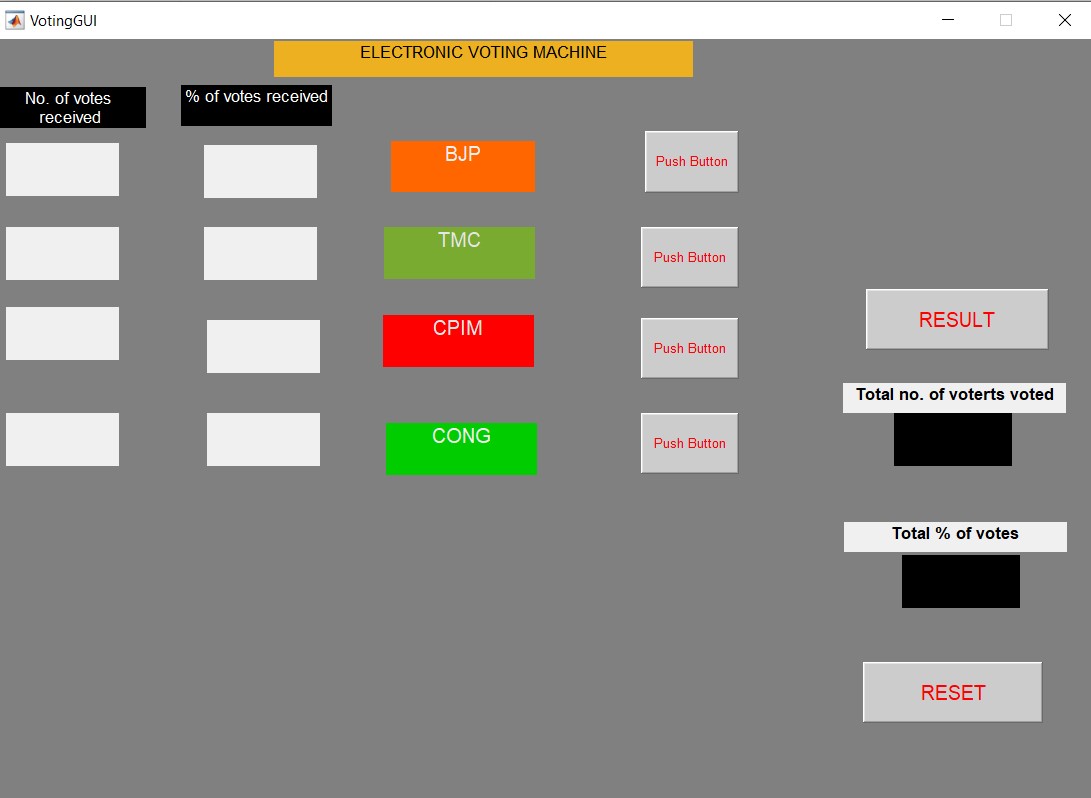
In this project, a demo software program using MATLAB based graphical user interface (GUI) to demonstrate the working of an EVM is presented. GUIDE is used to develop the GUI for this demo project, with components like "Static Text" to display Party Name, Votes, Votes Percentage, and "Push Button" components are used as Vote, Result and Reset Buttons. The logic is this demo project is very simple, for each party we have created a global variable, which is declared and initialized. So some of the additional feature of this project are as follows: Voters who's names and Id's are present in Database can only vote. Duplicate Voting is not allowed. Voting Percentage is also calculated. So with the above mentioned features one can create a more robust and professional system. To create database, Microsoft Excel is used and names of voters and there voting id's are written in two different columns. For this project a sample database of 20 voters is created. We have the database now, and then in system we have to load this data, and based on the ID's we have to take action whether a voter can vote or not. Whenever someone presses the voting button, system will asks for its voting id and then search the voting id in its database.
After the addition of database in the system now we can see various changes in the GUI. Whenever a voter will cast his/her vote he has to enter his Voting ID only then he/she will be able to cast his/her vote. Also, if he tries to vote again, the system will display,”You cannot vote multiple times.” And when a wrong ID is entered the system displays,”No user found!”
PROPOSED SYSTEM:
GUIDE is used to develop the GUI for this project, with components like "Static Text" todisplay Party Name, Votes, Votes Percentage, and "Push Button" components are used as Vote,Resultand Reset Buttons. Also, we can design the EVM interface according to our wish i.e., we can change the colour ,font style and size of text. Logo can also be added for each party.
After implementing all these steps,we obtained the GUI for our Voting Machine, which is as follows:
Video Demonstration of Working of the Voter Machine:
https://drive.google.com/file/d/1ua12IP12uPIpqHsMEj3RZhPWrUlJO_BR/view?usp=sharing