Loading repository data…
Jazzmin-Washington / repository
Using teachablemachine.withgoogle.com, a machine model was trained to recognize four images: Rock, Paper, Scissors and Nothing. This training model was then used to design a game of Rock, Paper, Scissors in which users play against the computer using user's camera.
A transparent discovery signal based on current public GitHub metadata.
This score does not audit code, security, maintainers, documentation quality, or suitability. Verify the repository and its current documentation before adoption.
Using a Teachable Machine , we trained an image model with four different classes: Rock, Paper, Scissors and Nothing. The trained model was then downloaded via TensorFlow and saved in a directory.

This model makes variable predictions containing the output of the model. Each element in the output corresponds to the class. The more pictures one uses, the better the overall model. This is why 1000 + images were used for this model. Please keep in mind, the handshapes should be similar to those shown above or the model may not predict the player choices as accurately.
Within the command line:
#To change the directory to my working directory:
cd ~/Documents/AiCore/AiCore_Projects/Computer_Vision_Rock_Paper_Scissors
#To create a new conda environment.
# Note the newest version of TensorFlow is not compatible with current version of python so the environment was made with an older version.
$ conda create -n Computer_Vision_RPS python=3.8
#To activate the environment:
$ conda activate Computer_Vision_RPS
#To install the dependencies: opencv-python, TensorFlow and ipykernel
$ conda install opencv-python
$ conda install tensorflow
$ conda install ipykernel
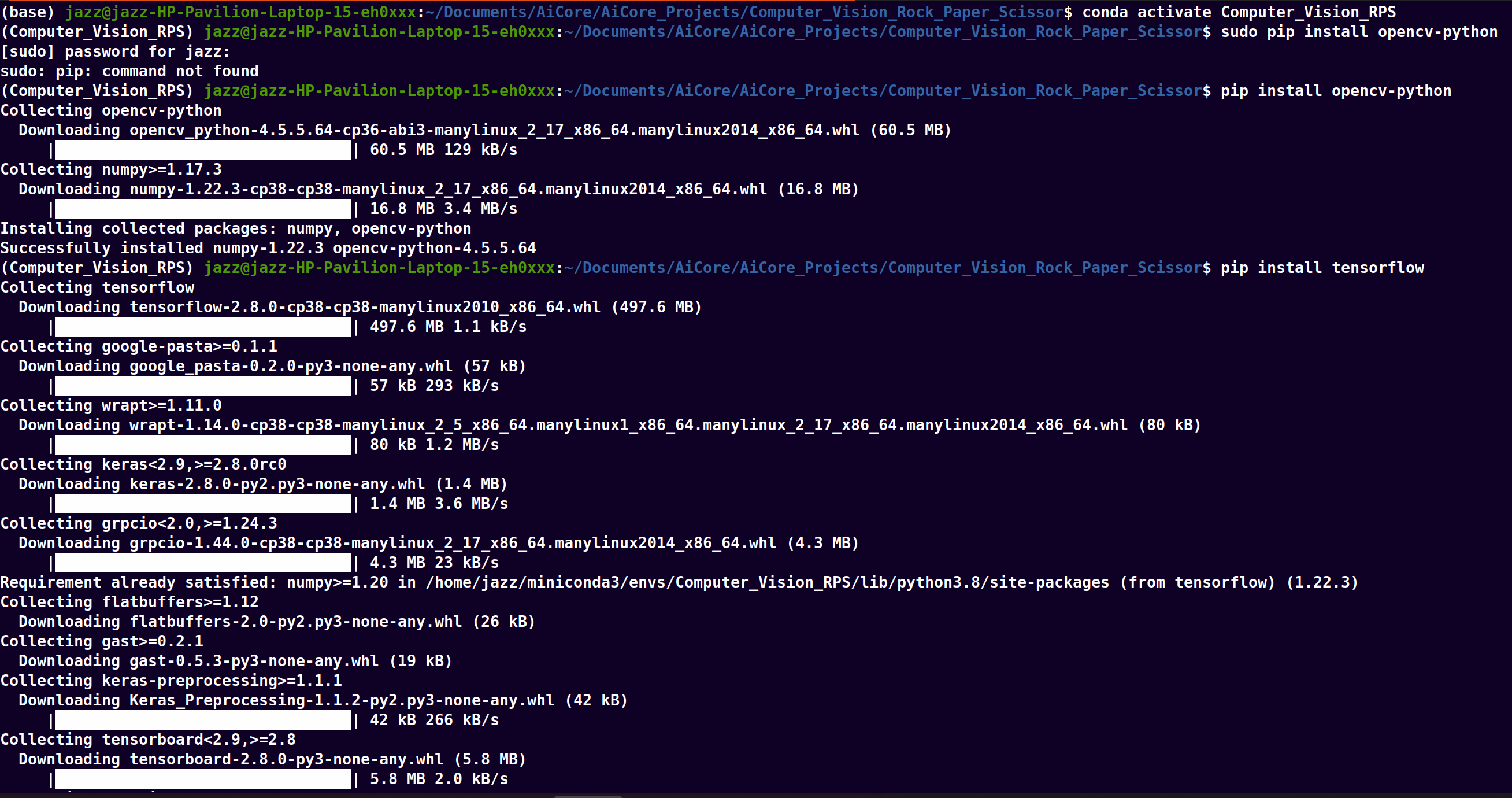
Picture Above: The necessary dependencies were downloaded and pictured above.
The model was then run on a local machine using the previously made conda environment as the Jupyter/Python interpreter. The following code was used to test the decision accuracy of the model and ensure it recognized the different classes.
model = load_model('RPS_Model_Final.h5')
cap = cv2.VideoCapture(0)
data = np.ndarray(shape=(1, 224, 224, 3), dtype=np.float32)
while True:
ret, frame = cap.read()
resized_frame = cv2.resize(frame, (224, 224), interpolation = cv2.INTER_AREA)
image_np = np.array(resized_frame)
normalized_image = (image_np.astype(np.float32) / 127.0) - 1 # Normalize the image
data[0] = normalized_image
prediction = model.predict(data)
cv2.imshow('Rock, Paper, Scissors Game', frame)
new_RPS_game.getting_started()
if cv2.waitKey(1) & 0xFF == ord('q'):
break
cap.release()
cv2.destroyAllWindows()
The necessary programs were imported including tensorflow, numpy, opencv(cv2) and time. A Rock, Paper, Scissors Class was created and attributes to keep track of the overall game was initialized:
#Programs and Initialization
from random import choice
import time
import cv2
from tensorflow.keras.models import load_model
import numpy as np
class RPS_Game():
def __init__(self):
self.name = ''
self.player_choice = ''
self.computer_choice = ''
self.computer_wins = 0
self.player_wins = 0
self.options = ['Rock', 'Paper','Scissors']
self.rounds = 0
A command for user input was made to store the user's and the computer's choices using the random with python. To add a personal touch, the player is prompted to enter their name before the game begins. Note: if the camera isn't starting up, it could be due tto the program waiting for the name to be input.
def welcome(self):
print("Welcome to my Computer Vision Project in which
you will play the classic game of Rock,
Paper,Scissors")
self.name = input("Please enter you name for the game")
print('Hello,', self.name)
A winning structure function def who_wins() was created so the program can decide a winner for each round. This function will then be integrated with the camera so the output of the camera is decided as a matching 'string' within the function.
def who_wins(self):
if self.player_wins < 3 and self.computer_wins < 3 :
if self.computer_choice == self.player_choice:
print("It's a tie")
self.show_text(frame, f"It's a Tie ", (100, 300), cv2.FONT_HERSHEY_SIMPLEX, 2, (0, 255, 255), 2, cv2.LINE_8)
self.rounds +=1
cv2.waitKey(2500)
self.play_again()
elif self.player_choice == ('Rock'):
if self.computer_choice == 'Paper':
self.computer_wins += 1
print('The computer wins')
self.show_text(frame, f"The Computer Wins!!", (75, 250), cv2.FONT_HERSHEY_SIMPLEX, 1.7, (0, 255, 255), 2, cv2.LINE_8)
self.rounds +=1
cv2.waitKey(2500)
self.play_again()
elif self.computer_choice == 'Scissors':
self.player_wins +=1
self.rounds +=1
print(f'{self.name} wins!')
self.show_text(frame, f"{self.name} Wins!!", (100, 250), cv2.FONT_HERSHEY_SIMPLEX, 2, (0, 255, 255), 2, cv2.LINE_8)
cv2.waitKey(2500)
self.play_again()
elif self.player_choice == 'Paper':
if self.computer_choice == 'Scissors':
self.computer_wins += 1
self.rounds +=1
print('The computer wins')
self.show_text(frame, f"The Computer Wins!!", (75, 250), cv2.FONT_HERSHEY_SIMPLEX, 1.7, (0, 255, 255), 2, cv2.LINE_8)
cv2.waitKey(2500)
self.play_again()
elif self.computer_choice == 'Rock':
self.player_wins += 1
self.rounds +=1
print(f'{self.name} wins!')
self.show_text(frame, f"{self.name} Wins!!", (100, 250), cv2.FONT_HERSHEY_SIMPLEX, 2, (0, 255, 255), 2, cv2.LINE_8)
cv2.waitKey(2500)
self.play_again()
elif self.player_choice == 'Scissors':
if self.computer_choice == 'Paper':
self.player_wins += 1
self.rounds +=1
print(f'{self.name} wins!')
self.show_text(frame, f"{self.name} Wins!!", (100, 250), cv2.FONT_HERSHEY_SIMPLEX, 2, (0, 255, 255), 2, cv2.LINE_8)
cv2.waitKey(2500)
self.play_again()
elif self.computer_choice == 'Rock':
self.computer_wins += 1
self.rounds +=1
print('The computer wins')
self.show_text(frame, f"The Computer Wins!!", (75, 250), cv2.FONT_HERSHEY_SIMPLEX, 1.7, (0, 255, 255), 2, cv2.LINE_8)
cv2.waitKey(2500)
self.play_again()

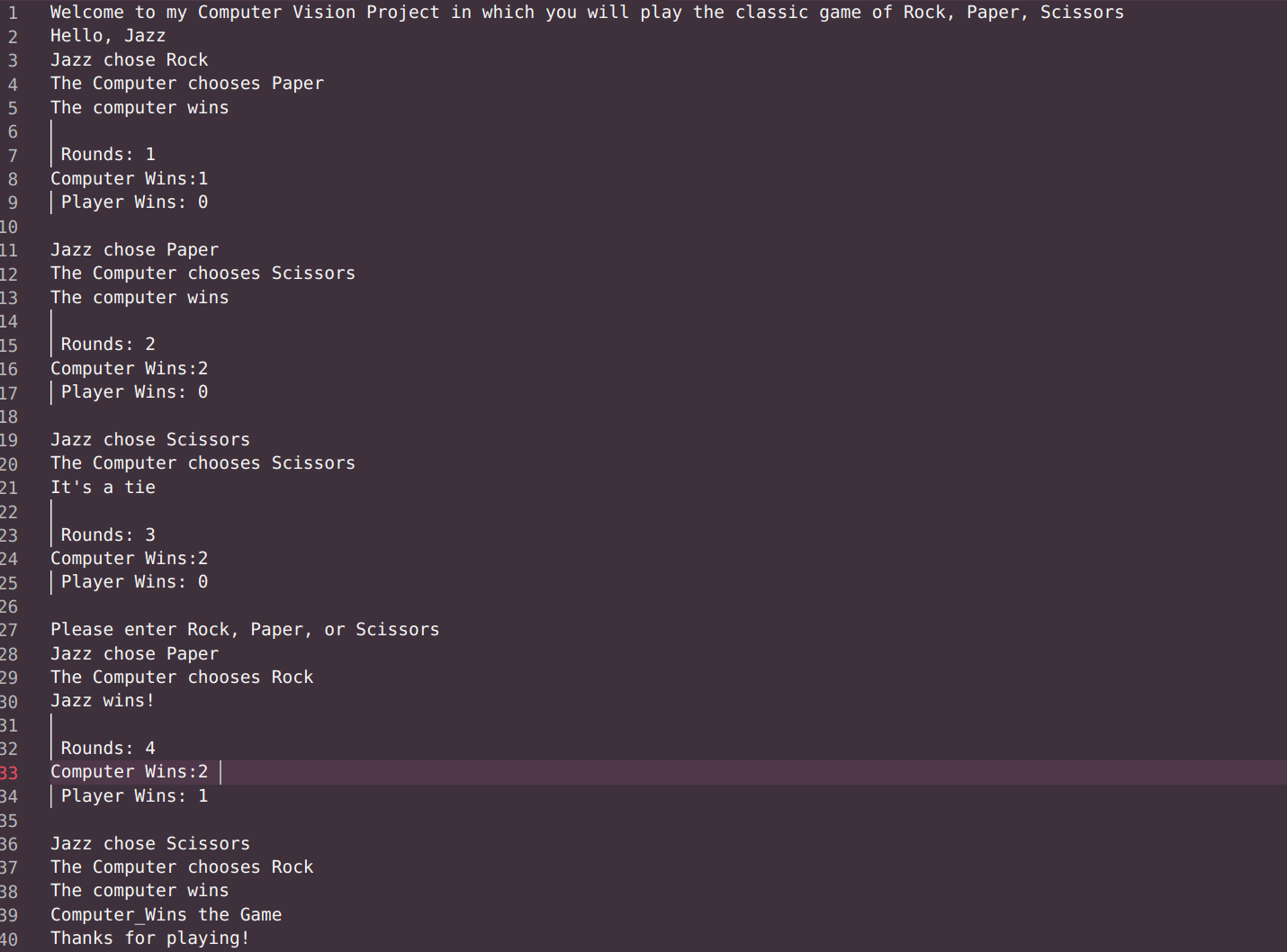
The picture above illustrated how the def who_wins() function was tested using an text input in which the user picks Rock, Paper, Scissors to ensure the correct winner is selected and the play_again() function was called properly.
After the player or the computer achieves three wins, the game will end. The self.getting_started() will then give the player the option to play again or quit the game.
#Determines when the game is over and the winner
def play_again(self):
if self.computer_wins == 3 or self.player_wins == 3:
if self.computer_wins == 3:
cv2.putText(frame, f"The Computer Wins the Game!!", (50, 250), cv2.FONT_HERSHEY_SIMPLEX, 1.7, (255, 255, 255), 2, cv2.LINE_AA)
cv2.waitKey(2500)
print('The Computer WINS the Game!!')
elif self.player_wins == 3:
cv2.putText(frame, f'{self.name} WINS the Game!!', (50, 250), cv2.FONT_HERSHEY_SIMPLEX, 1.7, (255, 255, 255), 2, cv2.LINE_AA)
cv2.waitKey(2500)
print(f'{self.name} WINS the Game!!')
else:
self.getting_started()
A class list was created to allow the program to match the input of the player to the trained model. **It is important to note that this class list should match the order of the classes that were put into the Teachable Machine
# Looks up which move is the best fit for the camera input
def move_list(self, value):
Rev_Class_Map = {
0: 'Rock',
1: 'Paper',
2: 'Scissors',
3: 'Nothing'
}
return Rev_Class_Map[value]
Next, a function was created to allow the program to make a decision on which move is being displayed by the player.The trained model ouputs an array of four numbers based on how well the input from the camera matches the classes. The np.argmax(prediction[:0]) selects the number with the highest likelihood of matching the player input. This selection was then saved as the player choice. If the Nothing class was selected the user would be asked to make another selection.
# Makes a prediction from the camera frame given when timer runs out
def make_a_prediction(self, frame, data, model):
ret, frame = cap.read()
resized_frame = cv2.resize(frame, (224, 224), interpolation = cv2.INTER_AREA)
image_np = np.ar