Kunal AI - Multi-Feature AI Assistant
A full-stack AI-powered application featuring three intelligent tools: Q&A Bot, Text Summarizer, and Expense Tracker. Built with React, TypeScript, Flask, and Google Gemini AI.



▶️ Demo Video
You can watch the project demo directly from this repository. GitHub READMEs don't allow iframes, so click the thumbnail below to open a playable preview of the demo page.
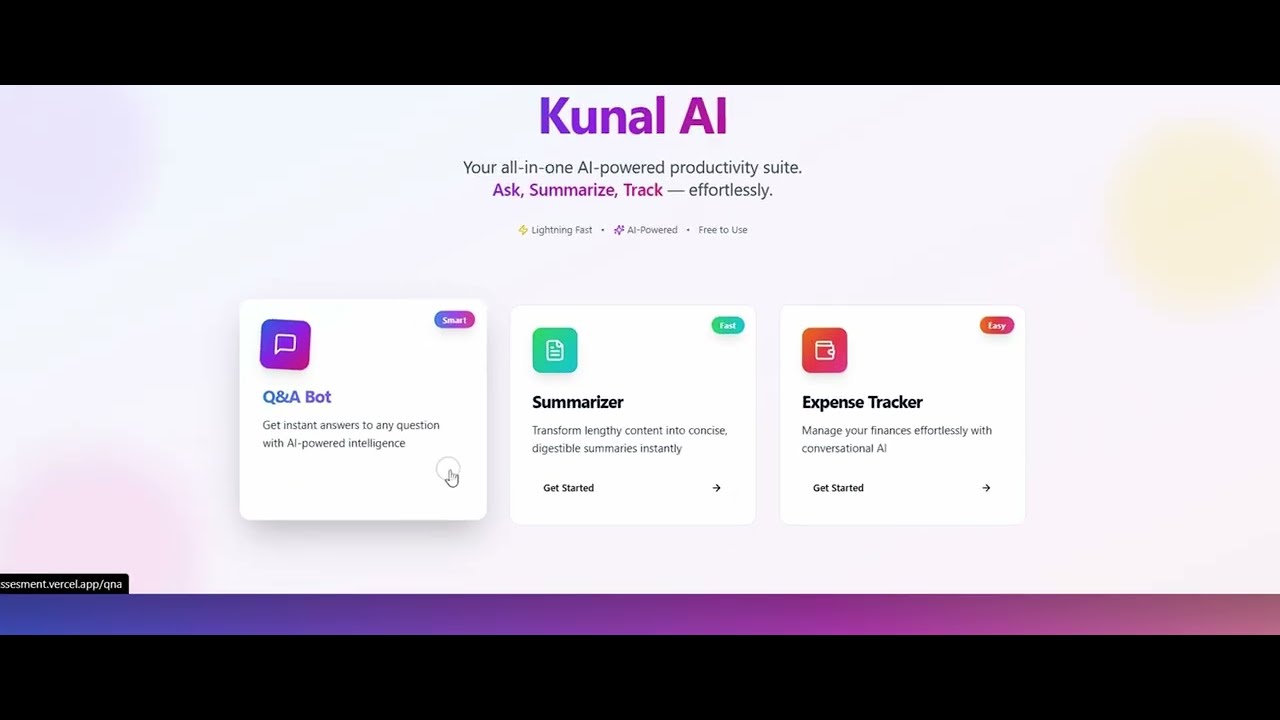
Or open the video on YouTube: https://youtu.be/RztUMrw_sJ4
🌟 Features
1. Q&A Bot
- Interactive question-answering system powered by Google Gemini
- Real-time streaming responses with character-by-character display
- Natural language understanding for diverse queries
2. Text Summarizer
- Intelligent text summarization using AI
- Extracts key points from long documents
- Clean, concise summaries
3. Expense Tracker
- AI-powered expense management
- Natural language input (e.g., "add $20 for coffee")
- Track spending with conversational commands
🏗️ Tech Stack
Frontend
- Framework: React 18.3.1 with TypeScript
- Build Tool: Vite 5.4.19
- UI Components: Shadcn UI (Radix UI primitives)
- Styling: Tailwind CSS
- Routing: React Router DOM
- State Management: TanStack Query
- Deployment: Vercel
Backend
- Framework: Flask 3.0.3
- AI Integration: LangChain + Google Gemini AI
- CORS: Flask-CORS
- Server: Gunicorn
- Deployment: Railway
📋 Prerequisites
Before you begin, ensure you have the following installed:
- Node.js (v18 or higher)
- Python (v3.11 or higher)
- pip (Python package manager)
- npm or yarn (Node package manager)
- Google Gemini API Key (Get one here)
🚀 Local Setup
1. Clone the Repository
git clone https://github.com/Hiteshydv001/Internship-assesment.git
cd Internship-assesment
2. Backend Setup
Navigate to backend directory
cd backend
Create virtual environment (recommended)
# Windows
python -m venv venv
venv\Scripts\activate

# macOS/Linux
python3 -m venv venv
source venv/bin/activate
Install dependencies
pip install -r requirements.txt
Create .env file
Create a .env file in the backend directory:
GEMINI_API_KEY=your_gemini_api_key_here
Replace your_gemini_api_key_here with your actual Google Gemini API key.
Run the backend server
# Development mode
python main.py

# Production mode with Gunicorn
gunicorn main:app --bind 0.0.0.0:5001 --workers 2
The backend server will start at http://localhost:5001
3. Frontend Setup
Navigate to frontend directory (from root)
cd frontend
Install dependencies
npm install
# or
yarn install
Create .env file (optional)
Create a .env file in the frontend directory:
VITE_API_URL=http://localhost:5001/api
Run the development server
npm run dev
# or
yarn dev
The frontend will start at http://localhost:5173
📂 Project Structure
Internship-assign/
├── backend/
│   ├── app/
│   │   ├── __init__.py          # Flask app factory with CORS config
│   │   ├── api/
│   │   │   ├── qna.py           # Q&A endpoint with streaming
│   │   │   ├── summarizer.py    # Summarization endpoint
│   │   │   └── tracker.py       # Expense tracker endpoint
│   │   └── core/
│   │       └── agents.py        # LangChain agent configurations
│   ├── config.py                # Configuration management
│   ├── main.py                  # Flask application entry point
│   └── requirements.txt         # Python dependencies
├── frontend/
│   ├── src/
│   │   ├── components/
│   │   │   ├── features/        # Feature-specific components
│   │   │   ├── layout/          # Layout components (Navbar, Footer)
│   │   │   └── ui/              # Shadcn UI components
│   │   ├── pages/               # Route pages
│   │   ├── lib/
│   │   │   ├── api.ts           # API client functions
│   │   │   └── utils.ts         # Utility functions
│   │   ├── App.tsx              # Main app component
│   │   └── main.tsx             # Entry point
│   ├── package.json             # Node dependencies
│   └── vite.config.ts           # Vite configuration
├── Dockerfile                   # Docker configuration for backend
└── README.md                    # This file
🔧 Environment Variables
Backend (backend/.env)
| Variable | Description | Required |
|---|
GEMINI_API_KEY | Google Gemini API key | Yes |
Frontend (frontend/.env)
| Variable | Description | Default |
|---|
VITE_API_URL | Backend API URL | http://localhost:5001/api |
🐳 Docker Deployment
Build Docker Image
docker build -t kunal-ai-backend .
Run Docker Container
docker run -p 8080:8080 -e GEMINI_API_KEY=your_api_key kunal-ai-backend
🌐 Production Deployment
Backend (Railway)
- Push your code to GitHub
- Connect your repository to Railway
- Add
GEMINI_API_KEY environment variable
- Railway will automatically deploy using the Dockerfile
Live Backend URL: https://internship-assesment-production.up.railway.app
Frontend (Vercel)
- Push your code to GitHub
- Import project to Vercel
- Set environment variable:
VITE_API_URL=https://internship-assesment-production.up.railway.app/api
- Deploy
Live Frontend URL: https://internship-assesment-git-main-hitesh-kumars-projects-788f775a.vercel.app
🔌 API Endpoints
Health Check
GET /api/health
Returns API status
Q&A Bot
POST /api/qna
Content-Type: application/json

{
  "question": "What is machine learning?"
}
Returns streaming text response
Summarizer
POST /api/summarize
Content-Type: application/json

{
  "text": "Long text to summarize..."
}
Returns JSON with summary
Expense Tracker
POST /api/tracker
Content-Type: application/json

{
  "prompt": "add $50 for groceries"
}
Returns JSON with tracker response
🛠️ Development
Run Tests
# Backend
cd backend
python -m pytest

# Frontend
cd frontend
npm run test
Lint Code
# Frontend
cd frontend
npm run lint
Build for Production
# Frontend
cd frontend
npm run build
🐛 Troubleshooting
CORS Issues
If you encounter CORS errors:
- Ensure
VITE_API_URL includes /api suffix
- Check that backend CORS is configured for your frontend origin
- Verify the API endpoints are correct (
/api/qna, not /qna)
API Key Errors
If you get API key errors:
- Verify your
.env file exists in the backend directory
- Ensure
GEMINI_API_KEY is set correctly
- Restart the backend server after adding the key
Port Conflicts
If ports are already in use:
- Backend: Change port in
main.py (default: 5001)
- Frontend: Change port in
vite.config.ts or use --port flag
📝 License
This project is created as part of an internship assessment.
👤 Author
Hitesh Kumar
🙏 Acknowledgments
- Google Gemini AI for powering the AI features
- Shadcn UI for beautiful components
- LangChain for AI agent orchestration
- Flask and React communities
Made with ❤️ for Kunal AI Internship Assessment