Loading repository data…
EvotecIT / repository
Dashimo
Dashimo is very simple, intuitive PowerShell generated HTML file. That's right. A single, static HTML file that you can send to email or host on a website.
#css#html#js#powershell#pswritehtmlArchived
Live repository statistics
★ 117Stars
⑂ 15Forks
◯ 0Open issues
◉ 117Watchers
README preview
Dashimo - PowerShell Module
Dashimo is very simple, intuitive PowerShell generated HTML file. That's right. A single, static HTML file that you can send to email or host on a website. Dashimo is based on PSWriteHTML which I've written and is under development. What you can do in Dashimo you can do there and more. If you would like to help with development all code related to HTML/JS/CSS is on PSWriteHTML repo.
IMPORTANT
Dashimo project has been integrated back to PSWriteHTML. This project is now ARCHIVED. Dashimo syntax will live as part of PSWriteHTML aliases.
Uninstall-Module Dashimo -AllVersions
Install-Module PSWriteHTML -Force
Everything below is now a bit irrelevant. Leaving this for historical reasons. The reason for moving Dashimo syntax to PSWriteHTML was that it was getting hard to keep both modules in sync, especially that 90% of features was identical. I still like Dashimo syntax therefore it will be fully supported as part of PSWriteHTML. Hope to see you in that project.
ARCHIVE
How to Install
While you can take sources and use it from here, Dashimo actually is composed of multiple other of my modules. To get it up and running you will neeed PSWriteHTML. PSWriteHTML will need PSSharedGoods, and PSSharedGoods will need Connectimo and PSWriteColor. You can get all that from sources but if you just want to use my modules you should use Install-Module command. It's available in PowerShell 5.1. As an added bonus when I publish modules to PowerShellGallery I remove any junk, minimize modules to a single file which makes them faster to load and use. I really encourage you to use module from PowerShellGallery and treat GitHub as highely development version.
Simply use:
Install-Module Dashimo
And to update
Update-Module Dashimo
That's it. Whenever there's new version you simply run the command and you can enjoy it. Remember, that you may need to close, reopen PowerShell session if you have already used module before updating it.
The important thing is if something works for you on production, keep using it till you test the new version on a test computer. I do changes that may not be big, but big enough that auto-update will break your code. For example, small rename to a parameter and your code stops working! Be responsible!
Changelog
-
0.0.22
- This is last release of DASHIMO. It basically points to PSWRITEHTML making Dashimo, an empty module that just downloads PSWriteHTML. There is no need to download/install Dashimo. You can use Dashimo syntax straight from PSWriteHTML, just like you did before. Just make sure to update PSWriteHTML to newest version.
-
0.0.20
- TableConditionalFormatting
- Function was moved to PSWriteHTML (as an alias to New-HTMLTableConditionalFormatting) due to added benefits. It has much more functionality now.
- TableConditionalFormatting
-
0.0.19 - 2019.07.12
- Table
- Fix for Buttons - Add pageLength to Table button validation set - PR by dizech
- Table
-
0.0.18 - 2019.07.09
- Table
- Added $PriorityProperties parameter - it works also on ScrollX and other types of places contrary to ResponsivePriorityProperties which only works on Responsive Table
- Table
-
0.0.17 - 2019.07.08
- Table
- Small improvement when no data provided
- TableCondition
- Supports contains now - PR by Adam Cook (codamok)
- Removed ColorSchemes - removal of ReportHTML old code
- Table
-
0.0.16 - 2019.07.01
- Table
- Fix for ScrollX with low amount of columns
- Table
-
0.0.15 - 2019.07.01
Credits
Matthew Quickenden (@lucidqdreams) - author of ReportHTML - without him this wouldn't be possible.
Examples
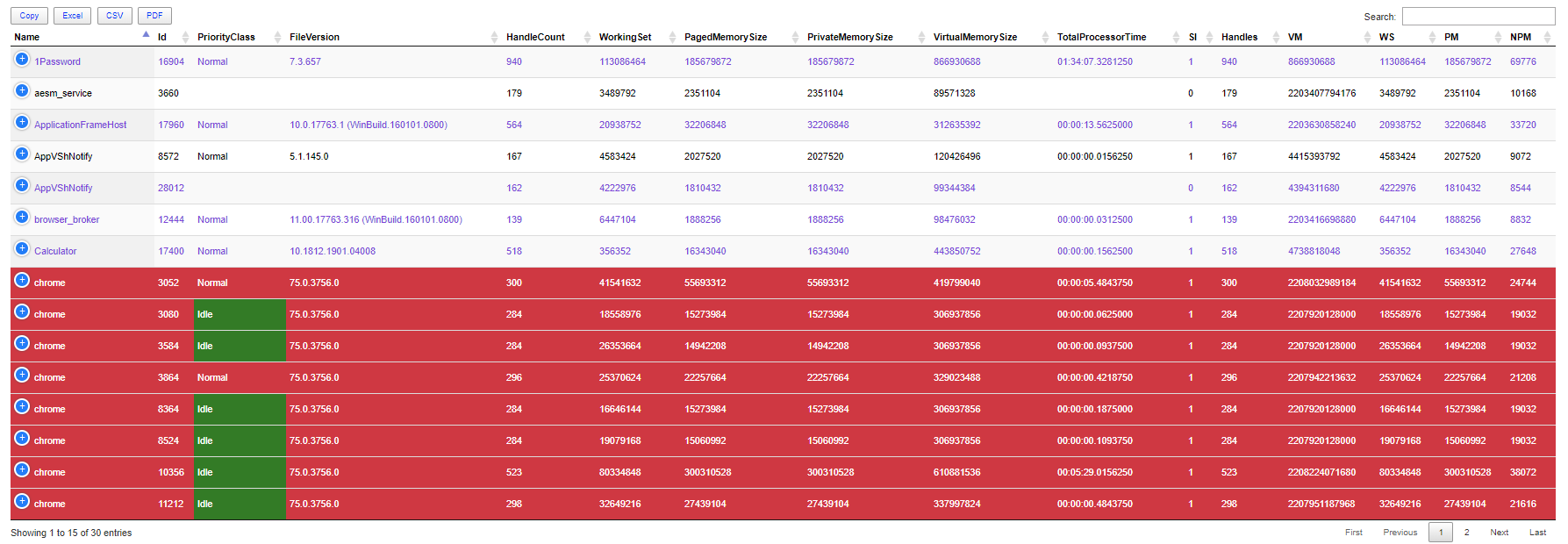
Conditional formatting in action...
$Process = Get-Process | Select-Object -First 30

Dashboard -Name 'Dashimo Test' -FilePath $PSScriptRoot\DashboardSimplestTableConditions.html -Show {
    Table -DataTable $Process -HideFooter {
        TableConditionalFormatting -Name 'ID' -ComparisonType number -Operator gt -Value 10000 -Color BlueViolet -Row
        TableConditionalFormatting -Name 'Name' -ComparisonType string -Operator eq -Value 'chrome' -Color White -BackgroundColor Crimson -Row
        TableConditionalFormatting -Name 'PriorityClass' -ComparisonType string -Operator eq -Value 'Idle' -Color White -BackgroundColor Green
    }
}
Easy example:
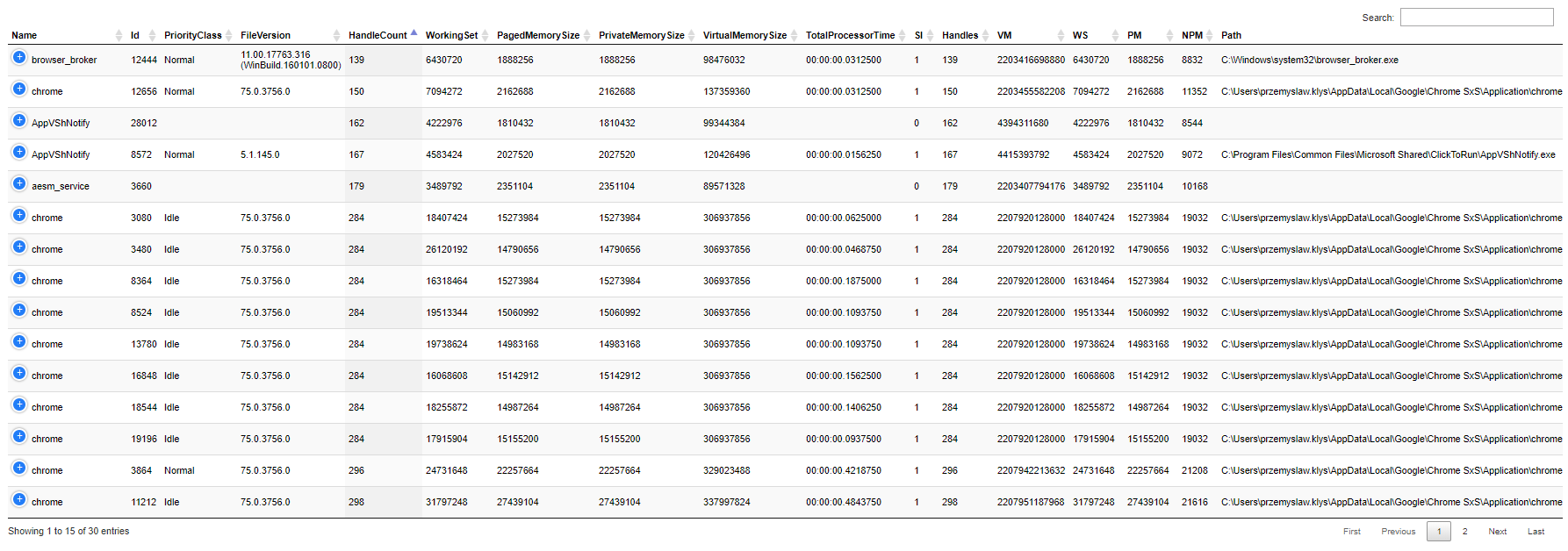
$Process = Get-Process | Select-Object -First 30

Dashboard -Name 'Dashimo Test' -FilePath $PSScriptRoot\DashboardSimplestTable.html -AutoRefresh 15 -Show {
    Table -DataTable $Process -DefaultSortIndex 4 -ScrollCollapse -HideFooter -Buttons @()
}
Complicated, still easy example:
$Process = Get-Process | Select-Object -First 30
$Process1 = Get-Process | Select-Object -First 5
$Process2 = Get-Process | Select-Object -First 10
$Process3 = Get-Process | Select-Object -First 10

Dashboard -Name 'Dashimo Test' -FilePath $PSScriptRoot\DashboardEasy.html -Show {
    Tab -Name 'First tab' {
        Section -Name 'Test' {
            Table -DataTable $Process
        }
        Section -Name 'Test2' {
            Panel {
                Table -DataTable $Process1
            }
            Panel {
                Table -DataTable $Process1
            }
        }
        Section -Name 'Test3' {
            Table -DataTable $Process -DefaultSortColumn 'Id'
        }
    }
    Tab -Name 'second tab' {
        Panel {
            Table -DataTable $Process2
        }
        Panel {
            Table -DataTable $Process2
        }
        Panel {
            Table -DataTable $Process3 -DefaultSortIndex 4
        }
    }
}
