Loading repository data…
EdgeTypE / repository
rustview
A Streamlit/Gradio equivalent for pure Rust. Build live browser UIs in seconds with no HTML, CSS, or JS required.
#dashboard#data-app#gradio#gui#immediate-mode#internal-tools
Live repository statistics
★ 19Stars
⑂ 2Forks
◯ 0Open issues
◉ 19Watchers
70/100
OPENREPOHUB HEALTH SIGNAL
Healthy signals
A transparent discovery signal based on current public GitHub metadata.
Recent activity35% weight
100
Community adoption25% weight
21
Maintenance state20% weight
100
License clarity10% weight
0
Project information10% weight
100
This score does not audit code, security, maintainers, documentation quality, or suitability. Verify the repository and its current documentation before adoption.
README preview
RustView
A Streamlit/Gradio equivalent for pure Rust. Write a plain Rust function, and RustView turns it into a live browser UI -- no HTML, no JavaScript, no frontend build step.
The project is under active development. The core widget set and layout system are usable today, but the API is not yet stable. Expect breaking changes before a 1.0 release.
Why RustView?
If you've used Streamlit or Gradio in Python, you know how fast you can go from an idea to a working UI. RustView brings that same experience to Rust. No HTML, no CSS, no JavaScript, no npm, no build step. Just a function.
This makes it a good fit when you already have Rust code and want to put a UI on it without switching languages or maintaining a separate frontend. Internal tools, ML model demos, data explorers, system dashboards: anything where you want a real browser UI without the overhead of a full web stack.
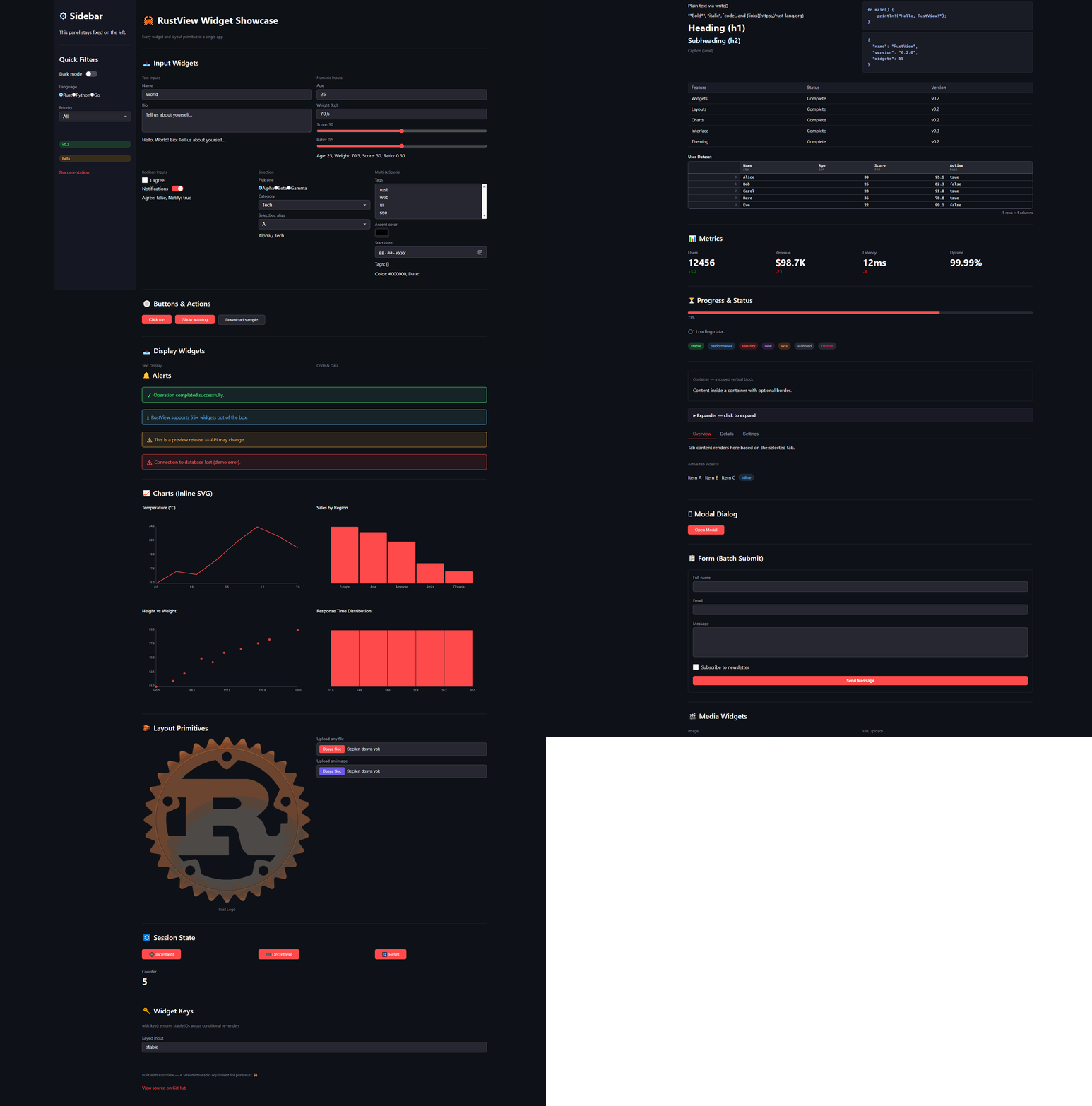
Quick Start
Add the dependency to your Cargo.toml:
[dependencies]
rustview = "0.1.5"
Or use cargo add:
cargo add rustview
Write your app:
use rustview::prelude::*;

fn app(ui: &mut Ui) {
    let name = ui.text_input("Your name", "World");
    let times = ui.int_slider("Repeat", 1..=10, 3);
    for _ in 0..times {
        ui.write(format!("Hello, {}!", name));
    }
}

fn main() {
    rustview::run(app);
}
Run it:
cargo run
# opens http://127.0.0.1:8501
Features
RustView ships 50+ widgets across these categories:
| Category | Widgets |
|---|---|
| Input | text_input, int_slider, slider, checkbox, button, toggle, radio, select, selectbox, multi_select, text_area, number_input, int_input, color_picker, date_picker, file_upload, image_upload |
| Output | write, heading, subheading, caption, markdown, code, json, table, dataframe, metric, progress, spinner, divider, badge, link |
| Alerts | success, warning, info, error, toast |
| Media | image, audio, video, download_button |
| Layout | container, sidebar, columns, tabs, expander, row, modal, empty |
| Forms | form, form_submit_button |
| Charts | line_chart, bar_chart, scatter_chart, histogram |
| Theming | Theme struct with CSS custom properties |
Full API docs: docs/widgets.md
Examples
Four runnable examples are included:
cargo run --example hello       # minimal text-in / text-out
cargo run --example counter     # stateful counter with buttons
cargo run --example dashboard   # multi-column layout with charts
cargo run --example showcase    # every widget on a single page
Built with RustView
Here are some projects powered by RustView:
- OldTurkicOCR - An Optical Character Recognition tool for Old Turkic (Orkhon) script.
Configuration
use rustview::server::RustViewConfig;

let config = RustViewConfig {
    bind: "0.0.0.0:8080".parse().unwrap(),
    title: "My Dashboard".into(),
    session_ttl_secs: 3600,
    max_upload_bytes: 10_000_000,
    ..Default::default()
};
rustview::run_with_config(app, config);
Themes are customizable through a Theme struct:
use rustview::server::{RustViewConfig, Theme};

let config = RustViewConfig {
    theme: Theme {
        background: "#ffffff".into(),
        foreground: "#1a1a1a".into(),
        primary: "#0066ff".into(),
        ..Theme::default()
    },
    ..Default::default()
};
State Management
Every widget remembers its value across re-renders automatically. For
user-defined state, use get_state and set_state:
fn counter(ui: &mut Ui) {
    let count = ui.get_state::<i64>("n", 0);
    if ui.button("Increment") {
        ui.set_state("n", count + 1);
    }
    ui.write(format!("Count: {}", ui.get_state::<i64>("n", 0)));
}
Interface Mode
For simple input-to-output functions, the Gradio-style Interface API avoids
writing any UI code:
use rustview::prelude::*;

fn greet(name: String) -> String {
    format!("Hello, {}!", name)
}

fn main() {
    Interface::from_fn(greet)
        .title("Greeter")
        .description("Type a name to greet")
        .launch();
}
Architecture
RustView uses a thin-client / server-rendered model:
- An Axum HTTP server runs the app function and maintains a virtual DOM per session.
- On each user interaction the server diffs the old and new trees and sends JSON patches over SSE or as a POST response.
- A lightweight (~12 KB) vanilla JS shim in the browser applies patches and forwards events back to the server.
- Session state is stored in-memory with a configurable TTL (default 24 hours).
- The
#[cached]proc-macro can cache expensive computations across renders.
See docs/architecture.md for a detailed walkthrough.
Testing
The TestUi harness lets you unit-test apps without starting a server:
use rustview::testing::TestUi;

#[test]
fn test_counter() {
    let mut t = TestUi::new();
    t.run(|ui| {
        let n = ui.get_state::<i64>("n", 0);
        if ui.button("Inc") { ui.set_state("n", n + 1); }
        ui.write(format!("Count: {}", ui.get_state::<i64>("n", 0)));
    });
    assert!(t.contains_text("Count: 0"));
    t.click_button("Inc");
    t.run(|ui| {
        let n = ui.get_state::<i64>("n", 0);
        if ui.button("Inc") { ui.set_state("n", n + 1); }
        ui.write(format!("Count: {}", ui.get_state::<i64>("n", 0)));
    });
    assert!(t.contains_text("Count: 1"));
}
Roadmap
The list below reflects what exists today and what is planned. Items may shift depending on community feedback.
Done
- Publish to crates.io
- Core widget set (50+ widgets across input, output, layout, charts)
- Immediate-mode rendering with virtual DOM diffing
- Session state and user-defined state
- SSE-based live updates
#[cached]proc-macro- Custom theming
- Interface mode (Gradio-style single-function UIs)
- TestUi harness for unit testing
Near-term
- Add accessibility attributes (ARIA roles, keyboard navigation)
- WebSocket transport option alongside SSE
- File download improvements (streaming large files)
- Stabilize the public API
Medium-term
- Component system for reusable widget groups
- Persistent state backends (SQLite, Redis)
- Authentication and multi-user session isolation
- Client-side routing for multi-page apps
- More chart types (area, candlestick, heatmap)
Long-term
- Plugin API for third-party widgets
- Deployment helpers (Docker image, systemd unit)
- Optional WASM compilation for offline-capable apps
Requirements
- Rust 1.75 or newer
- Edition 2021
Contributing
See CONTRIBUTING.md for setup instructions, coding guidelines, and how to submit a pull request.