Loading repository data…
Comfy-Org / repository
ComfyUI-Manager
ComfyUI-Manager is an extension designed to enhance the usability of ComfyUI. It offers management functions to install, remove, disable, and enable various custom nodes of ComfyUI. Furthermore, this extension provides a hub feature and convenience functions to access a wide range of information within ComfyUI.
Live repository statistics
★ 15.4KStars
⑂ 2.3KForks
◯ 397Open issues
◉ 15.4KWatchers
README preview
ComfyUI Manager
ComfyUI-Manager is an extension designed to enhance the usability of ComfyUI. It offers management functions to install, remove, disable, and enable various custom nodes of ComfyUI. Furthermore, this extension provides a hub feature and convenience functions to access a wide range of information within ComfyUI.
NOTICE
- V3.38: Security patch - Manager data migrated to protected path. See Migration Guide.
- V3.16: Support for
uvhas been added. Setuse_uvinconfig.ini. - V3.10:
double-click featureis removed- This feature has been moved to https://github.com/ltdrdata/comfyui-connection-helper
- V3.3.2: Overhauled. Officially supports https://registry.comfy.org/.
- You can see whole nodes info on ComfyUI Nodes Info page.
Installation
Installation[method1] (General installation method: ComfyUI-Manager only)
To install ComfyUI-Manager in addition to an existing installation of ComfyUI, you can follow the following steps:
- Go to
ComfyUI/custom_nodesdir in terminal (cmd) git clone https://github.com/ltdrdata/ComfyUI-Manager comfyui-manager- Restart ComfyUI
Installation[method2] (Installation for portable ComfyUI version: ComfyUI-Manager only)
- install git
- https://git-scm.com/download/win
- standalone version
- select option: use windows default console window
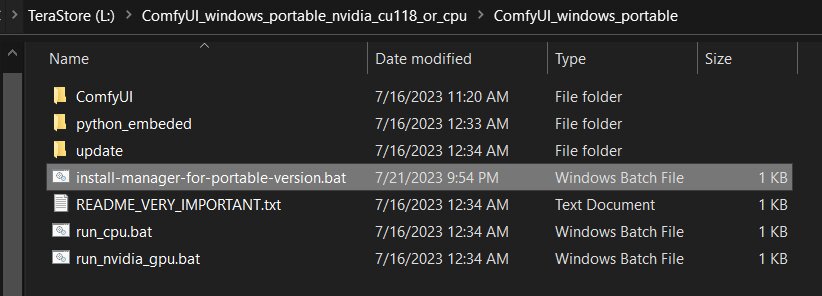
- Download scripts/install-manager-for-portable-version.bat into installed
"ComfyUI_windows_portable"directory
- Don't click. Right-click the link and choose 'Save As...'
- Double-click
install-manager-for-portable-version.batbatch file
Installation[method3] (Installation through comfy-cli: install ComfyUI and ComfyUI-Manager at once.)
RECOMMENDED: comfy-cli provides various features to manage ComfyUI from the CLI.
- prerequisite: python 3, git
Windows:
python -m venv venv
venv\Scripts\activate
pip install comfy-cli
comfy install
Linux/macOS:
python -m venv venv
. venv/bin/activate
pip install comfy-cli
comfy install
- See also: https://github.com/Comfy-Org/comfy-cli
Installation[method4] (Installation for Linux+venv: ComfyUI + ComfyUI-Manager)
To install ComfyUI with ComfyUI-Manager on Linux using a venv environment, you can follow these steps:
- prerequisite: python-is-python3, python3-venv, git
- Download scripts/install-comfyui-venv-linux.sh into empty install directory
- Don't click. Right-click the link and choose 'Save As...'
- ComfyUI will be installed in the subdirectory of the specified directory, and the directory will contain the generated executable script.
chmod +x install-comfyui-venv-linux.sh./install-comfyui-venv-linux.sh
Installation Precautions
- DO:
ComfyUI-Managerfiles must be accurately located in the pathComfyUI/custom_nodes/comfyui-manager- Installing in a compressed file format is not recommended.
- DON'T: Decompress directly into the
ComfyUI/custom_nodeslocation, resulting in the Manager contents like__init__.pybeing placed directly in that directory.- You have to remove all ComfyUI-Manager files from
ComfyUI/custom_nodes
- You have to remove all ComfyUI-Manager files from
- DON'T: In a form where decompression occurs in a path such as
ComfyUI/custom_nodes/ComfyUI-Manager/ComfyUI-Manager. - DON'T: In a form where decompression occurs in a path such as
ComfyUI/custom_nodes/ComfyUI-Manager-main.- In such cases,
ComfyUI-Managermay operate, but it won't be recognized withinComfyUI-Manager, and updates cannot be performed. It also poses the risk of duplicate installations. Remove it and install properly viagit clonemethod.
- In such cases,
You can execute ComfyUI by running either ./run_gpu.sh or ./run_cpu.sh depending on your system configuration.
Colab Notebook
This repository provides Colab notebooks that allow you to install and use ComfyUI, including ComfyUI-Manager. To use ComfyUI, click on this link.
- Support for installing ComfyUI
- Support for basic installation of ComfyUI-Manager
- Support for automatically installing dependencies of custom nodes upon restarting Colab notebooks.
How To Use
-
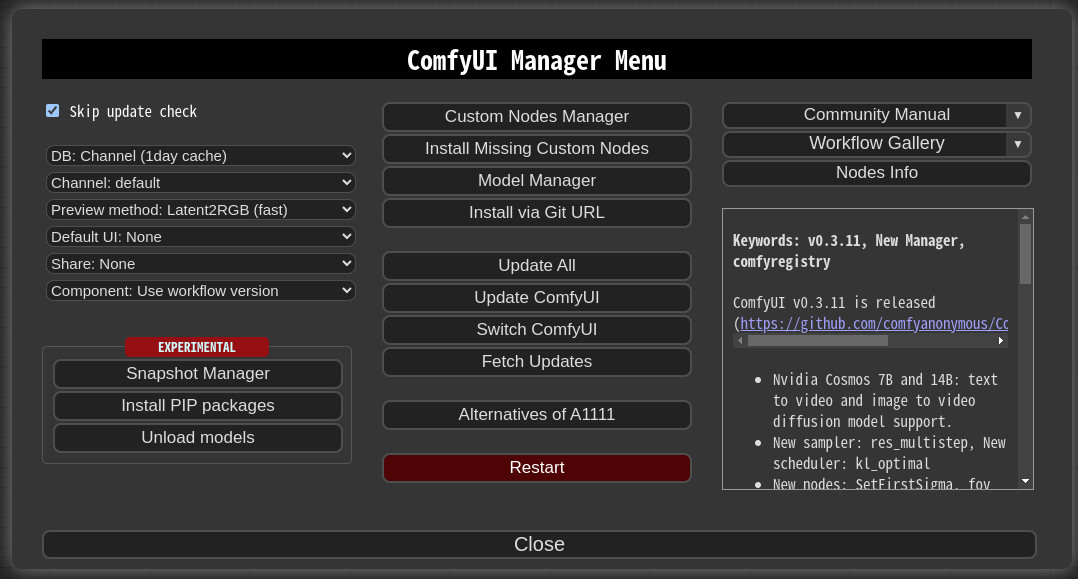
Click "Manager" button on main menu

-
If you click on 'Install Custom Nodes' or 'Install Models', an installer dialog will open.
-
There are three DB modes:
DB: Channel (1day cache),DB: Local, andDB: Channel (remote).Channel (1day cache)utilizes Channel cache information with a validity period of one day to quickly display the list.- This information will be updated when there is no cache, when the cache expires, or when external information is retrieved through the Channel (remote).
- Whenever you start ComfyUI anew, this mode is always set as the default mode.
Localuses information stored locally in ComfyUI-Manager.- This information will be updated only when you update ComfyUI-Manager.
- For custom node developers, they should use this mode when registering their nodes in
custom-node-list.jsonand testing them.
Channel (remote)retrieves information from the remote channel, always displaying the latest list.- In cases where retrieval is not possible due to network errors, it will forcibly use local information.
-
The
Fetch Updatesmenu retrieves update data for custom nodes locally. Actual updates are applied by clicking theUpdatebutton in theInstall Custom Nodesmenu.
-
-
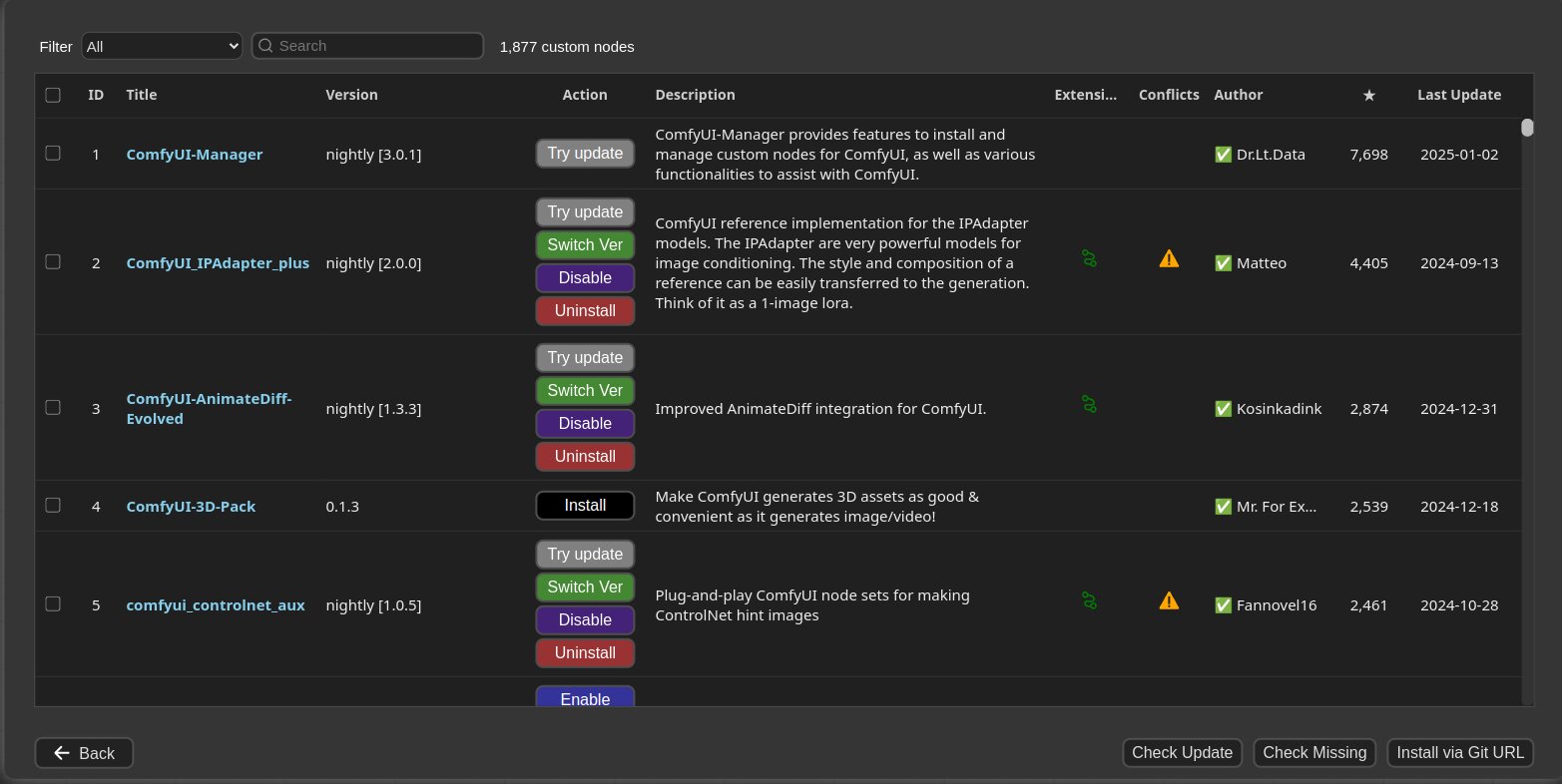
Click 'Install' or 'Try Install' button.
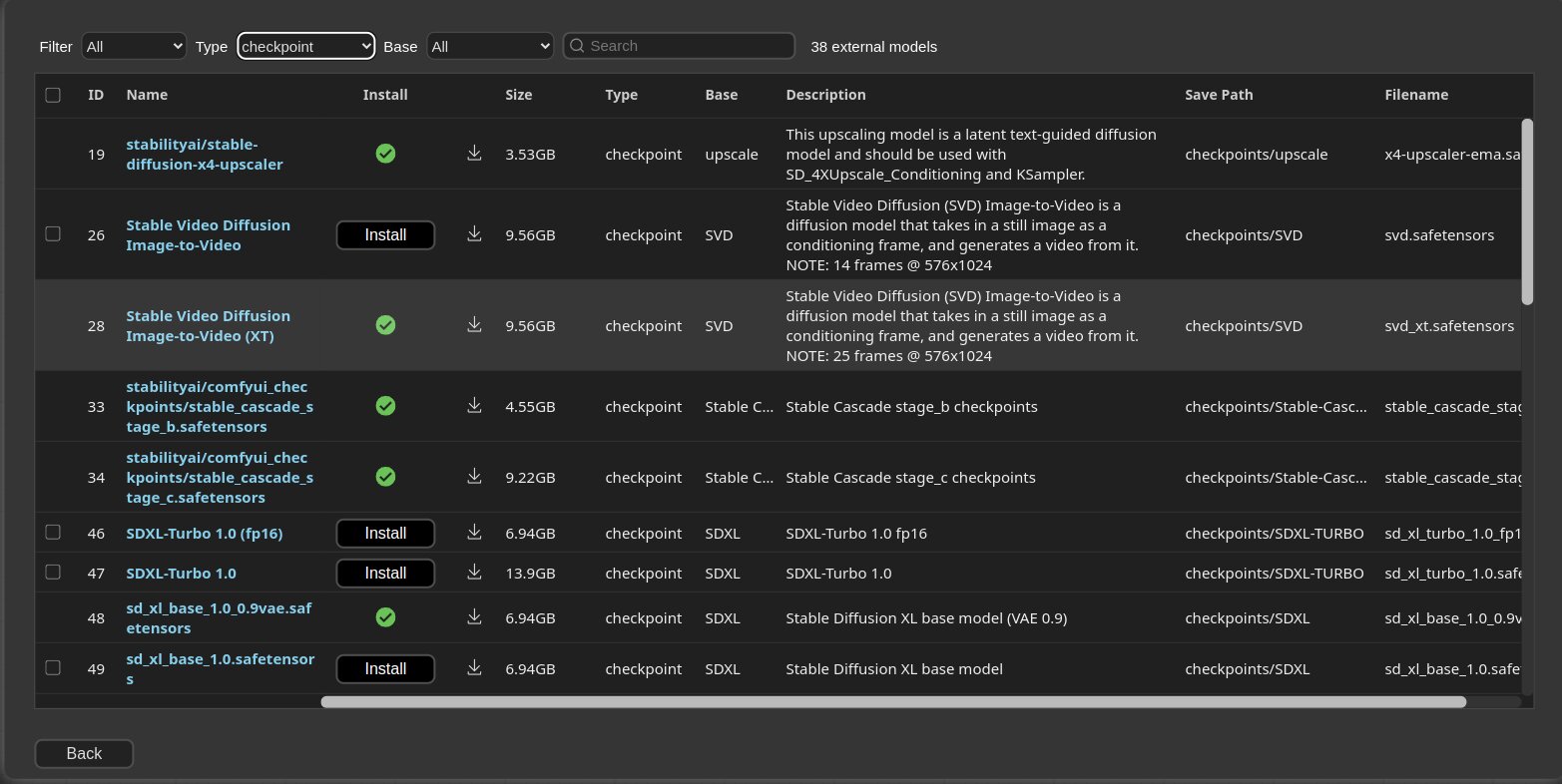
-
Installed: This item is already installed.
-
Install: Clicking this button will install the item.
-
Try Install: This is a custom node of which installation information cannot be confirmed. Click the button to try installing it.
-
If a red background
Channelindicator appears at the top, it means it is not the default channel. Since the amount of information held is different from the default channel, many custom nodes may not appear in this channel state.
-
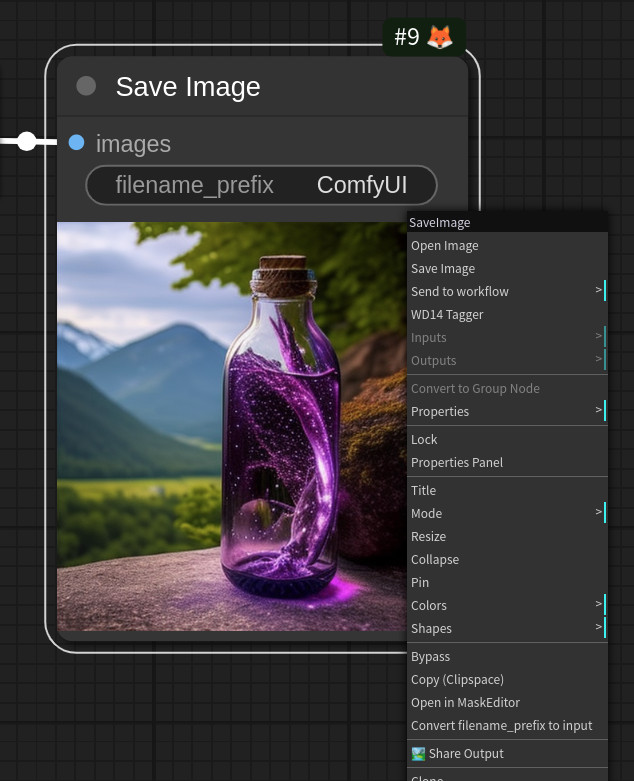
- You can share the workflow by clicking the Share button at the bottom of the main menu or selecting Share Output from the Context Menu of the Image node.
- Currently, it supports sharing via https://comfyworkflows.com/, https://openart.ai, https://youml.com as well as through the Matrix channel.
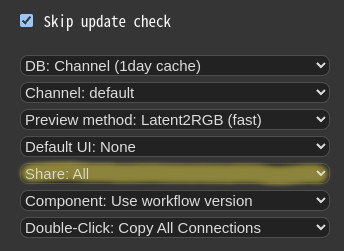
- Through the Share settings in the Manager menu, you can configure the behavior of the Share button in the Main menu or Share Output button on Context Menu.
None: hide from Main menuAll: Show a dialog where the user can select a title for sharing.
Paths
Starting from V3.38, Manager uses a protected system path for enhanced security.
- <USER_DIRECTORY>
- If executed without any options, the path defaults to ComfyUI/user.
- It can be set using --user-directory <USER_DIRECTORY>.
| ComfyUI Version | Manager Path |
|---|---|
| v0.3.76+ (with System User API) | <USER_DIRECTORY>/__manager/ |
| Older versions | <USER_DIRECTORY>/default/ComfyUI-Manager/ |
- Basic config files:
config.ini - Configurable channel lists:
channels.list - Configurable pip overrides:
pip_overrides.json - Configurable pip blacklist:
pip_blacklist.list - Configurable pip auto fix:
pip_auto_fix.list - Saved snapshot files:
snapshots/ - Startup script files:
startup-scripts/ - Component files:
components/
Note: See Migration Guide for upgrade details.
extra_model_paths.yaml Configuration
The following settings are applied based on the section marked as is_default.
custom_nodes: Path for installing custom nodes- Importing does not need to adhere to the path set as
is_default, but this is the path where custom nodes are installed by theComfyUI Nodes Manager.
- Importing does not need to adhere to the path set as
download_model_base: Path for downloading models
Snapshot-Manager
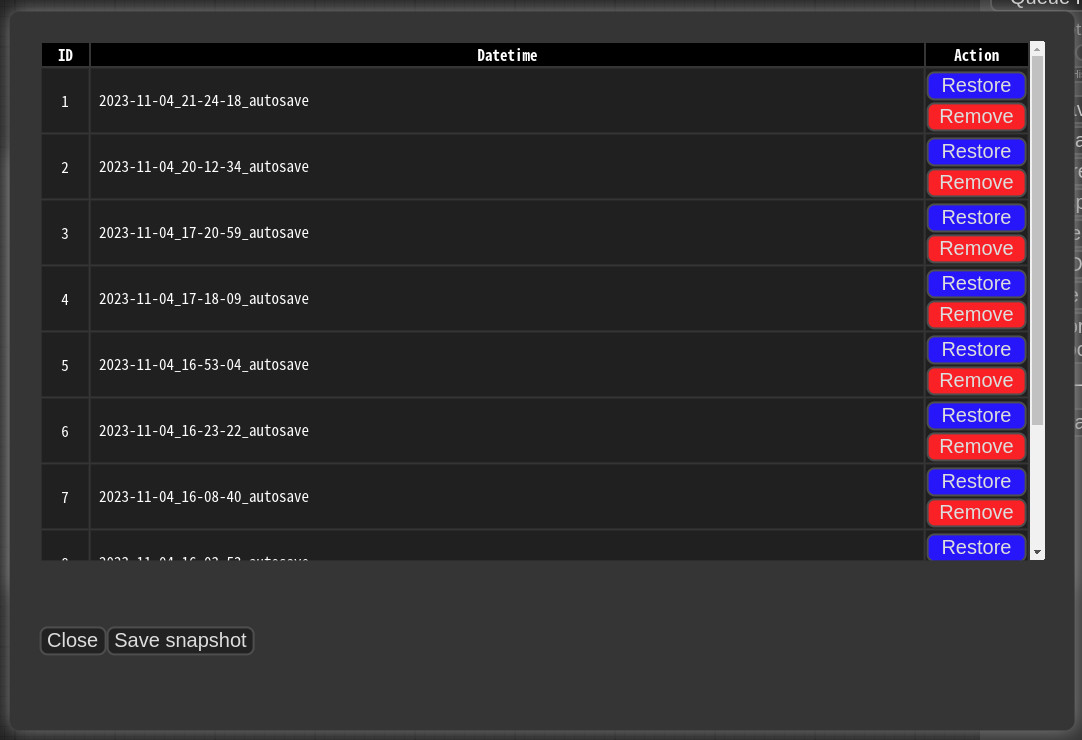
- When you press
Save snapshotor useUpdate AllonManager Menu, the current installation status snapshot is saved.- Snapshot file dir:
<USER_DIRECTORY>/default/ComfyUI-Manager/snapshots - You can rename snapshot file.
- Snapshot file dir:
- Press the "Restore" button to revert to the installation status of the respective snapshot.
- However, for custom nodes not managed by Git, snapshot support is incomplete.
- When you press
Restore, it will take effect on the next ComfyUI startup.- The selected snapshot file is saved in
<USER_DIRECTORY>/default/ComfyUI-Manager/startup-scripts/restore-snapshot.json, and upon restarting ComfyUI, the snapshot is applied and then deleted.
- The selected snapshot file is saved in
cm-cli: command line tools for power users
- A tool is provided that allows you to use the features of ComfyUI-Manager without running ComfyUI.
- For more details, please refer to the cm-cli documentation.
How to register your custom node into ComfyUI-Manager
- Add an entry to
custom-node-list.jsonlocated in the root of ComfyUI-Manager and submit a Pull Request. - NOTE: Before submitting the PR after making changes, please check
Use local DBand ensure that the extension list loads without any issues in theInstall custom nodesdialog. Occasionally, missing or extra commas can lead to JSON syntax errors. - The remaining JSON will be updated through scripts in the future, so you don't need to worry about it.
Custom node support guide
-
NOTICE:
- You should no longer assume that the GitHub repository name will match the subdirectory name under
custom_nodes. The name of the subdirectory undercustom_nodeswill now use the normalized name from thenamefield inpyproject.toml. - Avoid relying on directory names for imports whenever possible.
- You should no longer assume that the GitHub repository name will match the subdirectory name under