Loading repository data…
Cimbali / repository
pympress
Pympress is a simple yet powerful PDF reader designed for dual-screen presentations
#beamer#gtk#pdf-reader#pdf-viewer#poppler#presentation
Live repository statistics
★ 1.6KStars
⑂ 106Forks
◯ 39Open issues
◉ 1.6KWatchers
README preview
 What is Pympress?
Pympress is a PDF presentation tool designed for dual-screen setups such as presentations and public talks. Highly configurable, fully-featured, and portable
It comes with many great features (more below):
- supports embedded gifs (out of the box), videos, and audios (with VLC or Gstreamer integration)
- text annotations displayed in the presenter window
- natively supports beamer's notes on second screen, as well as Libreoffice notes pages!
Pympress is a free software, distributed under the terms of the GPL license (version 2 or, at your option, any later version).
Pympress was originally created and maintained by Schnouki, on his repo.
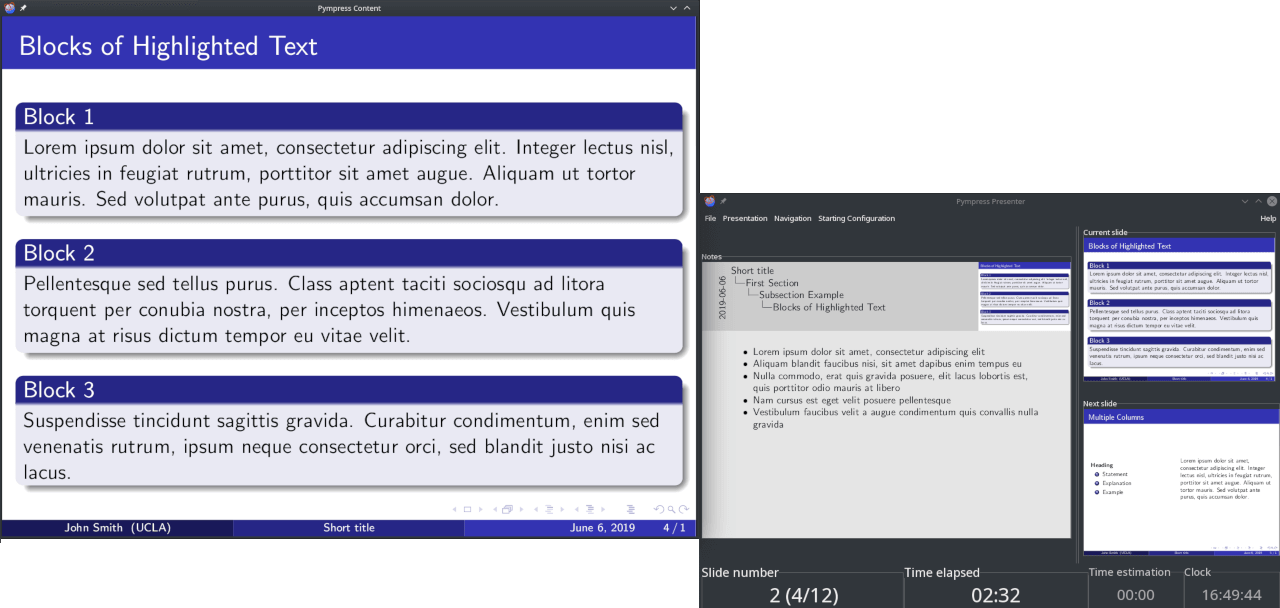
Here is what the 2 screen setup looks like, with a big notes slide next to 2 small slides (current and next) on the presenter side:
Installing 
-
Ubuntu
 20.04 focal or newer, Debian
  11 Bullseye or newer
(maintained by @mans0954)
apt-get install pympress libgtk-3-0 libpoppler-glib8 libcairo2 python3-gi python3-gi-cairo gobject-introspection libgirepository-1.0-1 gir1.2-gtk-3.0 gir1.2-poppler-0.18 -
RPM-based Linux (Fedora
 CentOS
  Mageia
  OpenSuse
  RHEL)
RHEL)


Notes
To support playing embedded videos in the PDFs, your system must have VLC installed (with the same bitness as pympress). VLC is not distributed with pympress, but it is certainly available in your system’s package manager and on their website.
Usage
Opening a file
Simply start Pympress and it will ask you what file you want to open.
You can also start pympress from the command line with a file to open like so:
pympress slides.pdf
or
python3 -m pympress slides.pdf
Functionalities
All functionalities are available from the menus of the window with slide previews. Don't be afraid to experiment with them!
Keyboard shortcuts are also listed in these menus. Some more usual shortcuts are often available, for example Ctrl+L, and F11 also toggle fullscreen, though the main
 from AUR
 using
using 

 with
with 

 − requires