Loading repository data…
ArchiveTeam / repository
grab-site
The archivist's web crawler: WARC output, dashboard for all crawls, dynamic ignore patterns
#archiving#crawl#crawler#spider#warc
Live repository statistics
★ 1.6KStars
⑂ 157Forks
◯ 103Open issues
◉ 1.6KWatchers
README preview
grab-site
[![Build status][travis-image]][travis-url]
grab-site is an easy preconfigured web crawler designed for backing up websites. Give grab-site a URL and it will recursively crawl the site and write WARC files. Internally, grab-site uses a fork of wpull for crawling.
grab-site gives you
-
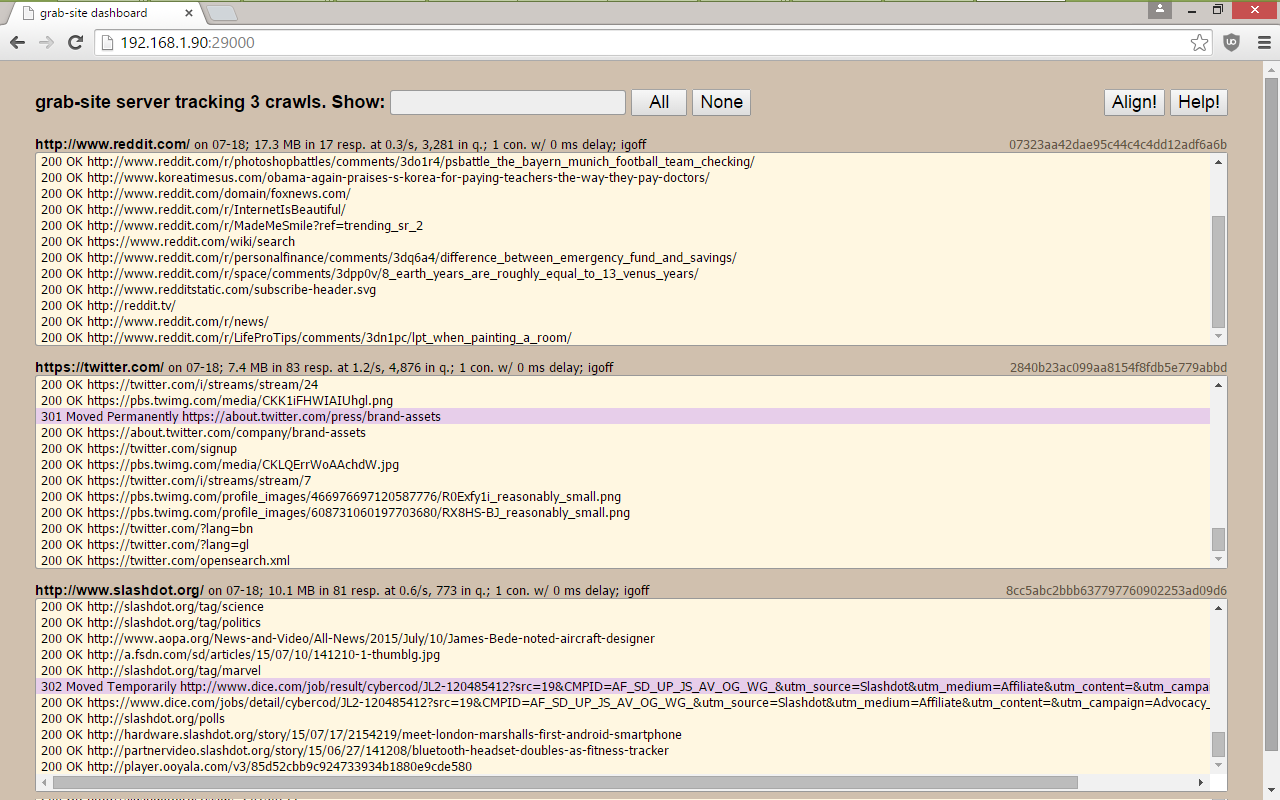
a dashboard with all of your crawls, showing which URLs are being grabbed, how many URLs are left in the queue, and more.
-
the ability to add ignore patterns when the crawl is already running. This allows you to skip the crawling of junk URLs that would otherwise prevent your crawl from ever finishing. See below.
-
an extensively tested default ignore set (global) as well as additional (optional) ignore sets for forums, reddit, etc.
-
duplicate page detection: links are not followed on pages whose content duplicates an already-seen page.
The URL queue is kept on disk instead of in memory. If you're really lucky, grab-site will manage to crawl a site with ~10M pages.
Note: if you have any problems whatsoever installing or getting grab-site to run, please file an issue - thank you!
The installation methods below are the only ones supported in our GitHub issues. Please do not modify the installation steps unless you really know what you're doing, with both Python packaging and your operating system. grab-site runs on a specific version of Python (3.7 or 3.8) and with specific dependency versions.
Contents
- Install on Ubuntu 18.04, 20.04, 22.04, Debian 10 (buster), Debian 11 (bullseye)
- Install on NixOS
- Install on another distribution lacking Python 3.7.x or 3.8.x
- Install on macOS
- Install on Windows 10 (experimental)
- Upgrade an existing install
- Usage
- Changing ignores during the crawl
- Inspecting the URL queue
- Preventing a crawl from queuing any more URLs
- Stopping a crawl
- Advanced
gs-serveroptions - Viewing the content in your WARC archives
- Inspecting WARC files in the terminal
- Automatically pausing grab-site processes when free disk is low
- Thanks
- Help
Install on Ubuntu 18.04, 20.04, 22.04, Debian 10 (buster), Debian 11 (bullseye)
-
On Debian, use
suto become root ifsudois not configured to give you access.sudo apt-get update sudo apt-get install --no-install-recommends \ wget ca-certificates git build-essential libssl-dev zlib1g-dev \ libbz2-dev libreadline-dev libsqlite3-dev libffi-dev libxml2-dev \ libxslt1-dev libre2-dev pkg-configIf you see
Unable to locate package, run the two commands again. -
As a non-root user:
wget https://raw.githubusercontent.com/pyenv/pyenv-installer/master/bin/pyenv-installer
chmod +x pyenv-installer
./pyenv-installer
~/.pyenv/bin/pyenv install 3.8.15
~/.pyenv/versions/3.8.15/bin/python -m venv ~/gs-venv
~/gs-venv/bin/pip install --no-binary lxml --upgrade git+https://github.com/ArchiveTeam/grab-site
--no-binary lxmlis necessary for the html5-parser build. -
Add this to your
~/.bashrcor~/.zshrc:PATH="$PATH:$HOME/gs-venv/bin"and then restart your shell (e.g. by opening a new terminal tab/window).
Install on NixOS
grab-site was removed from nixpkgs master; 23.05 is the last release to contain grab-site.
nix-env -f https://github.com/NixOS/nixpkgs/archive/release-23.05.tar.gz -iA grab-site
or, if you are using profiles (ie when you have flakes enabled):
nix profile install nixpkgs/release-22.11#grab-site
Install on another distribution lacking Python 3.7.x or 3.8.x
After installing uv, you can run
uv tool install --python=3.8 --no-binary-package lxml git+https://github.com/ArchiveTeam/grab-site/
Install on macOS
On OS X 10.10 - macOS 11:
-
Run
localein your terminal. If the output includes "UTF-8", you are all set. If it does not, your terminal is misconfigured and grab-site will fail to start. This can be corrected with:-
Terminal.app: Preferences... -> Profiles -> Advanced -> check Set locale environment variables on startup
-
iTerm2: Preferences... -> Profiles -> Terminal -> Environment -> check Set locale variables automatically
-
Using Homebrew (Intel Mac)
For M1 Macs, use the next section instead of this one.
-
Install Homebrew using the install step on https://brew.sh/
-
Run:
brew update brew install python@3.8 libxslt re2 pkg-config /usr/local/opt/python@3.8/bin/python3 -m venv ~/gs-venv PKG_CONFIG_PATH="/usr/local/opt/libxml2/lib/pkgconfig" ~/gs-venv/bin/pip install --no-binary lxml --upgrade git+https://github.com/ArchiveTeam/grab-site -
To put the
grab-sitebinaries in your PATH, add this to your~/.zshrc(macOS 10.15, 11+) or~/.bash_profile(earlier):PATH="$PATH:$HOME/gs-venv/bin"and then restart your shell (e.g. by opening a new terminal tab/window).
Using Homebrew (M1 Mac)
-
Install Homebrew using the install step on https://brew.sh/
If you already have a Homebrew install at
/usr/local, you may need to first remove that old Intel-based Homebrew install. -
Run:
brew update brew install python@3.8 libxslt re2 pkg-config /opt/homebrew/opt/python@3.8/bin/python3 -m venv ~/gs-venv PKG_CONFIG_PATH="/opt/homebrew/opt/libxml2/lib/pkgconfig" ~/gs-venv/bin/pip install --no-binary lxml --upgrade git+https://github.com/ArchiveTeam/grab-site -
To put the
grab-sitebinaries in your PATH, add this to your~/.zshrc(macOS 10.15, 11+) or~/.bash_profile(earlier):PATH="$PATH:$HOME/gs-venv/bin"and then restart your shell (e.g. by opening a new terminal tab/window).
Install on Windows 10 (experimental)
On Windows 10 Fall Creators Update (1703) or newer:
-
Start menu -> search "feature" -> Turn Windows features on or off
-
Scroll down, check "Windows Subsystem for Linux" and click OK.
-
Wait for install and click "Restart now"
-
Start menu -> Store
-
Search for "Ubuntu" in the store and install Ubuntu (publisher: Canonical Group Limited).
-
Start menu -> Ubuntu
-
Wait for install and create a user when prompted.
-
Follow the Ubuntu 18.04, 20.04, 22.04, Debian 10 (buster), Debian 11 (bullseye) steps.
Upgrade an existing install
To update grab-site, simply run the ~/gs-venv/bin/pip install ... or
nix-env ... command used to install it originally (see above).
After upgrading, stop gs-server with kill or ctrl-c, then start it again.
Existing grab-site crawls will automatically reconnect to the new server.
Usage
First, start the dashboard with:
gs-server
and point your browser to http://127.0.0.1:29000/
Note: gs-server listens on all interfaces by default, so you can reach the dashboard by a non-localhost IP as well, e.g. a LAN or WAN IP. (Sub-note: no code execution capabilities are exposed on any interface.)
Then, start as many crawls as you want with:
grab-site 'URL'
Do this inside tmux unless they're very short crawls.
grab-site outputs WARCs, logs, and control files to a new subdirectory in the
directory from which you launched grab-site, referred to here as "DIR".
(Use ls -lrt to find it.)
You can pass multiple URL arguments to include them in the same crawl,
whether they are on the same domain or different domains entirely.
warcprox users: warcprox breaks the dashboard's WebSocket; please make your browser skip the proxy for whichever host/IP you're using to reach the dashboard.
grab-site options, ordered by importance
Options can come before or after the URL.
-
--1: grab justURLand its page requisites, without recursing. -
--igsets=IGSET1,IGSET2: use ignore setsIGSET1andIGSET2.Ignore sets are used to avoid requesting junk URLs using a pre-made set of regular expressions. See the full list of available ignore sets.
The global ignore set is implied and enabled unless
--no-global-igsetis used.The ignore sets can be changed during the crawl by editing the
DIR/igsetsfile. -
--no-global-igset: don't add the global ignore set. -
--no-offsite-links: avoid following links to a depth of 1 on other domains.grab-site always grabs page requisites (e.g. inline images and stylesheets), even if they are on other domains. By default, grab-site also grabs linked pages to a depth of 1 on other domains. To turn off this behavior, use
--no-offsite-links.Using
--no-offsite-linksmay prevent all kinds of useful images, video, audio, downloads, etc from being grabbed, because these are often hosted on a CDN or subdomain, and thus would otherwise not be included in the recursive crawl. -
-i/--input-file: Load list of URLs-to-grab from a local file or from a URL; likewget -i. File must be a newline-delimited list of URLs. Combine with--1to avoid a recursive crawl on each URL. -
--igon: Print all URLs being ignored to the terminal and dashboard. Can be changed during the crawl bytouching orrming theDIR/igofffile. This is slower because it needs to find the specific regexp to blame. -
--no-video: Skip the download of videos by both mime type and file extension. Skipped videos are logged toDIR/skipped_videos. Can be changed during the crawl bytouching orrming theDIR/videofile. -
--no-sitemaps: don't queue URLs fromsitemap.xmlat the root of the site.